How does SNI Routing work in HAProxy
Table of contents
As I travel a lot I faced the problem that in some Wi-Fi networks certain ports are blocked for outgoing communication 😱. The solution is to use software that can handle TCP and HTTP via port 443 so that I can use my Nextcloud and my XMPP client on the same port.
Introduction🔗
TLS/SSL🔗
Today’s communication should be done via Transport Layer Security (TLS) Protocol Version 1.3 or The Transport Layer Security (TLS) Protocol Version 1.2.
Encrypted communication is beneficial because the information being transported is not easily readable on the wire. This means that the network packets traversing the Internet are more or less secure, with only small parts of unencrypted data reaching the target server.
HTTP🔗
At the HTTP level, a common decision criterion for a web server that hosts several websites on the same server is the Host Header (A.1.1. Multihomed Web Servers).
The HTTP server (HAProxy, NGINX, Caddyserver, …) parses the HTTP protocol and decides which route or content should be used or delivered.
This technique has been used for a long time and it is rock-solid.
HTTP here is a shortcut for all HTTP versions that support Host Headers (HTTP/1.1, HTTP/2).
The Problem🔗
Now let me explain the problem that I solve with HAProxy SNI Routing.
To be able to read the Host Header the server must read the HTTP protocol and therefore must decrypt the TLS packet. But that means the listener (frontend) must have all certificates, which is sometimes not possible.
Luckily there is a Transport Layer Security (TLS) Extensions: Extension Definitions RFC which defines the Server Name Indication, available since January 2011.
The Generic Solution🔗
This SNI (Server Name Indication) is part of the (extended) client hello which is plain text. Now that the client can tell the server which host it wants to reach, the server can decide which route or content should be delivered.
In Kubernetes there are several Ingress Controllers based on HAProxy.
NGINX uses the same function via the Module ngx_stream_ssl_preread_module.
Envoy uses the same function via the TLS Inspector — see How do I set up SNI.
The OpenShift router based on The HAProxy Template Router works exactly as described in the HAProxy Solution below.
HAProxy Solution🔗
Picture🔗
Prose🔗
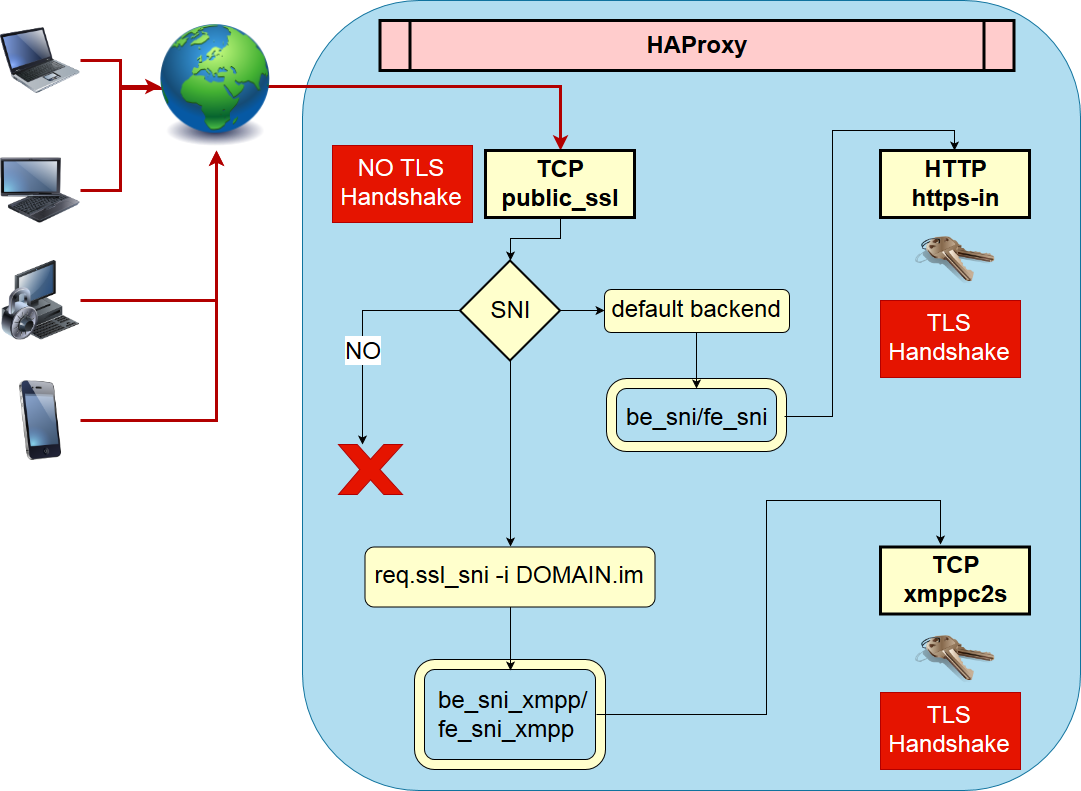
I describe the picture above along with the configuration below.
In the picture the TCP frontend public_ssl is the main entry point for port 443.
As you can see, this frontend section is pretty small because of the power of HAProxy’s map feature. Based on req.ssl_sni it is possible to route to different backends for different SNI values, where each backend must be able to handle the TLS handshake.
In this case I have only one backend backend be_sni_xmpp before HAProxy forwards the request to the default_backend be_sni.
The backend be_sni forwards the request to the frontend https-in on the same server, but this could be any destination that HAProxy supports. The request will now be decrypted in HTTP mode as the listener (frontend https-in) has the required certificates and keys to decrypt the request. The same flow applies to the listener (listen xmppc2s-backend).
HAProxy Config🔗
#---------------------------------------------------------------------
# Global settings
#---------------------------------------------------------------------
global
    log stdout format raw daemon debug
    log-send-hostname cloud.DOMAIN

    maxconn     5000

    # ssl-default-bind-options ssl-min-ver TLSv1.0 no-tls-tickets
    tune.ssl.default-dh-param 3072

    # https://mozilla.github.io/server-side-tls/ssl-config-generator/?server=haproxy-1.8.0&openssl=1.1.0i&hsts=yes&profile=modern
    # set default parameters to the intermediate configuration
    ssl-default-bind-ciphers ECDHE-ECDSA-AES256-GCM-SHA384:ECDHE-RSA-AES256-GCM-SHA384:ECDHE-ECDSA-CHACHA20-POLY1305:ECDHE-RSA-CHACHA20-POLY1305:ECDHE-ECDSA-AES128-GCM-SHA256:ECDHE-RSA-AES128-GCM-SHA256:ECDHE-ECDSA-AES256-SHA384:ECDHE-RSA-AES256-SHA384:ECDHE-ECDSA-AES128-SHA256:ECDHE-RSA-AES128-SHA256
    ssl-default-bind-options ssl-min-ver TLSv1.1 no-tls-tickets

    ssl-default-server-ciphers ECDHE-ECDSA-AES256-GCM-SHA384:ECDHE-RSA-AES256-GCM-SHA384:ECDHE-ECDSA-CHACHA20-POLY1305:ECDHE-RSA-CHACHA20-POLY1305:ECDHE-ECDSA-AES128-GCM-SHA256:ECDHE-RSA-AES128-GCM-SHA256:ECDHE-ECDSA-AES256-SHA384:ECDHE-RSA-AES256-SHA384:ECDHE-ECDSA-AES128-SHA256:ECDHE-RSA-AES128-SHA256
    ssl-default-server-options ssl-min-ver TLSv1.1 no-tls-tickets

    # https://www.haproxy.com/blog/dynamic-configuration-haproxy-runtime-api/
    stats socket ipv4@127.0.0.1:9999 level admin
    stats socket /var/run/haproxy.sock mode 666 level admin
    stats timeout 2m

#---------------------------------------------------------------------
# common defaults that all the 'listen' and 'backend' sections will
# use if not designated in their block
#---------------------------------------------------------------------
defaults
    mode                    tcp
    log                     global
    option                  dontlognull
    #option                  logasap
    option                  srvtcpka
    option                  log-separate-errors
    retries                 3
    timeout http-request    10s
    timeout queue           2m
    timeout connect         10s
    timeout client          5m
    timeout server          5m
    timeout http-keep-alive 10s
    timeout check           10s
    maxconn                 750

#---------------------------------------------------------------------
# main frontend which proxys to the backends
#---------------------------------------------------------------------

##
## Frontend for HTTP
##
frontend http-in
    bind :::80 v4v6
    mode http
    option httplog

    tcp-request inspect-delay 5s
    tcp-request content accept if HTTP

    # redirect http to https .
    http-request redirect scheme https unless { ssl_fc }

##
## Frontend for HTTPS
##
frontend public_ssl

    bind :::443 v4v6

    option tcplog
    log-format "%ci:%cp [%t] %ft %b/%s %Tw/%Tc/%Tt %B %ts %ac/%fc/%bc/%sc/%rc %sq/%bq ssl_fc_has_sni '%[ssl_fc_has_sni]' sni:'%[capture.req.hdr(0)]' ssl_fc_sni '%[ssl_fc_sni]' ssl_fc_protocol '%[ssl_fc_protocol]' ssl_bc '%[ssl_bc]' ssl_bc_alpn '%[ssl_bc_alpn]' ssl_bc_protocol '%[ssl_bc_protocol]' ssl_c_i_dn '%[ssl_c_i_dn()]' ssl_c_s_dn '%[ssl_c_s_dn()]' ssl_f_i_dn '%[ssl_f_i_dn()]' ssl_f_s_dn '%[ssl_f_s_dn]' ssl_fc_cipher '%[ssl_fc_cipher]' "

    tcp-request inspect-delay 5s
    tcp-request content capture req.ssl_sni len 25
    tcp-request content accept if { req.ssl_hello_type 1 }

    # https://www.haproxy.com/blog/introduction-to-haproxy-maps/
    use_backend %[req.ssl_sni,lower,map(/usr/local/etc/haproxy/tcp-domain2backend-map.txt)]

    default_backend be_sni

##########################################################################
# TLS SNI
#
# When using SNI we can terminate encryption with dedicated certificates.
##########################################################################
backend be_sni
  server fe_sni 127.0.0.1:10444 weight 10 send-proxy-v2-ssl-cn

backend be_sni_xmpp
  server fe_sn_xmpp 127.0.0.1:10442 weight 10 send-proxy-v2-ssl-cn

# handle https incoming
frontend https-in

    # terminate ssl
    bind 127.0.0.1:10444 accept-proxy ssl strict-sni alpn h2,http/1.1 crt /usr/local/etc/haproxy-certs

    mode http
    option forwardfor
    option httplog
    option http-use-htx
    option http-ignore-probes

    # Strip off Proxy headers to prevent HTTPoxy (https://httpoxy.org/)
    http-request del-header Proxy

    http-request set-header Host %[req.hdr(host),lower]
    http-request set-header X-Forwarded-Proto https
    http-request set-header X-Forwarded-Host %[req.hdr(host),lower]
    http-request set-header X-Forwarded-Port %[dst_port]
    http-request set-header X-Forwarded-Proto-Version h2 if { ssl_fc_alpn -i h2 }
    http-request add-header Forwarded for=\"[%[src]]\";host=%[req.hdr(host),lower];proto=%[req.hdr(X-Forwarded-Proto)];proto-version=%[req.hdr(X-Forwarded-Proto-Version)]

    # Add hsts https://www.haproxy.com/blog/haproxy-and-http-strict-transport-security-hsts-header-in-http-redirects/
    # http-response set-header Strict-Transport-Security "max-age=16000000; includeSubDomains; preload;"

    # https://www.haproxy.com/blog/introduction-to-haproxy-maps/
    use_backend %[req.hdr(host),lower,map(/usr/local/etc/haproxy/http-domain2backend-map.txt)]

#---------------------------------------------------------------------
#  backends
#---------------------------------------------------------------------
## backend for cloud.DOMAIN
backend nextcloud-backend
    mode http
    option http-use-htx
    option httpchk GET / HTTP/1.1\r\nHost:\ BACKEND_VHOST
    server short-cloud 127.0.0.1:81 check


## backend for dashboard.DOMAIN
backend dashboard-backend
    mode http
    option http-use-htx
    server short-cloud 127.0.0.1:82 check

## backend for upload.DOMAIN
backend httpupload-backend
    log global
    mode http
    option http-use-htx
    server short-cloud 127.0.0.1:8443 check

## backend for DOMAIN (XMPP C2S) direct TLS/SSL
listen xmppc2s-backend

    bind 127.0.0.1:10442 accept-proxy ssl strict-sni crt /usr/local/etc/haproxy-certs

    log global
    log-format "%ci:%cp [%t] %ft %b/%s %Tw/%Tc/%Tt %B %ts %ac/%fc/%bc/%sc/%rc %sq/%bq ssl_fc_has_sni '%[ssl_fc_has_sni]' sni:'%[capture.req.hdr(0)]' ssl_fc_sni '%[ssl_fc_sni]' ssl_fc_protocol '%[ssl_fc_protocol]' ssl_bc '%[ssl_bc]' ssl_bc_alpn '%[ssl_bc_alpn]' ssl_bc_protocol '%[ssl_bc_protocol]' ssl_c_i_dn '%[ssl_c_i_dn()]' ssl_c_s_dn '%[ssl_c_s_dn()]' ssl_f_i_dn '%[ssl_f_i_dn()]' ssl_f_s_dn '%[ssl_f_s_dn]' ssl_fc_cipher '%[ssl_fc_cipher]' "

    # if you want to have the client IP in ejabberd
    # add send-proxy-v2-ssl-cn and in ejabberd use_proxy_protocol: true
    server me2d-cloud 127.0.0.1:5223 check ssl check-ssl verify none check-sni str('DOMAIN') sni str('DOMAIN') ssl-min-ver TLSv1.2

#---------------------------------------------------------------------
#  stats page is hosted at different port
#---------------------------------------------------------------------
listen stats
  bind *:10000
  mode http
  stats enable
  stats hide-version
  stats realm Haproxy\ Statistics
  stats uri /stats
  stats auth "${STAT_USER}:${STAT_PASS}"
TCP Map🔗
In the file tcp-domain2backend-map.txt the domain-to-backend mapping is defined at the TCP SNI level. I strongly suggest reading Introduction to HAProxy Maps.
jabber.mydomain.im be_sni_xmppHTTP Map🔗
In the file http-domain2backend-map.txt the domain-to-backend mapping is defined at the TLS decrypted level. I strongly suggest reading Introduction to HAProxy Maps.
# http backends
nextcloud.MyDomain.com nextcloud-backend
dashboard.MyDomain.com dashboard-backend
jabupload.MyDomain.com httpupload-backendRun🔗
HAProxy is running via podman from Docker hub haproxy as it supports TLS 1.3. The flags are documented in podman-run(1).
 podman run -dt --name=my_haproxy \
   --expose 80-80 --expose 443-443 --expose 9999-9999 --expose 10000-10000 \
   -p 80-80 -p 443-443 -p 9999-9999 -p 10000-10000 \
   --network host \
   -v /haproxy/etc:/usr/local/etc/haproxy:ro \
   -v /haproxy/certs:/usr/local/etc/haproxy-certs:ro \
   --env-file /haproxy/etc/env_stats_auth.txt \
   me2digital/haproxy19 haproxy -f /usr/local/etc/haproxy/haproxy.cfg
SSL Labs Output🔗
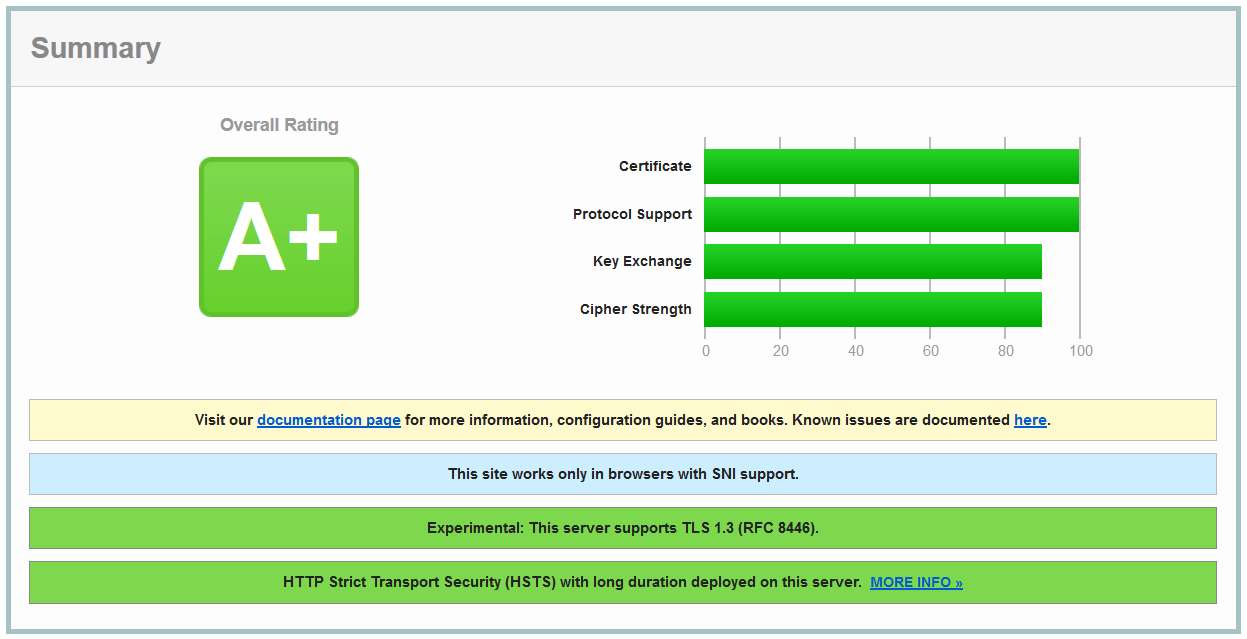
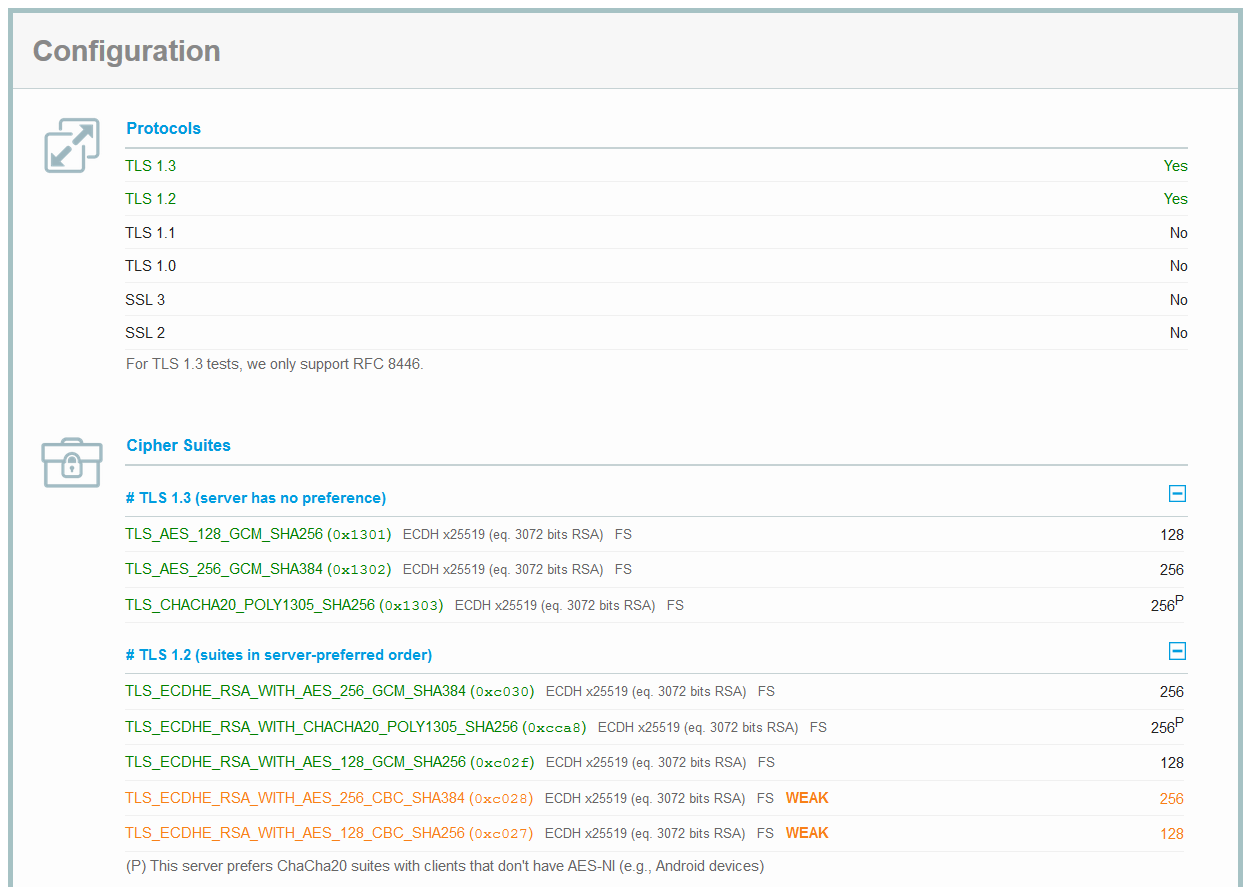
After all this work and tuning I was able to achieve an A+ on the SSL Labs Report with TLS 1.3 available.
Changes🔗
- 2026-03-16: Migrate to zola and fix old links