tls-proxy-tunnel: Transparent TLS Tunnelling Through Corporate HTTP Proxies
Table of contents
Many enterprise networks sit behind a corporate HTTP CONNECT proxy. Applications that speak TLS natively — think git, curl, SSH-over-HTTPS, or any custom binary — often have no built-in proxy support. Configuring every single tool is tedious, fragile, and sometimes impossible when you don’t control the binary.
tls-proxy-tunnel (tpt) solves this at layer 4: it sits between your application and the outside world, intercepts the TLS connection, extracts the Server Name Indication (SNI) from the ClientHello, and tunnels the raw bytes through your corporate HTTP CONNECT proxy — without ever terminating TLS.
The Problem🔗
Client app (no proxy support)
    │
    │  wants to reach api.example.com:443
    │
    ▼
[corporate firewall — direct TCP blocked]
    │
    ▼
HTTP CONNECT proxy (only outbound path)
    │
    ▼
api.example.com:443
Your DNS resolver returns an internal alias that points to tpt instead of the real host. The client connects, tpt peeks at the TLS SNI, sends CONNECT api.example.com:443 HTTP/1.1 to the corporate proxy, and then forwards the original ClientHello through the established tunnel. The application never notices a proxy was involved.
How It Works🔗
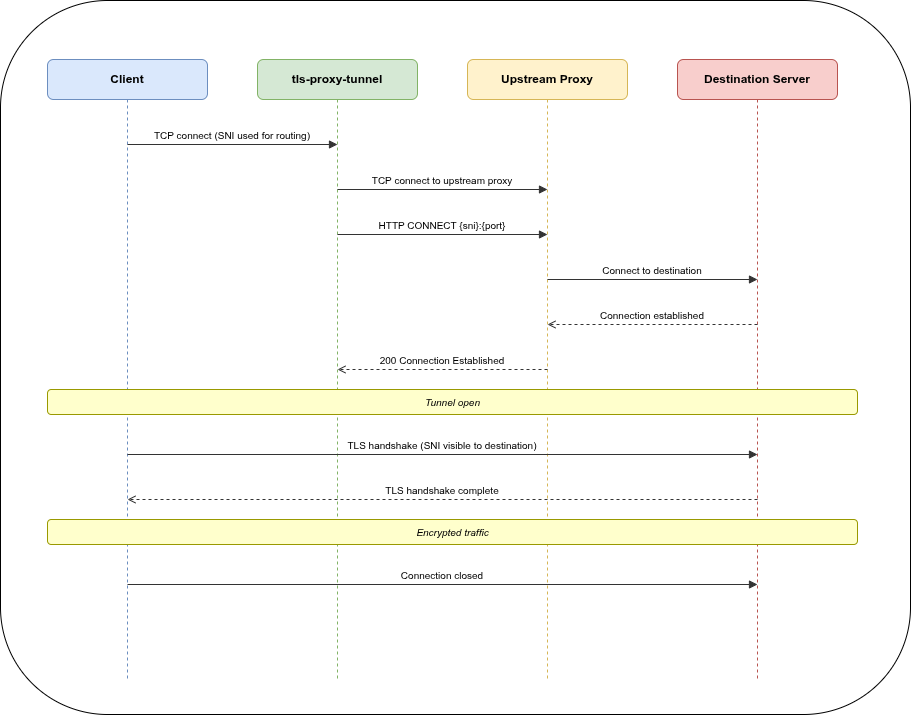
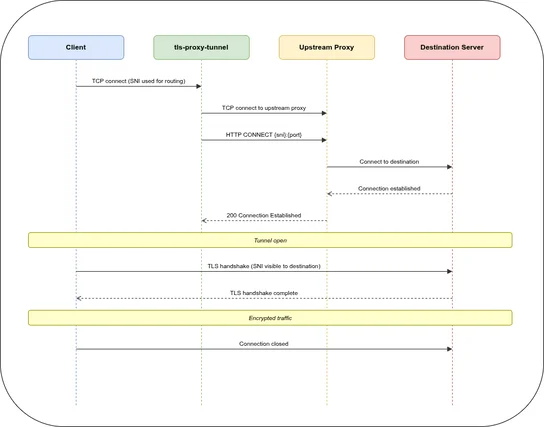
The key insight: tpt uses peek() to read the TLS ClientHello without consuming it from the TCP stream. The SNI is extracted, the CONNECT tunnel is established, and then the original bytes flow through unchanged. The destination server performs TLS termination directly with the client — tpt never sees the plaintext.
Configuration🔗
A minimal tpt.yaml:
version: 1
log: info

servers:
  egress:
    listen:
      - "0.0.0.0:8443"
    tls: true
    sni:
      api.example.com: corp_proxy
      git.internal.org: corp_proxy
    default: ban
    maxclients: 200
    via:
      use_sni_as_target: true
      target_port: 443
      connect_timeout: 30s
      headers:
        Proxy-Authorization: "Basic $PROXY_AUTH_TOKEN"

  health:
    listen:
      - "127.0.0.1:8080"
    default: health

upstream:
  corp_proxy: "tcp://proxy.internal:3128"
Point your DNS so that api.example.com resolves to the host running tpt. The client connects to tpt on port 8443, SNI api.example.com is matched, and the connection is tunnelled through proxy.internal:3128 to api.example.com:443.
SNI Routing Strategies🔗
tpt supports four routing modes per SNI entry:
| Config | Behaviour |
|---|---|
www.example.com: upstream_name | Plain string — inherits server-level via |
upstream: name (no via) | Extended — inherits server-level via |
upstream: direct + via: {} | Direct TCP forward, no CONNECT |
upstream: proxy + via: {target: ...} | Per-SNI via override |
Environment Variable Substitution🔗
Header values support $VARNAME substitution resolved at connection time:
headers:
  Proxy-Authorization: "Basic $PROXY_AUTH_TOKEN"
  X-Tenant-ID: "$TENANT_ID"
If a referenced variable is missing, the connection is closed cleanly — no crash, no partial headers sent upstream.
Direct TCP Forward🔗
When no CONNECT proxy is needed, omit via or set via: {}:
sni:
  intern.corp.org:
    upstream: direct_server
via: {} # bypass CONNECT — raw TCP forwardObservability🔗
Health check🔗
GET http://localhost:8080/health → 200 OKPrometheus metrics🔗
GET http://localhost:8080/metrics

# HELP tpt_active_connections Current number of active connections
# TYPE tpt_active_connections gauge
tpt_active_connections{name="egress",listen="0.0.0.0:8443"} 12

# HELP tpt_maxclients Maximum number of concurrent connections
# TYPE tpt_maxclients gauge
tpt_maxclients{name="egress",listen="0.0.0.0:8443"} 200
Stats interval logging🔗
For long-lived connections, tpt can log running byte counters periodically:
via:
  stats_interval: 30s   # 0s = disabled
[relay:api.example.com → proxy.internal:3128] in-flight tx=1048576 rx=524288Built-in Upstreams🔗
| Name | Use case |
|---|---|
ban | Reject connections immediately (default fallback) |
echo | Reflect bytes back — useful for smoke tests |
health | HTTP/1.1 health + /metrics endpoint |
Deployment🔗
Binary🔗
TPT_CONFIG=/etc/tpt/tpt.yaml tls-proxy-tunnelConfig search order when --config is not given:
$TPT_CONFIG/etc/tpt/tpt.yaml/etc/tpt/config.yaml./tpt.yaml./config.yaml
Docker🔗
docker run -d \
  -v /etc/tpt:/etc/tpt:ro \
  -p 8443:8443 \
  -p 8080:8080 \
  -e PROXY_AUTH_TOKEN="$(echo -n user:pass | base64)" \
  ghcr.io/git001/tls-proxy-tunnel:4
Design Decisions🔗
Layer 4, not layer 7. tpt never terminates TLS. It operates on raw TCP streams and only reads the ClientHello to extract the SNI. This means it works with any TLS application — HTTP/2, custom protocols, mutual TLS — without any special configuration.
Single static binary. Built with musl libc, no runtime dependencies. Drops into any container or bare-metal host.
Async Rust with Tokio. Each connection is a lightweight task. The maxclients semaphore limits concurrency per server without blocking the runtime. Connection counters are atomics — no lock contention.
Graceful shutdown. A CancellationToken signals all active connections. TaskTracker waits for in-flight relays to drain before the process exits.
DNS caching. Upstream addresses are resolved once and cached with a TTL. Failed resolutions use a short 3-second error TTL so recovery is fast.
Source🔗
- Repository: github.com/git001/tls-proxy-tunnel
- Container image: ghcr.io/git001/tls-proxy-tunnel
- License: Apache-2.0