vigil-rs: A Rust Service Supervisor for Containers
Table of contents
Every container that runs more than one process needs a supervisor. Most reach for dumb-init, tini, s6-overlay, or supervisord. None of them felt quite right for what we needed, so we wrote vigil-rs.
This post walks through what github.com/git001/vigil-rs is, why we built it, and how it works internally.
What is vigil-rs?🔗
vigil-rs is a service supervisor and container init daemon written in Rust from scratch. It manages multiple processes inside a single container — starting, stopping, restarting, and health-checking them — and exposes a JSON REST API over a Unix socket for programmatic control.
vigil-rs is an original implementation. We looked at the existing landscape, liked the YAML-layer configuration model popularised by Canonical Pebble, and then wrote everything ourselves — different language, different internals, different feature set. The config schema has surface-level similarities (service layers, health check levels), but the implementation shares no code and takes a deliberately different direction in every area that mattered to us:
- Native PID 1 / zombie-reaper built into the daemon — no wrapper, no
tini, no flags required - Per-service
stop-signal— send SIGUSR1, SIGHUP, or any other signal to trigger a service’s own graceful shutdown logic - Configurable
kill-delay— precisely how long to wait before escalating to SIGKILL, per service - Real exit-code propagation — vigild exits with the exact code the managed service returned, not a hardcoded constant
- Check
delayfield — suppress health checks for N seconds at startup so slow-starting processes aren’t killed before they’re ready - Built-in identity/access control — no external auth proxy needed
- Auto-generated OpenAPI spec and Swagger UI at
/docs - Two-binary split — lean PID 1 daemon (
vigild) plus a separate CLI (vigil) that works from inside or outside the container
The problem with existing options🔗
When you need to run multiple processes in a container, your choices are roughly:
| Tool | Health checks | REST API | Config format | PID 1 safe | Real exit code | Custom stop signal | Log streaming |
|---|---|---|---|---|---|---|---|
| dumb-init / tini | ❌ | ❌ | CLI args only | ✅ | ✅ | ❌ | ❌ |
| s6-overlay | ❌ | ❌ | Directory-based | ✅ | ✅ | partial | partial |
| supervisord | ❌ | XML-RPC | INI file | ❌ | ❌ | partial | ❌ |
| Canonical Pebble | ✅ | ✅ JSON | YAML layers | ❌ | ❌ | ❌ | ❌ |
| vigil-rs | ✅ | ✅ JSON | YAML layers | ✅ | ✅ | ✅ | ✅ SSE + ndjson |
dumb-init / tini are the right choice for single-process containers — they are minimal, safe, and do one thing well. The moment you need a second process, health checks, or the ability to restart a service without restarting the whole container, they leave you without tools.
s6-overlay is battle-tested and has a tiny footprint, but it comes with significant operational complexity: services are configured as directory trees, there is no runtime API, and health checks require custom shell scripts wired up by hand. Integrating it into a standard Dockerfile is non-trivial.
supervisord requires a Python runtime (≈30 MB overhead), was not designed for PID 1 use, and exposes an XML-RPC interface. It has no concept of graceful stop signals per service — all processes get the same signal — and it does not propagate the real exit code of the managed process.
Canonical Pebble is the tool that pointed us in the right direction: YAML config, a proper JSON REST API, health checks. But it was built for a specific Ubuntu use-case and ships with a notable set of gaps for general container use: it does not run as PID 1 (no zombie reaping), every service gets SIGTERM regardless of what its graceful shutdown actually requires, the exit code it propagates is a hardcoded constant rather than the real one, and it has no built-in access control. These are not edge cases — they come up immediately in production.
vigil-rs was written to close all of those gaps at once.
Architecture🔗
Two binaries instead of one🔗
Most supervisors ship a single binary that switches behaviour based on the subcommand — the same process starts the daemon and acts as the CLI client. It’s convenient to distribute, but it means the daemon carries all the CLI parsing and output-formatting logic around for its entire lifetime as PID 1.
vigil-rs deliberately splits into two separate binaries:
vigild | vigil | |
|---|---|---|
| Role | Daemon / PID 1 | CLI client |
| Runs as | PID 1 in container | podman exec / host / CI |
| Contains | API server, supervisor logic | HTTP client, output formatting |
| Transports | Unix socket + optional TLS TCP | Unix socket or HTTP/HTTPS |
| Final image | Required | Optional |
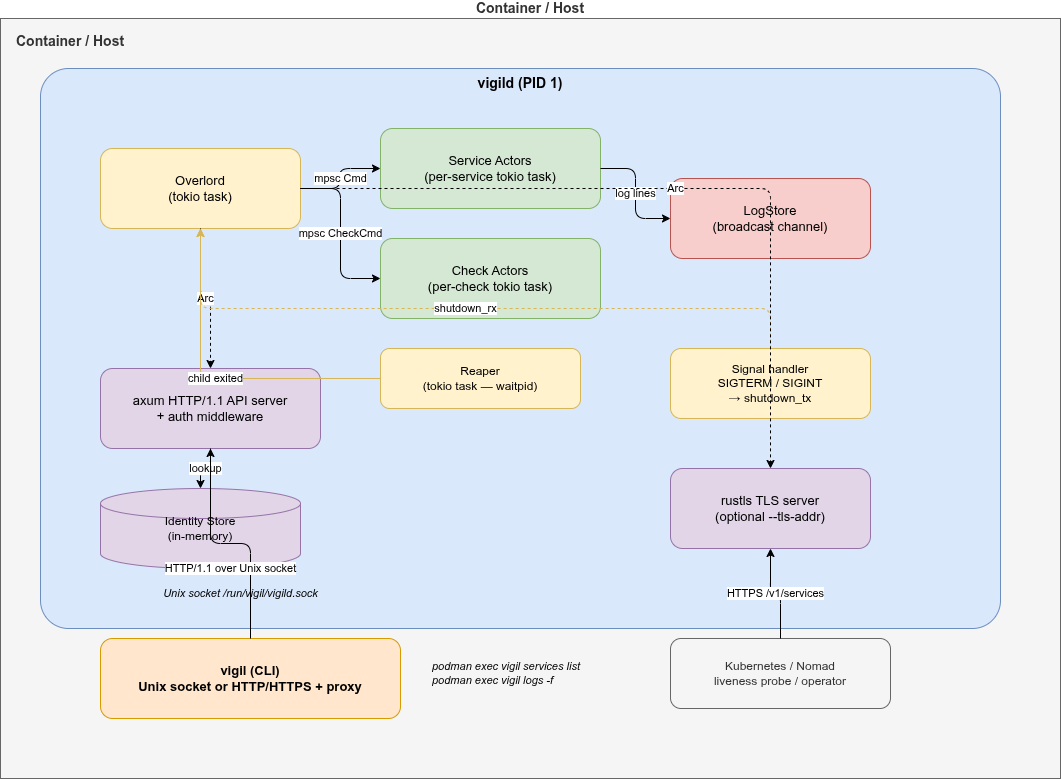
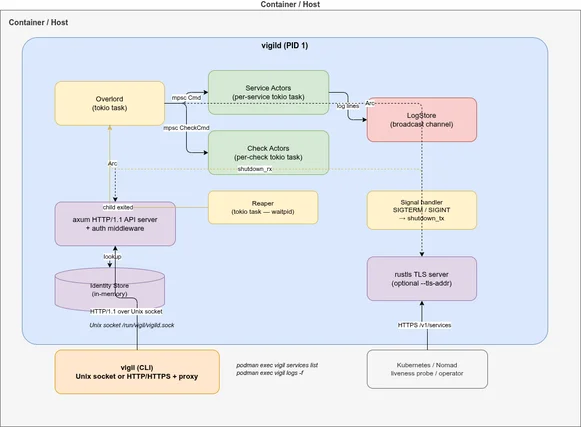
Why the split?
Smaller attack surface.
vigildin the container image contains no CLI parsing code and no client-side formatting logic.vigilcan be excluded from images where interactive access is not needed.Independent versioning. The CLI and daemon can evolve at different speeds. A newer
vigilclient talks to an oldervigildas long as the API contract holds.Shared types as the contract. The
vigil-typescrate is the single source of truth for all API request/response types. Both binaries depend on it — the daemon serialises with it, the client deserialises with it. Full compile-time verification.No PID 1 bloat.
vigildis PID 1 and runs for the entire container lifetime. Keeping it lean (no CLI parsing, no output formatting) means fewer dependencies and a faster startup.Mirrors real-world patterns. Container orchestrators (Kubernetes, Nomad) interact with the daemon via the REST API, not the CLI. The CLI is a convenience tool for developers — and it supports both Unix sockets (inside the container) and HTTP/HTTPS (from outside).
Internal actor model🔗
Inside vigild, each service and each health check runs as an independent Tokio task with an mpsc mailbox. There is no shared mutable state and no locks.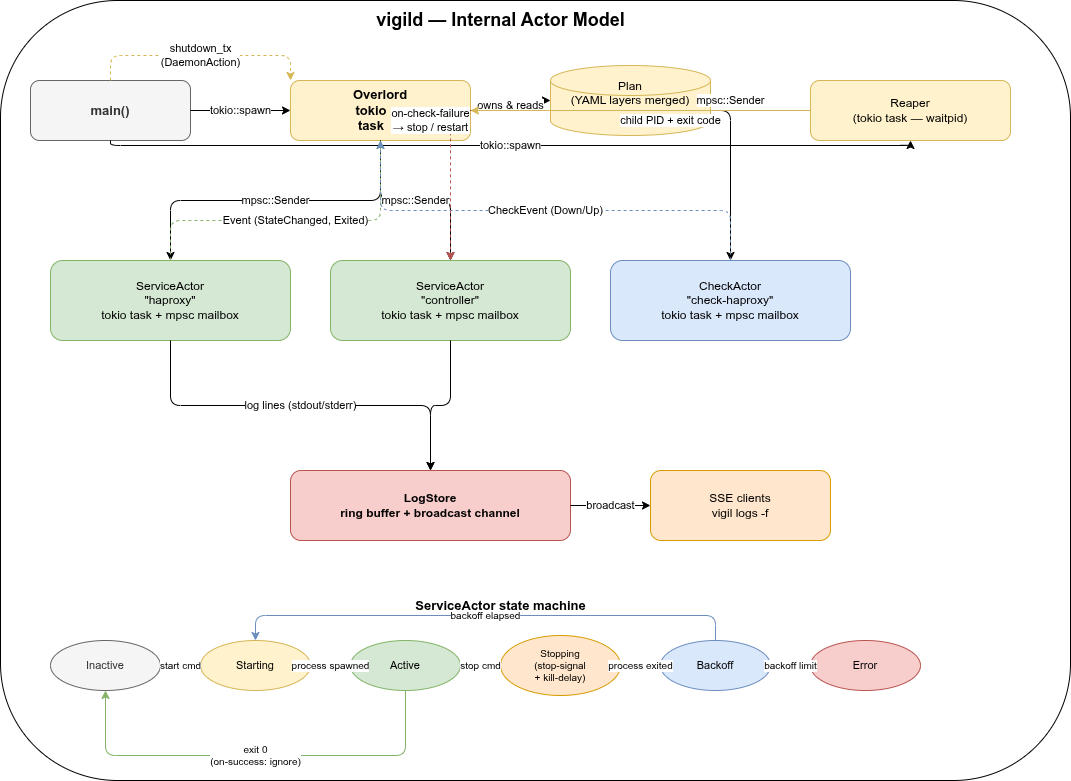
- Overlord owns the plan (merged YAML layers) and routes commands from the API to the right actor. It is the only component that reads YAML files.
- ServiceActors manage a single child process each: spawn, signal, wait, backoff, restart. State machine:
Inactive → Starting → Active → Stopping → Backoff → Error. - CheckActors run health checks on a timer and send
CheckEvent::Down/CheckEvent::Upback to the Overlord when a check transitions. - LogStore holds a ring buffer of recent log lines and a broadcast channel for live SSE streaming to
vigil logs -fclients.
Configuration🔗
Services and health checks are declared in YAML layer files. Multiple layers are merged in order — later layers override earlier ones.
# /etc/vigil/layers/001-app.yaml
summary: My application

services:

  myapp:
    summary: Main application process
    command: /usr/local/bin/myapp --config /etc/myapp/config.yaml
    startup: enabled
    stop-signal: SIGTERM      # default; can be SIGUSR1, SIGHUP, ...
    kill-delay: 10s           # SIGKILL sent after this if still running
    on-success: restart
    on-failure: restart
    backoff-delay: 1s
    backoff-factor: 2.0
    backoff-limit: 30s
    on-check-failure:
      myapp-alive: restart

  sidecar:
    summary: Helper process (starts after myapp)
    command: /usr/local/bin/sidecar
    startup: enabled
    after:
      - myapp
    on-success: restart
    on-failure: restart

checks:

  myapp-alive:
    level: alive
    startup: enabled
    delay: 3s         # wait before first check (default: 3s)
    period: 10s
    timeout: 3s
    threshold: 3
    http:
      url: http://localhost:8080/healthz
Supported check types🔗
# HTTP check
http:
  url: http://localhost:8080/healthz
  headers:
    Authorization: "Bearer token"

# TCP check
tcp:
  host: localhost
  port: 5432

# Exec check (exit code 0 = healthy)
exec:
  command: pg_isready -U postgres
  service-context: myapp   # inherit env/user/group from service
Real-world example: HAProxy + controller🔗
The examples/hug/ directory shows a realistic multi-service setup: an HAProxy instance supervised by vigild, with a controller process that starts after HAProxy is up.
services:

  haproxy:
    command: /usr/local/bin/run-haproxy
    startup: enabled
    stop-signal: SIGUSR1    # graceful drain in master-worker mode
    kill-delay: 30s
    on-success: restart
    on-failure: restart
    on-check-failure:
      check-haproxy: restart

  controller:
    command: /usr/local/bin/run-controller
    startup: enabled
    after:
      - haproxy             # starts only after haproxy reaches Active state
    on-success: restart
    on-failure: restart

checks:

  check-haproxy:
    level: alive
    startup: enabled
    delay: 3s
    period: 10s
    timeout: 5s
    threshold: 3
    exec:
      command: >
        curl -sf --unix-socket /var/run/haproxy/health.sock
        http://localhost/stats?csv
Key things this demonstrates:
after:startup ordering — controller waits for haproxy to reachActivestop-signal: SIGUSR1— haproxy graceful drain instead of immediate SIGTERMkill-delay: 30s— up to 30 seconds for in-flight connections to drain- Exec health check against the HAProxy Unix stats socket
on-check-failure: restart— automatic restart if the health check goes down
Real-world example: Kubernetes pod log collector🔗
The kubernetes-pod-logs example shows a different kind of multi-service container: a dedicated log-collection pod that streams logs from other pods in a namespace via the Kubernetes API and forwards them to Filebeat — all running inside a single container supervised by vigild.
Architecture🔗
K8s API (/api/v1/namespaces/<ns>/pods/<pod>/log?follow=true×tamps=true)
↓ one async task per pod, refreshed every 30 s
vigil-http-streamer --kubernetes → TCP 127.0.0.1:5170
↓
Filebeat → output.console (enriched JSON → container stdout)
↓
oc logs / kubectl logs → Elasticsearch / Loki / …vigild supervises both Filebeat and vigil-http-streamer with independent restart policies:
services:

  filebeat:
    command: >-
      sh -c 'mkdir -p /tmp/fb-data && filebeat run
      --strict.perms=false --path.data /tmp/fb-data
      -c /usr/share/filebeat/vigil-filebeat.yml 2>/dev/null'
    startup: enabled
    on-failure: restart
    backoff-delay: 2s
    backoff-factor: 2.0
    backoff-limit: 30s
    logs-forward: passthrough   # Filebeat's enriched JSON → container stdout

  pod-log-collector:
    command: /usr/local/bin/vigil-http-streamer --kubernetes
    startup: enabled
    # No `after: filebeat` needed — vigil-http-streamer reconnects to the TCP
    # sink with exponential backoff, so it can start independently.
    on-failure: restart
    backoff-delay: 5s
    backoff-factor: 2.0
    backoff-limit: 60s
    logs-forward: disabled     # status lines → ring buffer; inspect with vigil logs
    on-check-failure:
      pod-log-collector-alive: restart
Liveness via HTTP healthcheck🔗
vigil-http-streamer exposes a GET /healthz endpoint (default: 127.0.0.1:9091) that returns 200 ok while the watch loop is ticking and 503 stale if no tick has been received within --healthcheck-max-age seconds (default 90 s = 3× the default WATCH_INTERVAL). vigild polls it directly — no shell, no stat:
checks:
  pod-log-collector-alive:
    level: alive
    startup: enabled
    delay: 40s      # one full cycle + margin
    period: 30s
    timeout: 5s
    threshold: 2    # two consecutive 503s → restart
    http:
      url: http://127.0.0.1:9091/healthz
Collector status lines are available in the ring buffer — no noise in container stdout:
kubectl exec <pod> -- vigil logs -f pod-log-collectorPod selection and configuration🔗
All tuning is done via environment variables in the Kubernetes Deployment so operators can configure the collector without rebuilding the image:
| Variable | Default | Description |
|---|---|---|
NAMESPACE | default | Namespace to watch |
POD_SELECTOR | (all pods) | Label selector, e.g. app=myapp |
WATCH_INTERVAL | 30 | Seconds between pod-list refreshes |
TCP_SINK_HOST | 127.0.0.1 | TCP sink host |
TCP_SINK_PORT | 5170 | TCP sink port |
Output format🔗
Each log event includes pod and namespace metadata added by the collector:
{
  "@timestamp": "2026-03-18T22:21:27Z",
  "namespace": "zzz-test-build",
  "pod": "caddyv2-upload-59467fcd98-gbtn5",
  "stream": "stdout",
  "timestamp": "2026-02-24T09:55:09.369012248Z",
  "message": "{\"level\":\"info\",\"ts\":1771926909.37,...}",
  "collector": "filebeat"
}
OpenShift compatibility🔗
OpenShift runs containers as a non-root random UID and mounts /run as a fresh root-owned tmpfs at runtime — any chmod 777 applied in the image layer is silently lost. The image therefore uses:
WORKDIR /tmp— world-writable, survives runtime--socket /tmp/vigild.sock— avoids root-owned/run/chmod 644on the Filebeat config — readable by any UID--path.data /tmp/fb-data— Filebeat writes its registry to/tmp
An OpenShift ImageStream trigger is included in k8s/deployment.yaml so oc start-build automatically rolls the Deployment when the image is updated.
Observed: Kubernetes API closes streaming connections every ~5 minutes🔗
In production we observed a regular pattern in the collector logs:
01:51:27 WARN log stream error pod=caddyv2-upload-... error=ServiceError: error reading a body from connection
01:51:32 INFO starting log stream pod=caddyv2-upload-...
01:56:27 WARN log stream error pod=caddyv2-upload-... error=ServiceError: error reading a body from connection
01:56:32 INFO starting log stream pod=caddyv2-upload-...Each pod’s stream drops and reconnects with a 5-second gap, every ~5 minutes, like clockwork. This is the Kubernetes API server closing long-running streaming connections after its internal timeout — normal behaviour, not a bug in the collector.
vigil-http-streamer reconnects automatically with exponential backoff. The load on the API server from reconnects is negligible — a single lightweight HTTP request per pod per reconnect, far less than the continuous streaming traffic itself.
The 5-second gap means a small window of potential log loss per reconnect cycle. For most use-cases this is acceptable. If you need zero-gap coverage, a DaemonSet-based node-level log agent is the right tool.
Logging and log collection🔗
Every supervised service has its stdout and stderr captured by vigild into a per-service in-memory ring buffer. From there, log lines flow through two independent delivery paths:
| Path | When to use |
|---|---|
vigild’s own stdout (podman logs) | Default — each line prefixed with [service-name] |
SSE stream (GET /v1/logs/follow) | vigil logs -f, external collectors, any HTTP client |
logs-forward🔗
The logs-forward field on each service controls how captured output is handled:
services:
  myapp:
    command: /usr/local/bin/myapp
    logs-forward: enabled      # default — captured, stored, printed to podman logs

  high-volume-service:
    command: /usr/local/bin/access-logger
    logs-forward: disabled     # captured and stored in buffer, NOT printed to podman logs

  log-collector:
    command: sh -c '...'
    logs-forward: passthrough  # NOT captured at all — process inherits vigild's fds
passthrough is the key to running a log-collector service inside the same container without vigild intercepting its output. The collector (Vector, Filebeat, …) writes its enriched JSON directly to the container’s stdout, bypassing the ring buffer entirely.
Built-in log streaming API🔗
vigild exposes a streaming endpoint at GET /v1/logs/follow with three output formats controlled by the ?format= query parameter:
| Format | Content-Type | Description |
|---|---|---|
json (default) | text/event-stream | SSE — each event is a JSON object |
text | text/event-stream | SSE — each event is [service] message |
ndjson | application/x-ndjson | One JSON object per line, no SSE framing |
The ndjson format is designed specifically for log collectors. Because there is no SSE framing to strip, a collector can pipe curl directly into its stdin input without any grep | sed preprocessing:
services:
  myapp:
    command: /usr/local/bin/myapp
    logs-forward: disabled     # raw lines go to ring buffer only

  filebeat:
    command: >-
      sh -c 'curl -sN --unix-socket /run/vigil/vigild.sock
      "http://localhost/v1/logs/follow?format=ndjson"
      | filebeat run --strict.perms=false -c /etc/filebeat/filebeat.yml 2>/dev/null'
    startup: enabled
    after:
      - myapp
    logs-forward: passthrough  # filebeat's enriched JSON goes directly to podman logs
    on-failure: restart
Data flow:
myapp  →  vigild ring buffer  →  GET /v1/logs/follow?format=ndjson
                              →  curl  (one JSON object per line)
                              →  filebeat stdin  (json.keys_under_root)
                              →  add_fields (collector=filebeat)
                              →  stdout  →  podman logs
The examples/filebeat/, examples/filebeat-push/, examples/fluentbit/, and examples/vector/ directories contain fully working container images demonstrating both the push and pull patterns. All produce clean enriched JSON in podman logs with no sidecar container or DaemonSet required.
Push mode: vigild connects to the collector🔗
For collectors that can listen on a socket (Filebeat, Fluent Bit, …), vigild can push log lines directly without a curl process:
services:
  myapp:
    command: /usr/local/bin/myapp
    logs-forward: disabled
    logs-push-socket: /run/collector/input.sock   # Unix socket push

  filebeat:
    command: sh -c 'filebeat run --strict.perms=false -c /etc/filebeat/vigil.yml 2>/dev/null'
    startup: enabled
    logs-forward: passthrough
logs-push-addr: 127.0.0.1:5170 works the same way over TCP. vigild retries with exponential backoff if the collector isn’t ready yet — no after: ordering required.
vigil logs CLI🔗
The same ring buffer and SSE stream back the CLI command:
vigil logs                      # last 100 lines from all services
vigil logs myapp -n 50          # last 50 lines from myapp
vigil logs -f                   # follow live (Ctrl+C to stop)
vigil logs -f myapp sidecar     # follow specific services
The buffer size (default 1000 lines per service) is configurable via --log-buffer / VIGIL_LOG_BUFFER. vigild’s own diagnostic output format is separately configurable via --log-format text|json / VIGIL_LOG_FORMAT.
Container usage🔗
vigild is designed to run as PID 1:
ENTRYPOINT ["/usr/local/bin/vigild", \
    "--layers-dir", "/etc/vigil/layers", \
    "--socket",     "/run/vigil/vigild.sock"]
Interact from inside the container (Unix socket, podman exec):
podman exec <ctr> vigil services
podman exec <ctr> vigil checks
podman exec <ctr> vigil logs -f
podman exec <ctr> vigil restart myapp
Interact from outside the container — start vigild with a TLS listener and use the --url flag (no podman exec needed):
# Start daemon with optional HTTPS listener
vigild --layers-dir /etc/vigil/layers \
       --socket /run/vigil/vigild.sock \
       --tls-addr 0.0.0.0:8443

# Connect from host / CI / Kubernetes operator
vigil --url https://mycontainer:8443 --insecure services
vigil --url https://mycontainer:8443 --insecure logs -f
Or via curl directly:
# Inside via Unix socket
curl --unix-socket /run/vigil/vigild.sock http://localhost/v1/services

# Outside via HTTPS
curl -k https://mycontainer:8443/v1/services
The Swagger UI is available at /docs — via the Unix socket proxy or directly on the TLS listener.
Why not just extend Pebble?🔗
A fair question. The short answer: the gaps are architectural, not cosmetic.
Adding PID 1 / zombie-reaping to a Go daemon that wasn’t designed for it is non-trivial. Pebble’s service model has no concept of a per-service stop signal — the signal is hardcoded at a layer that would need to be redesigned, not patched. Exit-code propagation is tied to assumptions in the change/task system. And we wanted Rust specifically: smaller binary, no GC pauses, tokio for the async actor model, compile-time correctness for the API types.
Forking and patching Pebble would have produced something neither fish nor fowl. Starting fresh let us design for correctness from the beginning.
For reference, here is how the two compare today:
| Pebble | vigil-rs | |
|---|---|---|
| Language | Go | Rust |
| PID 1 / zombie reaper | ❌ | ✅ |
| Per-service stop signal | ❌ (hardcoded SIGTERM) | ✅ (any signal) |
| Configurable kill-delay | ❌ | ✅ |
| Real exit-code propagation | ❌ (hardcoded 0/10) | ✅ |
Check delay field | ❌ | ✅ |
| Built-in access control | ❌ | ✅ (local / Basic / TLS) |
| OpenAPI / Swagger UI | ❌ | ✅ |
| TLS API listener | ❌ | ✅ |
| Log ring buffer + SSE stream | ❌ | ✅ |
logs-forward: passthrough | ❌ | ✅ |
| ndjson log stream for collectors | ❌ | ✅ |
| Memory footprint | ~20 MB | ~10 MB |
| Two-binary split | ❌ | ✅ |
The core service/check/log API is intentionally shaped to be familiar if you have used Pebble before. That similarity is a deliberate design choice for operator ergonomics, not an indication of shared code.
Getting started🔗
# Build
cargo build --release --bin vigild --bin vigil

# Run the daemon (Unix socket only)
vigild --layers-dir /etc/vigil/layers --socket /run/vigil/vigild.sock

# Run the daemon with an additional HTTPS listener
vigild --layers-dir /etc/vigil/layers --socket /run/vigil/vigild.sock \
       --tls-addr 0.0.0.0:8443

# Use the CLI — Unix socket (default, inside the container)
vigil services
vigil checks
vigil logs -f
vigil start myservice

# Use the CLI — HTTP URL (remote, no TLS)
vigil --url http://myhost:8080 services

# Use the CLI — HTTPS URL (remote, self-signed cert)
vigil --url https://myhost:8443 --insecure services
vigil --url https://myhost:8443 --insecure logs -f
The source is available at github.com/git001/vigil-rs.
Access control🔗
vigild has a built-in identity and access control system. Named identities are stored at runtime via the API — there are no config files to manage.
Each identity has an access level (open → metrics → read → write → admin) and one or more auth methods:
| Auth method | How it works |
|---|---|
local | Unix socket + caller UID |
basic | HTTP Basic Auth with SHA-512-crypt password hash |
tls | TLS client certificate verified against a stored CA |
The API enforces the minimum required level per endpoint:
| Endpoint | Required level |
|---|---|
GET /v1/system-info | open |
GET /v1/metrics | metrics |
GET /v1/services, GET /v1/checks, GET /v1/logs | read |
POST /v1/services, POST /v1/replan | write |
POST /v1/vigild, */identities | admin |
Bootstrap mode: when the store is empty, every caller gets admin. Add your first identity (no credentials needed), then enforcement kicks in.
The examples/identities/ directory has a self-contained demo with one user per level — build it with podman build -f examples/identities/Containerfile -t vigil-identities . and run setup-identities inside the container.
Proxy support🔗
The vigil CLI supports HTTP/HTTPS proxies for environments where the vigild API is accessed via a proxy (e.g. corporate networks, Kubernetes service mesh):
vigil --url https://vigild.internal:8443 \
      --proxy http://proxy.corp:3128 \
      --proxy-cacert /etc/corp-ca.pem \
      --no-proxy "localhost,169.254.0.0/16" \
      services list
The same flags are available as environment variables: VIGIL_PROXY, VIGIL_PROXY_CACERT, VIGIL_NO_PROXY.
No-proxy matching follows curl semantics: "local.com" matches local.com, local.com:80, and www.local.com, but not www.notlocal.com. When HTTPS_PROXY / ALL_PROXY / HTTP_PROXY are set in the environment, vigil picks them up automatically (explicit --proxy overrides them).
Summary🔗
vigil-rs gives you:
- A lean Rust PID 1 with automatic zombie reaping
- Declarative YAML config with layer merging and hot-reload (
vigil replan) - Per-service HTTP / TCP / exec health checks with configurable thresholds
- Automatic restart with exponential backoff
- Per-service
stop-signalfor graceful draining (SIGUSR1, SIGHUP, …) - A JSON REST API over a Unix socket — Pebble-compatible, with Swagger UI
- An optional TLS listener for programmatic access from orchestrators
- Built-in identity/access control: local UID, Basic Auth, TLS client certs
- A CLI (
vigil) that speaks Unix socket and HTTP/HTTPS — with full proxy and CA support - Daemon lifecycle control from the CLI:
vigil vigild status/stop/restart - A clean two-binary split:
vigild(daemon) andvigil(CLI) - Per-service log capture with in-memory ring buffer and live SSE streaming
logs-forward: passthroughfor running log collectors (Filebeat, Vector) as supervised services?format=ndjsonon the log stream — one JSON object per line, no SSE framing, feeds directly into collector stdin inputslogs-push-socket/logs-push-addr— vigild connects to the collector’s socket and pushes ndjson directly (no curl, no SSE overhead)- Ready-to-run examples: Filebeat push/pull, Fluent Bit, Vector, Kubernetes pod log collector
If you are running multiple processes inside a container and want health checks, automatic restarts, and programmatic control, give vigil-rs a try.
vigil-rs is dual-licensed: AGPL-3.0 for open-source and internal use, and a commercial license for closed-source products and SaaS deployments. See LICENSE-COMMERCIAL.md for details.