Running a validating DNS recursor from the root zone with Hickory DNS
Table of contents
Hickory DNS is a Rust-based DNS implementation that covers the full stack: resolver, recursor, authoritative server, and DNSSEC. This post documents how to run it as a full recursive resolver — starting directly from the root zone, with DNSSEC validation and encrypted upstream transport — based on the changes developed in the recurser-from-root-zone branch.
Why upstream Hickory DNS does not work with the root zone out of the box🔗
Hickory DNS supports the recursor mode in principle, and the configuration accepts a roots file pointing to a root zone. However, two categories of problems prevent it from working reliably in practice.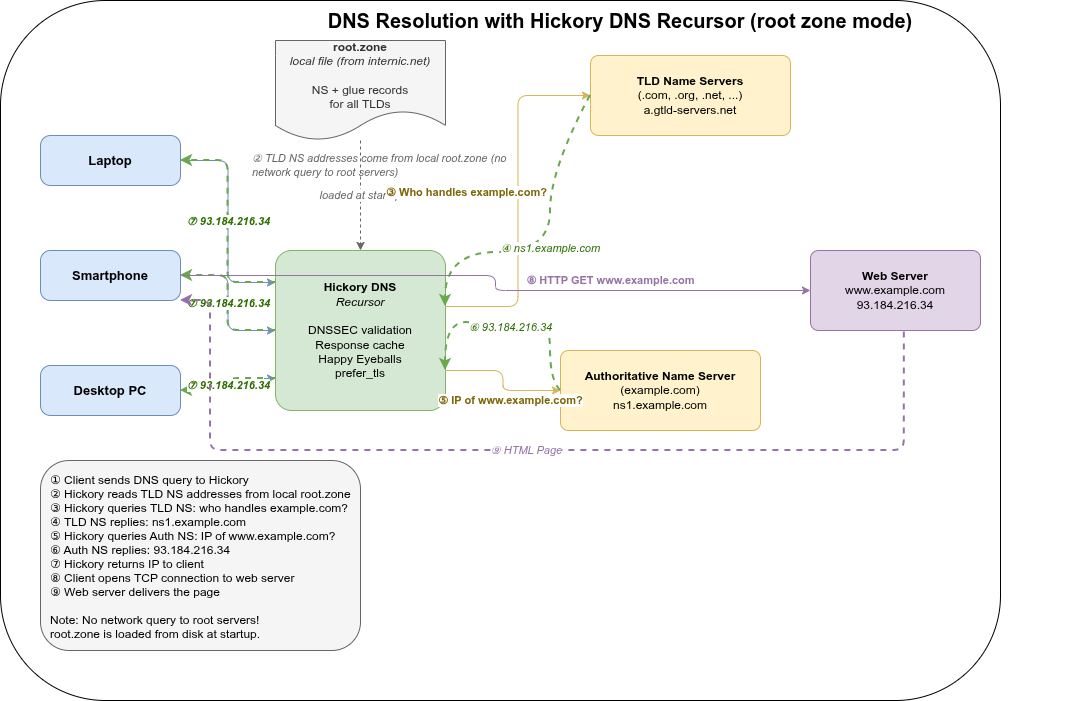
DNSSEC self-recursion bug🔗
The most critical issue is a bug in the DNSSEC validation path (f97de0069). When the recursor performs DNSSEC validation and needs to prove that a zone is insecure (i.e., not signed), it queries for DS records at the delegation point. For a DS query for name x.y.z., the upstream code checked for DS records at x.y.z. itself — the same name being queried. This causes the resolver to recurse into the same delegation point it is already trying to resolve, leading to infinite recursion and a SERVFAIL.
The fix is to check the parent name (y.z.) instead: for a DS query at x.y.z., insecurity is established by looking up DS records one level up, which is how the DNSSEC chain of trust actually works.
Without this fix, resolving any domain whose delegation chain passes through an unsigned zone (which is common — many ccTLDs are not DNSSEC-signed) will fail with a stack overflow or timeout.
Missing features for practical deployment🔗
Beyond the correctness bug, upstream Hickory DNS also lacks several features needed for a production recursor:
- No
connection_timeout— without a per-connection timeout, a slow or unresponsive upstream name server can stall an entire query indefinitely. - No Happy Eyeballs — without parallel IPv4/IPv6 connection attempts, queries to dual-stack name servers time out completely if one address family is unreachable, rather than falling back quickly.
- No
prefer_tlstransport mode with depth control — upstream has no way to request DNS-over-TLS for upstream connections, let alone to limit TLS attempts to name servers below a certain delegation depth. - No TLS failure backoff — without backoff, a name server with broken TLS causes every query through it to stall for the full TLS timeout before falling back to plaintext.
The recurser-from-root-zone branch addresses all of these.
What the branch adds🔗
The recurser-from-root-zone branch adds several features on top of upstream Hickory DNS:
Happy Eyeballs for upstream connections🔗
d6590dff3 — feat(resolver): implement Happy Eyeballs and prefer_tls failure backoff in NameServer
When connecting to an upstream name server that has both IPv4 and IPv6 addresses, the resolver now uses the Happy Eyeballs algorithm (RFC 8305): it starts an IPv6 connection attempt and waits a short delay before starting an IPv4 attempt in parallel, using whichever succeeds first. This avoids long timeouts when one address family is unreachable.
A failure backoff is also implemented for TLS: if a TLS connection to a name server fails, the resolver backs off before retrying TLS so it does not repeatedly stall on broken TLS endpoints.
New recursor options: connection_timeout, happy_eyeballs_delay, prefer_tls_min_depth🔗
73ab7e04c — feat(recursor): add connection_timeout, happy_eyeballs_delay, prefer_tls_min_depth options
Three new configuration options for the recursor:
connection_timeout— maximum time to wait for a TCP/TLS connection to an upstream name server before giving up and trying the next one.happy_eyeballs_delay— how long to wait for an IPv6 connection before starting the IPv4 attempt in parallel. Set tonullto disable Happy Eyeballs entirely.prefer_tls_min_depth— when usingprefer_tlsmode, only attempt TLS for name servers at or below this depth in the delegation chain. Servers above this depth (closer to the root) are contacted without TLS, since root and TLD name servers rarely support DoT and attempting it adds latency.
effective_prefer_tls() helper🔗
0366a2ce9 — feat(recursor): add effective_prefer_tls() to skip TLS above configured zone depth
An internal helper that combines prefer_tls_min_depth with the current delegation depth to decide whether to attempt TLS for a given query. This keeps the logic in one place and is tested directly.
Metrics fix: ResponseHandlerMetrics initialized once per server🔗
449513f0b — perf(server): initialize ResponseHandlerMetrics once per server, not per request
Previously ResponseHandlerMetrics::default() was called on every incoming request, causing repeated Prometheus counter lookups (HashMap access, Arc::new, describe_counter!) per request. Counter handles are cheap to clone (they are Arc internally), so the metrics struct is now created once in ServerContext and cloned per request.
Lock-free nameserver caches🔗
203026216 — perf(recursor): replace name_server_cache Mutex<LruCache> with moka
664639e5d — perf(recursor): replace connection_cache and transient_ns_error_cache Mutex<LruCache> with moka
The recursor maintains three internal caches for nameserver pools, individual nameserver connections, and transient error suppression. All three were previously Arc<Mutex<LruCache<...>>> — a global lock per cache, serializing all concurrent resolution attempts that touched the same cache.
They are now replaced with moka, a concurrent cache library that uses sharded internal locking and the W-TinyLFU eviction algorithm. Under load, parallel query resolutions for different domains no longer contend on a single mutex. W-TinyLFU also provides better hit rates than LRU for skewed access distributions (e.g., root and TLD nameservers accessed far more frequently than second-level nameservers).
The response_cache already used moka; these commits extend the same approach to the remaining three caches and remove the last parking_lot::Mutex uses from the recursor hot path.
Getting the root zone🔗
The recursor needs a copy of the DNS root zone to start resolving from the top of the hierarchy. The root zone is published by IANA and can be fetched directly:
curl -o root.zone https://www.internic.net/domain/root.zoneVerify the download:
wc -l root.zone
# should be several thousand lines
head -5 root.zone
# .                        86400   IN      SOA     ...
The file changes periodically (root zone TTLs are 6 hours to 2 days). For production use, set up a cron job or systemd timer to refresh it regularly:
# /etc/cron.daily/refresh-root-zone
#!/bin/sh
curl -sSo /etc/hickory-dns/root.zone.new https://www.internic.net/domain/root.zone \
  && mv /etc/hickory-dns/root.zone.new /etc/hickory-dns/root.zone
How to extract the DNSSEC root trust anchor🔗
Hickory DNS reads the trust anchor from a file containing standard DNSKEY records in zone file format:
. 34076 IN DNSKEY 257 3 8 AwEAAaz/tAm8yTn4Mfeh5eyI96WS...Note: the path field in dnssec_policy.ValidateWithStaticKey is optional. If omitted, Hickory uses its built-in trust anchors (currently key tags 20326 and 38696), which is the easiest option for most setups.
If you want an explicit file — for auditability or to pin a specific key — here are the options:
Option 1 — dig (simplest)
Query the root DNSKEY records directly and keep only the KSK (flag 257):
dig DNSKEY . +noall +answer | grep "257 3 8" > root.keyThis produces exactly the format Hickory expects. Verify:
cat root.key
# .   34076   IN  DNSKEY  257 3 8 AwEAAaz/...
Option 2 — extract from IANA XML
IANA publishes the authoritative trust anchors as XML:
curl -s https://data.iana.org/root-anchors/root-anchors.xmlThe XML contains <KeyDigest> entries with a <PublicKey> element for each KSK. Entries without a validUntil attribute are currently valid. Extract them with Python:
import xml.etree.ElementTree as ET, urllib.request
url = "https://data.iana.org/root-anchors/root-anchors.xml"
root = ET.(urllib.request.(url)).()
for kd in root.("KeyDigest"):
# skip expired entries
if kd.("validUntil"):
continue
flags = kd.("Flags")
algorithm = kd.("Algorithm")
pubkey = kd.("PublicKey").()
# Hickory needs the public key on a single line (no whitespace)
pubkey = "".(pubkey.())
print(f". IN DNSKEY {flags} 3 {algorithm} {pubkey}")Save the output as root.key. The format is:
. IN DNSKEY <Flags> 3 <Algorithm> <PublicKey-base64>where Flags=257 marks a Key Signing Key (KSK), 3 is the fixed DNSSEC protocol number, and Algorithm=8 means RSASHA256.
Option 3 — unbound-anchor
If Unbound is installed, unbound-anchor fetches and validates the trust anchor via the built-in RFC 5011 bootstrap process:
sudo unbound-anchor -a /etc/unbound/root.keyThe resulting file uses Unbound’s autotrust format (with ;;state= comment lines), which Hickory’s parser also accepts since it ignores comment lines starting with ;.
Keeping the trust anchor current
Root KSKs are rolled infrequently (the 2024 KSK 38696 is the newest), but it is good practice to refresh the file after a key rollover. The simplest approach is to re-run the dig command above periodically, or automate it alongside the root zone refresh.
Building🔗
Clone the branch and build with the required features:
git clone https://github.com/git001/hickory-dns.git
cd hickory-dns
git checkout recurser-from-root-zone

cargo build --release -p hickory-dns --bin hickory-dns \
  --features "recursor tls-ring dnssec-ring prometheus-metrics"
For development/profiling with debug symbols:
# Cargo.toml
[profile.profiling]
inherits = "release"
debug = 1
strip = "none"
cargo build --profile profiling -p hickory-dns --bin hickory-dns \
--features "recursor tls-ring dnssec-ring prometheus-metrics"Configuration🔗
The server is configured via a TOML file. Here is a complete annotated example (hickory-dns_recursor.toml):
# Listen on localhost port 1053 (use 53 for production, requires root or CAP_NET_BIND_SERVICE)
listen_addrs_ipv4 = ["127.0.0.1"]
listen_port = 1053

# Prometheus metrics endpoint
prometheus_listen_addr = "127.0.0.1:9100"

[[zones]]
zone = "."          # root zone — resolve everything
zone_type = "External"

[zones.stores]
type = "recursor"

# Path to the root zone file (fetched from internic.net)
roots = "/etc/hickory-dns/root.zone"

# Name server cache: how many NS records to remember
ns_cache_size = 1024

# Response cache: how many DNS responses to cache
response_cache_size = 1048576

# Maximum recursion depth for resolving a single query
recursion_limit = 24

# Maximum recursion depth when chasing NS delegations
ns_recursion_limit = 24

# Maximum number of concurrent upstream requests per query
num_concurrent_reqs = 4

# Timeout for TCP/TLS connection attempts to upstream name servers
connection_timeout = "2s"

# Happy Eyeballs: delay before starting IPv4 when IPv6 is already in flight
# Set to null to disable
happy_eyeballs_delay = "250ms"

[zones.stores.transport_encryption]
# mode = "opportunistic"  — try TLS, fall back to plain UDP/TCP, remember result
# mode = "prefer_tls"     — always try TLS first, fall back if unavailable
mode = "prefer_tls"

# Only attempt TLS for name servers at delegation depth >= 2.
# Root (depth 0) and TLD servers (depth 1) rarely support DoT,
# so skipping TLS for them avoids unnecessary latency.
prefer_tls_min_depth = 2

[zones.stores.transport_encryption.tls]
# Use the system CA store to verify upstream TLS certificates
verification = "system"
# To pin a specific CA instead:
# ca_file = "/path/to/ca.pem"

[zones.stores.transport_encryption.opportunistic]
# How long a successful TLS result is remembered (seconds): 3 days
persistence_period = 259200
# How long a failed TLS result suppresses retry (seconds): 1 day
damping_period = 86400
# How many TLS probes can run in parallel
max_concurrent_probes = 10
# Persist opportunistic TLS state across restarts
persistence = { path = "/etc/hickory-dns/opp_enc_state.toml", save_interval = 600 }

[zones.stores.cache_policy.default]
# Maximum TTL for positive answers (capped at 1 day)
positive_max_ttl = 86400
# Minimum and maximum TTL for NXDOMAIN / NODATA responses
negative_min_ttl = 5
negative_max_ttl = 60

[zones.stores.cache_policy.NS]
# NS negative answers can stay a bit longer
negative_min_ttl = 15
negative_max_ttl = 60

[zones.stores.dnssec_policy.ValidateWithStaticKey]
# Root trust anchor — produced by unbound-anchor or downloaded from IANA
path = "/etc/unbound/root.key"

# NSEC3 iteration limits.
# Responses with iteration counts above soft_limit are treated as Insecure.
# Responses above hard_limit are treated as Bogus.
nsec3_soft_iteration_limit = 100
nsec3_hard_iteration_limit = 500

# How many DNSSEC validations to cache
validation_cache_size = 1048576Running🔗
cargo run -p hickory-dns --bin hickory-dns \
  --features "recursor tls-ring dnssec-ring prometheus-metrics" \
  -- -c <PATH-TO>/hickory-dns_recursor.toml -z <PATH-TO>/<ZONE-DIR>
The -z flag sets the working directory for relative paths in the config file.
Test it:
dig @127.0.0.1 -p 1053 google.com
dig @127.0.0.1 -p 1053 +dnssec cloudflare.com AAAA
Prometheus metrics are available at http://127.0.0.1:9100/metrics.
Transport encryption modes🔗
| Mode | Behaviour |
|---|---|
prefer_tls | Always attempt DoT first. If TLS fails or is unsupported, fall back to plain UDP/TCP. With prefer_tls_min_depth, TLS is only tried at a certain depth in the delegation chain. |
opportunistic | Probe TLS on first contact. Remember the result for persistence_period. Suppress retries for damping_period after failure. State is persisted to disk across restarts. |
For most setups prefer_tls with prefer_tls_min_depth = 2 is the right choice: it encrypts traffic to authoritative name servers (which increasingly support DoT) while skipping the TLS attempt for root and TLD servers where it would almost always fail.
Combining the recursor with local zones🔗
The root zone recursor and local authoritative zones can coexist in the same Hickory DNS instance. The server uses a longest-match algorithm to route queries: it looks for the most specific zone that covers the queried name, falling back to the parent zone, and ultimately to . (the recursor) if no more specific zone matches.
This means a zone for local. will catch all queries for *.local., while everything else falls through to the recursor:
listen_addrs_ipv4 = ["127.0.0.1"]
listen_port = 1053

# Local authoritative zone — served directly, no recursion
[[zones]]
zone = "local"
zone_type = "Primary"

[zones.stores]
type = "file"
zone_file_path = "/etc/hickory-dns/local.zone"

# Root recursor — catches everything not matched above
[[zones]]
zone = "."
zone_type = "External"

[zones.stores]
type = "recursor"
roots = "/etc/hickory-dns/root.zone"
ns_cache_size = 1024
response_cache_size = 1048576
# ... (all other recursor options as above)
A minimal local.zone zone file looks like this:
$ORIGIN local.
$TTL 3600
@   IN  SOA  ns.local. admin.local. (
            2026040401 ; serial
            3600       ; refresh
            900        ; retry
            604800     ; expire
            300 )      ; minimum TTL

@   IN  NS   ns.local.
ns  IN  A    127.0.0.1

; your local records
router  IN  A  192.168.1.1
nas     IN  A  192.168.1.10
Queries for router.local. are answered from the zone file. Queries for google.com. miss .local., miss .com. (no zone configured), and are handled by the . recursor. The routing is transparent to the client.
Forwarding a zone to an internal DNS server🔗
The same longest-match routing works for forwarding. If you have a corporate domain like corporate.internal. served by an internal DNS server, you can forward only that zone to it while everything else is handled by the recursor:
# Forward corporate.internal to an internal name server
[[zones]]
zone = "corporate.internal"
zone_type = "External"

[zones.stores]
type = "forward"

[[zones.stores.name_servers]]
ip = "192.168.1.53"

[[zones.stores.name_servers.connections]]
port = 53
protocol = "Udp"

[[zones.stores.name_servers.connections]]
port = 53
protocol = "Tcp"

# Root recursor for everything else
[[zones]]
zone = "."
zone_type = "External"

[zones.stores]
type = "recursor"
roots = "/etc/hickory-dns/root.zone"
# ...
The forwarder also supports DNS-over-TLS if the upstream server offers it:
[[zones.stores.name_servers.connections]]
port = 853
protocol = "Tls"
server_name = "dns.corporate.internal"
All three zone types — local primary, forwarder, and recursor — can be combined in one config file. The priority is always most-specific zone first: host.corporate.internal. hits the forwarder, host.local. hits the primary zone, and google.com. falls through to the recursor at ..
Local ad-blocker🔗
Hickory DNS has a built-in blocklist store that can be chained in front of the recursor. It reads plain-text domain lists (one domain per line, #-comments supported), returns a configurable sinkhole IP for blocked queries, and supports wildcards.
The key feature is that a zone can have multiple stores stacked via [[zones.stores]]. The blocklist runs first — if the queried name matches, it returns the sinkhole IP immediately. If it does not match, the query falls through to the next store (the recursor).
[[zones]]
zone = "."
zone_type = "External"

# Store 1: blocklist — checked first
[[zones.stores]]
type = "blocklist"
wildcard_match = true
min_wildcard_depth = 2

# Blocked A queries return this IP, AAAA queries return the IPv6 equivalent
sinkhole_ipv4 = "0.0.0.0"
sinkhole_ipv6 = "::"

# Optional: add a TXT record to the additional section explaining the block
block_message = "Blocked by local DNS policy"

# Block list files (relative to the -z working directory)
lists = [
    "blocklists/ads.txt",
    "blocklists/malware.txt",
]

# Log which client IP triggered each block
log_clients = true

# Store 2: recursor — handles everything not blocked
[[zones.stores]]
type = "recursor"
roots = "/etc/hickory-dns/root.zone"
ns_cache_size = 1024
response_cache_size = 1048576
# ... (other recursor options)
Block list files are simple text files, one domain per line:
# Ads
doubleclick.net
*.googlesyndication.com
ads.example.com

# Malware
malware-c2.example.org
Popular ready-made lists in this format include StevenBlack/hosts and the oisd blocklist. Most need minor preprocessing to strip the leading 0.0.0.0 from hosts-file format — a simple awk '{print $2}' is enough.
DNS-over-TLS and DNS-over-HTTPS for clients🔗
Hickory DNS can accept encrypted queries from clients — not just send them upstream. This is useful when you want clients on your network to use DoT or DoH instead of plain UDP/TCP port 53, preventing eavesdropping on the local network.
All that is needed is a TLS certificate (PEM format) and a private key. Let’s Encrypt works if your resolver has a public DNS name; for a purely internal setup a self-signed certificate or a private CA is sufficient.
listen_addrs_ipv4 = ["0.0.0.0"]
listen_addrs_ipv6 = ["::"]
listen_port = 53
tls_listen_port = 853      # DNS-over-TLS (DoT)
https_listen_port = 443    # DNS-over-HTTPS (DoH)

[tls_cert]
# PEM certificate chain (server cert + intermediate CAs)
path = "/etc/hickory-dns/certs/dns.example.com.pem"
# Server name sent in TLS handshake (must match the certificate)
endpoint_name = "dns.example.com"
# PEM private key
private_key = "/etc/hickory-dns/certs/dns.example.com.key"

[[zones]]
zone = "."
zone_type = "External"

[[zones.stores]]
type = "recursor"
roots = "/etc/hickory-dns/root.zone"
# ...
One certificate covers all three protocols (plain, DoT, DoH) simultaneously. Clients can then be configured to use:
- DoT —
tls://dns.example.com(port 853) - DoH —
https://dns.example.com/dns-query(port 443)
Both can be combined with the blocklist by stacking stores as shown above.
No hot-reload — restart required for all changes🔗
Hickory DNS handles only SIGTERM (graceful shutdown). There is no SIGHUP reload and no file watching via inotify or similar. This applies to everything:
- Zone files (
.zone) - Blocklists
- TLS certificates and private keys
- Root zone file
- The config file itself
Any change requires a full process restart. For automated certificate renewal (e.g. certbot), add a deploy hook:
# /etc/letsencrypt/renewal-hooks/deploy/restart-hickory.sh
#!/bin/sh
cp /etc/letsencrypt/live/dns.example.com/fullchain.pem /etc/hickory-dns/certs/dns.example.com.pem
cp /etc/letsencrypt/live/dns.example.com/privkey.pem   /etc/hickory-dns/certs/dns.example.com.key
systemctl restart hickory-dns
For blocklist refreshes, a systemd timer or cron job that fetches updated lists and restarts the service is sufficient.
This is a known limitation. SIGHUP-based reload — especially for zone files, blocklists, and certificates — would be a useful upstream contribution, as would a live reload of Prometheus metrics registrations.
A note on TLS support at the root level🔗
As of today, virtually none of the root zone name servers (the 13 root server clusters operated by IANA, Verisign, Cogent, and others) offer DNS-over-TLS. The same is true for most TLD name servers. This is why prefer_tls_min_depth = 2 makes sense: attempting DoT against root or TLD servers only adds latency with no benefit.
This may change in the future. There is ongoing discussion in the DNS community about encrypting the full resolution path — including the root and TLD tiers — but it requires coordination across a large number of independently operated infrastructure providers. Until then, encryption of the recursive resolution path is effectively limited to the authoritative tier (depth ≥ 2), which already covers the majority of queries by volume.