Running pdns_recursor as a root-independent validating resolver
Table of contents
PowerDNS Recursor is a mature, production-grade recursive DNS resolver. This post documents how to configure it to bootstrap directly from a local root.zone file — so it never needs to reach the root name servers at runtime — with full DNSSEC validation producing the ad flag in responses.
Goal🔗
A standard recursive resolver always starts by asking the root name servers (the “hints”) for the authoritative name servers of each TLD. This means:
- Every cold-start resolution path depends on the root name servers being reachable — which adds latency and a dependency on external infrastructure.
- The root zone is small and static — it changes only when new TLDs are delegated or existing delegations change, which happens on a schedule. Fetching it fresh makes far more sense than querying it per-RR on demand.
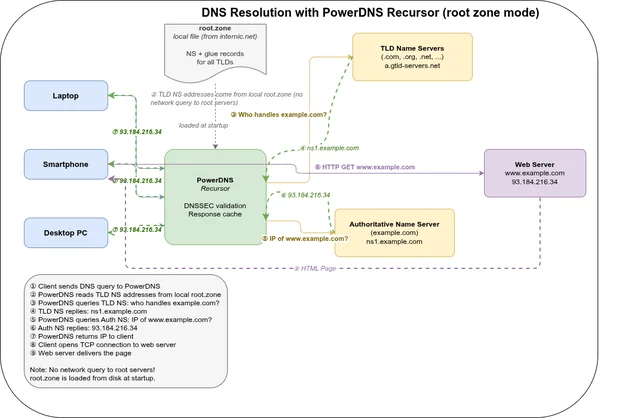
The goal: load the entire root zone into the resolver’s record cache at startup, so TLD delegations are always available locally without any root NS queries.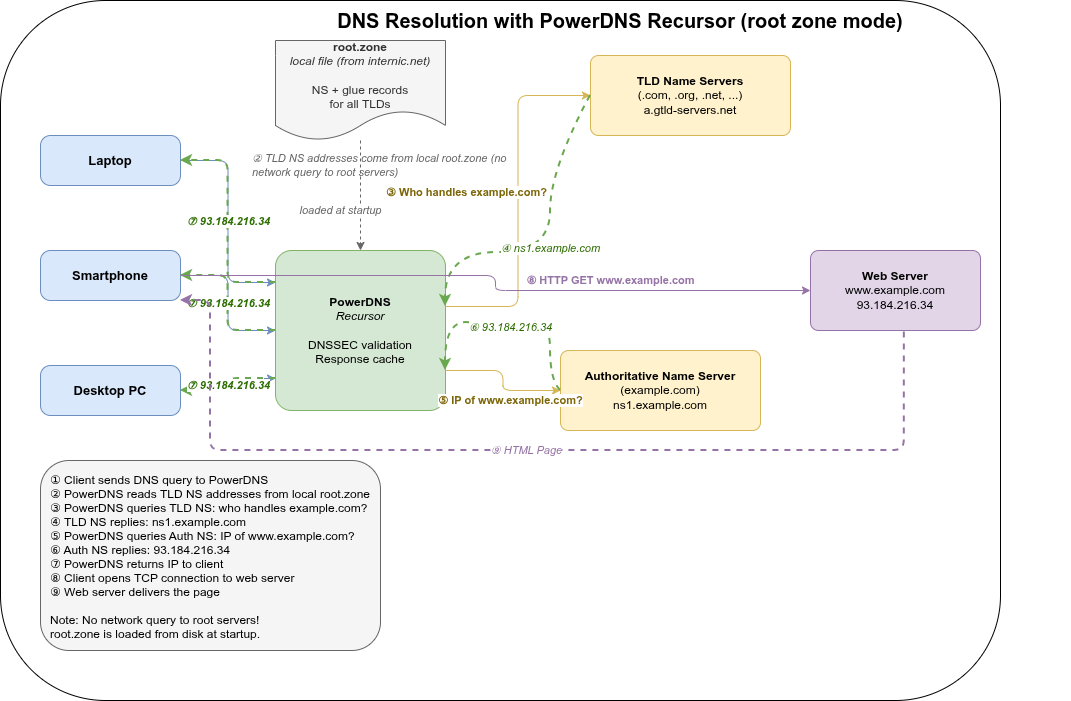
Why not auth_zones?🔗
The obvious first attempt is to use auth_zones to serve the root zone authoritatively:
recursor:
  auth_zones:
    - zone: .
      file: /etc/powerdns/root.zone
This loads the root zone but bypasses DNSSEC validation entirely for records served from auth zones. The resolver treats them as locally authoritative and never validates their signatures. As a result, dig responses carry no ad flag regardless of whether the queried domain is properly signed.
The right approach: zonetocaches🔗
PowerDNS Recursor 5.1+ supports recordcache.zonetocaches zonetocaches, which loads a zone file into the record cache — the same cache used for answers received from upstream name servers. Records loaded this way go through normal DNSSEC processing, so validation works correctly.
recordcache:
  zonetocaches:
    - zone: .
      method: file
      sources: ['/etc/powerdns/root.zone']
      dnssec: ignore
      zonemd: ignore
The dnssec: ignore and zonemd: ignore options are necessary to break a circular dependency: DNSSEC validation of the root zone itself requires the root zone to already be available. Without these options, the zone load fails because the signatures cannot be verified before the zone is loaded.
Trust anchor🔗
DNSSEC validation requires the root zone’s trust anchor — the KSK public key used to sign the root DNSKEY RRset. On Debian/Ubuntu systems this is available in the dns-root-data package:
/usr/share/dns/root.keyConfigure it in recursor.conf:
dnssec:
  validation: validate
  trustanchorfile: /usr/share/dns/root.key
Without an explicit trust anchor, the resolver cannot build the chain of trust and all DNSSEC validation results in Indeterminate.
The race condition: --hint-file=no breaks everything🔗
This is the non-obvious part. pdns_recursor has a background housekeeping thread that re-primes the root hints approximately 1 second after startup. Without a hint file, this repriming fails — and crucially, it poisons the internal state such that zonetocaches never successfully populates the record cache.
zonetocaches loads asynchronously, approximately 500ms after startup. Under normal conditions this completes before the root repriming. But if you pass --hint-file=no on the command line:
- The CLI flag overrides any
hint_file:setting in the YAML config. - The housekeeping repriming at T+1s fails because there are no hints.
- The failed repriming corrupts the internal root cache state before
zonetocachesfinishes. - Result:
SERVFAIL—No valid/useful NS in cache for '.'
The symptom is confusing because the failure disappears with --trace=debug — the logging overhead slows down the main thread just enough that zonetocaches wins the race.
The fix: do not pass --hint-file=no. Instead, set hint_file in the YAML config to point at the root zone file itself:
# /etc/powerdns/recursor.d/self-resolve.yml
recursor:
  hint_file: /etc/powerdns/root.zone

recordcache:
  zonetocaches:
    - zone: .
      method: file
      sources: ['/etc/powerdns/root.zone']
      dnssec: ignore
      zonemd: ignore
This way, even if the zonetocaches async load has not completed when the housekeeping repriming runs, the hints file provides a fallback that keeps the internal state valid until the zone cache is ready.
Complete configuration🔗
/etc/powerdns/recursor.conf🔗
dnssec:
  validation: validate
  trustanchorfile: /usr/share/dns/root.key
recursor:
  include_dir: /etc/powerdns/recursor.d
incoming:
  allow_from:
    - 127.0.0.0/8
  listen:
  - 127.0.0.1
  - ::1
  port: 5345
outgoing:
  source_address:
    - 0.0.0.0
- ::0.0.0.0/etc/powerdns/recursor.d/self-resolve.yml🔗
recursor:
  hint_file: /etc/powerdns/root.zone

recordcache:
  zonetocaches:
    - zone: .
      method: file
      sources: ['/etc/powerdns/root.zone']
      dnssec: ignore
zonemd: ignore/etc/powerdns/recursor.d/metrics.yml🔗
The built-in webservice exposes Prometheus metrics at /metrics. Add this to enable it:
# prometheus
webservice:
  webserver: true
  listen:
    - addresses: [ 127.0.0.1:8082 ]
  password: "geheim"
  allow_from:
    - 127.0.0.0/8
Verify with:
curl --user "":geheim http://127.0.0.1:8082/metrics | head -10Grafana cannot query the /metrics endpoint directly — it needs a Prometheus query API. Run Prometheus to scrape pdns_recursor and configure Grafana against the Prometheus server:
# prometheus.yml
scrape_configs:
  - job_name: pdns-recursor
    static_configs:
      - targets: ['127.0.0.1:8082']
    basic_auth:
      username: ""
      password: geheim
    metrics_path: /metrics
prometheus \
--config.file=/etc/prometheus/prometheus.yml \
--storage.tsdb.retention.time=7d \
--web.listen-address=127.0.0.1:9090Start command🔗
/usr/sbin/pdns_recursor --daemon=no --write-pid=no --disable-syslog \
  --log-timestamp=yes \
--socket-dir=/tmp/ --dnssec=validateVerification🔗
dig +dnssec @127.0.0.1 -p 5345 example.com AA successful response with DNSSEC validation shows the ad (Authentic Data) flag in the flags line:
;; flags: qr rd ra ad; QUERY: 1, ANSWER: 1, AUTHORITY: 0, ADDITIONAL: 1Keeping the root zone fresh🔗
Root zone RRSIG signatures are valid for approximately two weeks. The zone file must be refreshed before the signatures expire, otherwise pdns_recursor will log Bogus - Signature expired and fall back to querying the root name servers directly.
Fetch a fresh copy from IANA:
curl -o /etc/powerdns/root.zone https://www.internic.net/domain/root.zoneA daily cron job is recommended — the root zone changes infrequently, but the signature expiry window is short relative to how often problems are noticed.
Alternatively, zonetocaches supports method: url with a refreshPeriod for automatic in-process updates:
recordcache:
  zonetocaches:
    - zone: .
      method: url
      sources: ['https://www.internic.net/domain/root.zone']
      refreshPeriod: 86400  # seconds = 24h
      dnssec: ignore
      zonemd: ignore
When using method: url, a local hint_file is still needed for the race condition reason above.
Local ad-blocker with RPZ🔗
pdns_recursor supports Response Policy Zones (RPZ) — a DNS-level firewall mechanism that intercepts queries for known-bad domains and returns a configurable response instead of the real answer. This is the pdns equivalent of Hickory DNS’s blocklist store.
RPZ uses standard DNS zone format. Each entry in the RPZ zone defines a policy for a domain:
; NXDOMAIN for this domain
doubleclick.net.rpz.example.    IN  CNAME  .

; Redirect to sinkhole IP
malware-c2.example.org.rpz.example.  IN  A  0.0.0.0
In practice you do not write these entries by hand — you load a pre-built RPZ zonefile:
# /etc/powerdns/recursor.d/rpz.yml
recursor:
  rpzs:
    - name: blocklist
      zonefile: /etc/powerdns/blocklist.rpz
      defpol: nxdomain          # default policy: NXDOMAIN for all matches
      extendedErrorCode: 15     # EDNS Extended Error: "Blocked" (optional)
      extendedErrorExtra: "Blocked by local DNS policy"
Unlike Hickory’s plain-text domain lists, RPZ uses DNS zone format. Most public blocklists are distributed as hosts-file format (0.0.0.0 ads.example.com) and need conversion:
# Convert hosts-file format to RPZ zone format
awk '/^0\.0\.0\.0/ { print $2 ".rpz.example. IN CNAME ." }' \
  hosts.txt > /etc/powerdns/blocklist.rpz
Popular sources: StevenBlack/hosts, oisd blocklist. Both are distributed in hosts-file format and need the conversion above.
Comparison with Hickory DNS blocklist🔗
| Feature | Hickory DNS | pdns_recursor RPZ |
|---|---|---|
| Input format | Plain text, one domain per line | DNS zone format |
| Response | Configurable sinkhole IP | NXDOMAIN, SERVFAIL, redirect IP |
| Wildcards | *.domain.com syntax | Inherited from zone format |
| Updates | File reload on restart | Zonefile reload via rec_control reload-zones or AXFR/IXFR feed |
| Standard | Proprietary | RFC-compatible, interoperable |
The key RPZ advantage: blocklists can be distributed as live DNS zones and updated incrementally via AXFR/IXFR — no file download and service restart required. Commercial threat-intelligence feeds (Spamhaus RPZ, SURBL) work this way.
To reload the blocklist without restarting:
rec_control --socket-dir=/tmp reload-zonesProduction setup: replacing systemd-resolved🔗
The configuration above uses a manual start command with a non-standard port (5345). To replace systemd-resolved as the system resolver, a few more steps are needed.
Disable systemd-resolved🔗
systemctl disable --now systemd-resolved

# resolv.conf is typically a symlink to the stub resolver — replace it
rm /etc/resolv.conf
echo "nameserver 127.0.0.1" > /etc/resolv.conf
systemd unit🔗
pdns_recursor ships a systemd unit — simply enable it:
systemctl enable --now pdns-recursorThe listen address and port are set in recursor.conf via the incoming block. For a system resolver, listen on localhost port 53:
incoming:
  listen:
    - 127.0.0.1
    - ::1
  port: 53
Cache tuning for a mail/web server🔗
On a server where DNS correctness matters (DKIM/DMARC validation, certificate issuance), tune the cache more conservatively than for a home resolver:
# /etc/powerdns/recursor.d/cache.yml
packetcache:
  max_entries: 500000
  negative_ttl: 60       # re-check NXDOMAIN quickly during DNS propagation
  servfail_ttl: 10       # retry broken upstreams quickly
  shards: 2048

recordcache:
  max_entries: 500000
  max_rrset_size: 512
  shards: 2048
  max_ttl: 86400         # cap at 24h — prevents stale entries after root.zone refresh
                         # do NOT use serve_stale_extensions on a mail server:
                         # stale MX records could misroute mail
Reloading config without restart🔗
After changing any YAML config file, send HUP to reload in-process — the record cache is preserved:
kill -HUP $(pgrep pdns_recursor)
# or via rec_control for zone reloads only:
rec_control reload-zones
systemctl restart restarts the process and loses the entire cache. Prefer HUP for config changes, reload-zones for zone/RPZ updates.
Summary🔗
| Problem | Cause | Fix |
|---|---|---|
No ad flag | No trust anchor configured | trustanchorfile: /usr/share/dns/root.key |
No ad flag | Using auth_zones for root | Switch to recordcache.zonetocaches |
| SERVFAIL on startup | --hint-file=no CLI overrides YAML | Remove --hint-file=no; set hint_file: in YAML config |
| SERVFAIL intermittently | Race: repriming before zonetocaches loads | hint_file provides fallback while async load completes |
| Bogus - Signature expired | Stale root.zone file | Refresh weekly, or use method: url with refreshPeriod |