NFS to Object Store Sync with rclone and systemd
Table of contents
I needed to sync and back up an NFS share to cloud storage for example to Azure Blob Storage — reliably, with a hard “no version must ever be lost” SLA, and for a file tree that could grow to 1M+ files. This post documents the architecture decisions, the core sync script, the lab setup for testing without real NFS or Azure access, and the packaging for RPM, DEB, Nix and Alpine. The sync engine is rclone.
The result is nfs-sync-via-rclone.
Quick Start🔗
Requirements: rclone ≥ 1.58, systemd, an NFS mount, a configured rclone remote.
# 1. Install
sudo ./rclone/install.sh

# 2. Configure the rclone backend (Azure Blob, S3, GCS, …)
sudo vim /etc/rclone/rclone.conf

# 3. Set source mount and destination
sudo vim /etc/default/nfs-sync   # set SRC= and DST=

# 4. Benchmark against your real NFS share before going live
sudo -u nfs-sync nfs-sync-bench

# 5. Enable
systemctl enable --now nfs-sync.timer
journalctl -u nfs-sync.service -f
Verify it works:
# Check last successful sync
cat /var/log/nfs-sync/.last-ok

# Check for failures
journalctl -u nfs-sync.service --since "1 hour ago"
The rest of this post explains the architecture decisions, hardening details, and packaging. Skip ahead if you just needed the commands.
The Problem🔗
A production CMS stores its content on an NFS share. It needs to be synced and continuously replicated to Azure Blob Storage for backup, CDN delivery, and disaster recovery. The constraints:
- Source is an NFS client mount — no access to the NFS server.
- Hard loss SLA — every file version must eventually be synced, even after a crash, network drop, or NFS hiccup.
- Scale — 1M+ files and/or multi-GB individual files. NFS walk latency is the critical variable.
- “Last valid version wins” — no version history needed in the sync itself.
Why Not inotify?🔗
The first question is always: why not use inotify for event-driven sync?
The answer is structural: inotify on a Linux NFS client only fires for file changes made by the local process. Changes written by another host to the NFS server — which is exactly the production scenario here — do not generate inotify events on the client. There is no reliable way around this without access to the NFS server.
This means a polling + reconcile loop against the filesystem as source-of-truth is the only correct approach.
Why rclone Instead of rsync, lsyncd, blobfuse, or s3fs?🔗
| Tool | Why it doesn’t fit |
|---|---|
| rsync | Syncs to another filesystem, not to object storage. Requires an rsync daemon or SSH on the target — not available with Azure Blob or S3. |
| lsyncd | Wraps inotify. Same fundamental problem as inotify on NFS: remote writes are invisible to the client. |
| blobfuse / s3fs | Mounts object storage as a FUSE filesystem and uses rsync. FUSE overhead is significant at 1M+ files; metadata consistency is fragile under concurrent writes. |
| AWS DataSync / AzCopy | Vendor-locked. Works only for a single cloud provider; switching backends requires rewriting the pipeline. |
| Custom tool | Only justified if the benchmark shows rclone cannot meet the SLA. See the Benchmark Gate section. |
rclone supports 70+ backends (Azure Blob, S3, GCS, B2, SFTP, …) behind a single CLI and config file. It handles chunked uploads, parallel transfers, checksum verification, and bandwidth limiting out of the box. For a polling-based NFS sync, it is the right default tool — battle-tested, packaged in every major distro, and replaceable without changing the surrounding systemd infrastructure.
Architecture🔗
The sync runs as a systemd one-shot service triggered by a gap-based timer.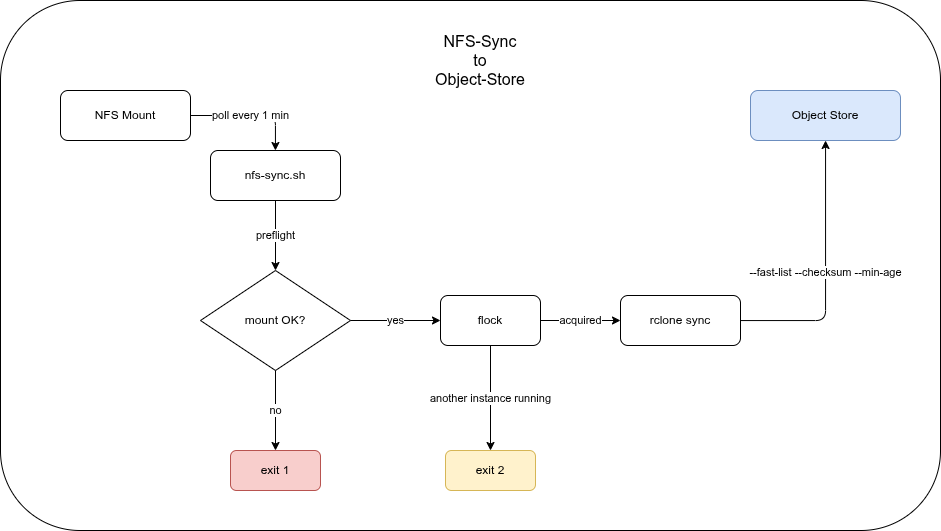
Three design decisions drive the rclone invocation:
--fast-list— single bucket listing call instead of per-directory. Essential for large object stores where per-directory LIST calls are expensive.--checksum— compare MD5 rather than mtime alone. NFS mtime granularity and attribute cache races make mtime-only comparison unreliable.--min-age— quiescence filter. Files touched within the last 30 seconds are skipped this run, preventing uploads of files that are still being actively written.
The timer uses OnUnitInactiveSec (not OnCalendar) so the gap between runs is fixed regardless of how long a sync takes. Two syncs can never overlap — and if a sync takes longer than the interval, the next one waits.
Object Store Consistency Semantics🔗
Object stores are not POSIX filesystems. Their consistency model directly influences several rclone flags and design decisions in this setup.
Strong vs. eventual consistency: AWS S3 has been strongly consistent for all operations since December 2020. Azure Blob Storage and GCS have always been strongly consistent. Third-party S3-compatible stores (MinIO, Ceph, Wasabi, etc.) vary — check your provider’s documentation before assuming strong consistency.
LIST consistency: rclone’s --fast-list issues a single LIST call at the start of a sync run. That list is a point-in-time snapshot. Files written to the NFS source during the sync run may not appear in the object store until the next timer tick (≤ 1 minute later) — which is acceptable given the SLA. Without --fast-list, rclone issues per-directory LIST calls, which are slower and more expensive at scale but give a slightly more up-to-date view.
Overwrite semantics: Writing to the same object key twice is atomic per-object — the last writer wins. There is no merge, no conflict resolution. This matches the “last valid version wins” SLA exactly, and it is why rclone sync with --checksum is the right primitive here.
Multipart upload edge cases: Files above the multipart threshold are uploaded in chunks. If the process dies mid-upload, an incomplete multipart upload remains in the store — it is invisible to readers but incurs storage costs. Clean these up with:
- S3: an S3 Lifecycle rule with
AbortIncompleteMultipartUpload(e.g., after 1 day) - Azure Blob: uncommitted blocks are automatically garbage-collected after 7 days
rclone itself does not leave partial objects visible; the concern is billing for abandoned in-progress uploads.
Why rclone sync Instead of rclone copy🔗
rclone copy uploads new and changed files — it never deletes anything from the destination. rclone sync makes the destination an exact mirror of the source: it uploads new/changed files and removes objects from the destination that no longer exist in the source.
For a content mirror where files deleted from the NFS share must also disappear from the CDN or DR bucket, sync is the correct choice.
If the NFS mount appears empty — dead mount, silently stale NFS — rclone sees no source files and deletes everything from the target. mountpoint -q alone is insufficient: a silently stale NFS mount passes the check. The sentinel file (MOUNT_CHECK_FILE) is the primary guard: set it to a file that is always present in the share, and the preflight will abort before rclone runs.
--min-age interacts with sync safely: files younger than MIN_AGE are skipped this run and uploaded on the next. This means a file being actively written is never partially uploaded — by the time it is old enough to be included, the write is complete.
The Sync Script🔗
The core of nfs-sync.sh is a preflight check, an flock-based single-instance guard, and an rclone invocation built from environment variables.
Preflight🔗
preflight() {
  if ! mountpoint -q "$SRC"; then
    log "FATAL: $SRC is not a mountpoint"
    exit 1
  fi
  if [ -n "$MOUNT_CHECK_FILE" ] && [ ! -e "$SRC/$MOUNT_CHECK_FILE" ]; then
    log "FATAL: sentinel $SRC/$MOUNT_CHECK_FILE missing — NFS likely stale"
    exit 1
  fi
}
The MOUNT_CHECK_FILE check is important: a silently stale NFS mount (mountpoint -q passes but the mount is dead) would cause rclone to see an empty source and delete everything from the target. A sentinel file that is known to always exist in the share catches this.
rclone arguments🔗
All tuning lives in /etc/default/nfs-sync — the script never hard-codes backend-specific values:
: "${SRC:=/mnt/nfs/source}"
: "${DST:=remote:bucket}"
: "${MIN_AGE:=30s}"
: "${MODIFY_WINDOW:=2s}"    # mtime tolerance — 2s suits NFS
: "${TRANSFERS:=32}"
: "${CHECKERS:=32}"
: "${EXCLUDE_PATTERNS:=*.tmp,*.swp,.~lock*,*.partial,.git/**,*.crdownload}"
: "${BWLIMIT:=}"
MODIFY_WINDOW=2s is NFS-specific — NFS mtime granularity can vary; 2 seconds of tolerance avoids false re-uploads. For non-NFS sources set it to 0.
The script works with any rclone backend (S3, GCS, B2, SFTP, …). The backend configuration lives entirely in rclone.conf.
Exit codes🔗
| Code | Meaning |
|---|---|
| 0 | Success |
| 1 | Preflight failed (mount missing or sentinel absent) |
| 2 | Another sync already running — not an error |
| 10+ | rclone error (10 + rclone exit code) |
The systemd service unit marks exit code 2 as success:
SuccessExitStatus=0 2Benchmark Gate🔗
Before enabling the timer in production, run nfs-sync-bench against the real NFS share and target storage:
sudo -u nfs-sync nfs-sync-benchIt measures three numbers:
WALK_TIME_S   — time to stat the entire source tree
RECONCILE_S   — end-to-end sync time for an unchanged tree (your latency floor)
UPLOAD_MBPS   — effective upload bandwidth
The decision rule:
| Result | Action |
|---|---|
RECONCILE_S < SLA × 0.5 | rclone is sufficient — enable the timer |
RECONCILE_S < SLA | rclone works, but monitor closely |
RECONCILE_S >= SLA | escalate: shorten interval, shard the tree, or build a custom tool with a SQLite manifest |
The custom-tool path — using jwalk + rusqlite + object_store + tokio for an O(changes) reconcile instead of O(all files) — only makes sense if the benchmark shows rclone cannot meet the SLA. Don’t build what you don’t need yet.
Local Lab (no NFS server, no cloud account)🔗
Testing the script without real infrastructure is possible with two components:
- Source: a
tmpfsmount at/tmp/nfs-lab/mount. This is a real mountpoint — it passesmountpoint -q— so the preflight check works without modification. - Target: Azurite (Azure Blob emulator) via Podman.
sudo ./lab/lab.sh setup        # start Azurite, mount tmpfs, generate 1000 test files
./lab/lab.sh run-sync          # run nfs-sync.sh with lab overrides
./lab/lab.sh verify            # assert source count == blob count, no *.tmp leaked
./lab/lab.sh teardown
The test data is 1040 files across 4 directory levels (sizes: 1 KB / 50 KB / 500 KB mix) plus 3 .tmp files in a temp/ subdirectory to verify exclude patterns.
rclone v1.74+ sends Azure Storage API version 2026-02-06 which older Azurite images do not support. Start Azurite with --skipApiVersionCheck to bypass the version check in lab environments.
lab.defaults🔗
The lab overrides MIN_AGE=5s (instead of 30s) and uses Azurite as the target:
SRC=/tmp/nfs-lab/mount
DST=lab-azure:lab-content
RCLONE_CONFIG=/path/to/lab/lab.rclone.conf
MIN_AGE=5s
MOUNT_CHECK_FILE=.lab-sentinel
EXCLUDE_PATTERNS=*.tmp,*.swp,.~lock*,*.partial,.git/**,*.crdownload,.lab-sentinel
The sentinel file itself is excluded from sync — it is a mount-health indicator, not content.
Monitoring🔗
Two mechanisms make failures observable without additional infrastructure.
Failure notification via systemd🔗
The service unit has OnFailure=nfs-sync-failure.service. The failure unit logs to syslog/journald at daemon.err priority via logger:
# nfs-sync.service
OnFailure=nfs-sync-failure.service
# nfs-sync-failure.service
ExecStart=logger -t nfs-sync -p daemon.err \
"sync FAILED — check: journalctl -u nfs-sync.service"Any log aggregator that forwards daemon.err (rsyslog, syslog-ng, Loki) will pick this up. For email alerts, replace logger with a mail call or wire OnFailure= to a more capable notification unit.
Last-success timestamp🔗
After every successful sync, the script writes an ISO timestamp to $LOG_DIR/.last-ok:
date -u +%Y-%m-%dT%H:%M:%SZ > "$LOG_DIR/.last-ok"A Nagios/Icinga/Prometheus check can use this to alert if the file is older than 2 × OnUnitInactiveSec:
# Example: alert if last successful sync is older than 3 minutes
find /var/log/nfs-sync/.last-ok -mmin -3 | grep -q . || echo "CRITICAL: nfs-sync stale"
Log rotation🔗
Sync logs in /var/log/nfs-sync/sync-*.log are rotated daily, kept for 30 days, and compressed via the shipped logrotate.d/nfs-sync config.
The –delete-excluded Gotcha🔗
rclone sync only synchronises files that are not excluded. If you add a new glob to EXCLUDE_PATTERNS after files matching that pattern have already been uploaded, those files remain in the object store indefinitely — rclone will not touch them on future runs.
To clean up stale objects that now match an exclude pattern, run once with --delete-excluded:
rclone sync "$SRC" "$DST" \
  --config /etc/rclone/rclone.conf \
  --exclude '*.tmp' \
  --delete-excluded \
--dry-run # remove --dry-run when you're sure--delete-excluded deletes objects from the target that match your exclude patterns. Always run with --dry-run first and verify the list before committing.
This is not part of the regular sync loop — it is a one-off maintenance operation.
Packaging🔗
The tool ships as native packages for four targets, all built from the same source files in rclone/:
| Format | Targets | Build command |
|---|---|---|
| RPM | RHEL/Rocky 8, 9, 10 | make -C packaging/rpm rpm |
| DEB | Ubuntu 22/24/26, Debian 12/13 | make -C packaging/deb deb |
| Nix Flake + NixOS module | x86_64, aarch64 | nix build .#nfs-sync |
| Alpine APKBUILD + OpenRC | Alpine 3.21+ | abuild -r |
All four have rclone >= 1.58 as a hard dependency. rclone v1.58 introduced upload_concurrency for the Azure Blob backend (parallel chunk uploads per file, orthogonal to --transfers). Older versions silently ignore the setting — no error, just degraded performance.
GitHub Actions builds RPMs and DEBs in native distro containers on every tag push and attaches the artifacts to the GitHub Release.
Installation🔗
See Quick Start for the full command sequence. The installer (./rclone/install.sh) is idempotent — re-running it updates binaries and unit files in place. Existing rclone.conf and /etc/default/nfs-sync are never overwritten; a .new file is written next to them for manual diffing.
Troubleshooting🔗
Sync exits with code 1 — “sentinel missing”
The file named in MOUNT_CHECK_FILE was not found under SRC. Either the NFS mount is stale, the mount failed silently, or the sentinel filename is wrong. Check with ls $SRC and verify the NFS mount with mount | grep $SRC.
Sync exits with code 10+ — rclone error
The exit code is 10 + rclone_exit_code. Check journalctl -u nfs-sync.service -n 50 for the rclone error message. Common causes: wrong rclone.conf credentials, bucket does not exist, network timeout.
File count in object store does not match source
Run rclone sync once with --dry-run and inspect the output. Likely causes:
- A file matches an
EXCLUDE_PATTERNSglob — it was never uploaded, or it was uploaded before the pattern was added (see The –delete-excluded Gotcha). --min-ageis still filtering recently written files — wait one interval and re-check.
rclone reports RESPONSE 400: InvalidHeaderValue against Azurite (lab only)
rclone v1.74+ sends Azure Storage API version 2026-02-06, which older Azurite images reject. Start Azurite with --skipApiVersionCheck. The lab.sh script does this automatically.
Two sync instances started simultaneously
This cannot happen in normal operation — flock prevents it and exit code 2 is treated as success. If you see it, a previous sync is still running (large tree, slow network). Check with systemctl status nfs-sync.service.
Versioning🔗
bump-version.sh updates the version atomically across all six packaging files and regenerates CHANGELOG.md via git-cliff:
./bump-version.sh 0.2.0 "Fix sentinel exclude pattern; update timer interval to 1 min"
git add -p
git commit -m "release: 0.2.0"
git tag v0.2.0
git push && git push --tags
The tag push triggers the CI pipeline: matrix RPM and DEB builds across all supported distros, followed by a GitHub Release with all artifacts attached and release notes generated by git-cliff.