AWS vs. GCP vs. Azure vs. OVHcloud: The Complete Guide to Managed Log Archiving
Table of contents
This is the index and reading guide for a six-part series comparing managed log archiving on AWS, GCP, Azure, and OVHcloud for retention periods of seven years or more. It is written for teams that have to choose between a hyperscaler’s managed log service and a self-hosted alternative on OVH, and who need the comparison grounded in real prices, real API behaviour, and real operational constraints rather than marketing copy. Each part stands on its own; together they walk the full lifecycle of a long-term log archive — from what it costs, through how it is built and secured, to how it is run and audited years after the first log lands.
The series uses one consistent workload throughout for comparability: 100 GB/day raw ingest, 7× compression, 7-year retention, priced at public EU-region list prices as of May 2026. Every cost figure in every part traces back to that same baseline, so the numbers in Part 1 (services and cost) and the numbers in Part 6 (production guardrails) describe the same archive, not two different scenarios.
This series is fairly broad, but it is not, and cannot be, complete. Every use case carries its own constraints — a regulatory obligation, a legacy dependency, a team’s operational maturity, a platform quirk not covered here — that can turn a general practice into the wrong call for that specific situation. Treat this guide as a starting point, not a checklist to apply unmodified: it is always worth discussing your own use case with people who know it before committing to any of the choices below.
How to read this guide🔗
If you are choosing a provider or defending a budget line, start with Part 1. If you already have a direction and need the operational detail, jump to the part that names your gap — the summaries below say what each part decides for you.
- Part 1 — Overview & Cost: services, storage model, 7-year cost comparison
- Part 2 — Pre-Flight, Flexibility & Auditor Export: irreversible setup decisions, tamper-evident export
- Part 3 — Operations: Kubernetes integration, ingest pipeline, backup & DR
- Part 4 — Security & Compliance: IAM/RBAC, encryption, WORM, GDPR, compliance certifications
- Part 5 — Query, Dashboards & Recommendations: query interfaces, dashboards, alerting, when to use which
- Part 6 — Production Checklist, Guardrails & Runbooks: loss detection, privacy, cost guardrails, fire drills
Part 1 — Overview & Cost🔗
Audience: decision makers and FinOps comparing providers.
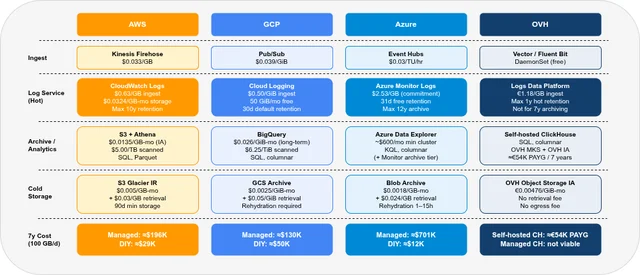
Part 1 lays out what each provider actually sells for log archiving — an operational log service, an analytics/archive layer, and cold object storage — and then prices all four against the same 100 GB/day, 7-year baseline. The central finding is that the managed log service rarely produces the lowest 7-year total: ingest cost, not storage, dominates the bill, and bypassing the managed log tier for a different ingest path changes the total by a factor of 3 to 58 depending on the provider.
Key takeaways:
- Ingest cost dominates the 7-year total, not storage — CloudWatch at $0.63/GB and Azure Monitor at $2.53/GB account for most of the managed-path cost before a single byte is archived.
- The managed-service 7-year total ranges from ≈$133,000 (GCP) to ≈$701,000 (Azure); bypassing the managed log service brings AWS to ≈$29,000, GCP to ≈$50,000, and Azure to ≈$12,000.
- OVH’s Logs Data Platform tops out at 1-year hot retention and is not a viable 7-year archive path; self-hosted ClickHouse on OVH (≈€54,000 over 7 years) is the alternative.
- OVH Managed ClickHouse has no S3/object-storage tiering — full 7-year retention there costs ≈€748,000, above every hyperscaler managed-service total in this comparison.
Read Part 1 — Overview & Cost →
Part 2 — Pre-Flight, Flexibility & Auditor Export🔗
Audience: whoever owns the irreversible setup decisions — platform leads and architects.
Part 2 is about the decisions that are trivial to change before the first log write and difficult or impossible to reverse afterward: Object Lock configuration, partition schemes, Log Sink creation, SSE-C key handling. It closes with the practical mechanics of handing log data to an external auditor — read-only access without an auditor account, bulk export with checksum manifests, and proving both content integrity and access history.
Key takeaways:
- GCP Log Sinks do not backfill — logs written before the sink exists never reach BigQuery or GCS, no matter how long Cloud Logging retention is set.
- OVH Object Lock and ClickHouse’s
PARTITION BYkey must be correct at creation time; neither can be changed retroactively without a full rebuild. - Pre-signed URLs, signed URLs, and SAS tokens give an external auditor time-limited read access with no account creation on any of the four providers.
- Audit-trail logs (CloudTrail, Cloud Audit Logs, Activity Log) default to 90–400 day retention — they must be archived separately, with the same discipline as application logs.
Read Part 2 — Pre-Flight, Flexibility & Auditor Export →
Part 3 — Operations🔗
Audience: platform engineers building and running the ingest pipeline.
Part 3 covers how logs actually get from a Kubernetes pod to the archive: which providers auto-collect from their managed Kubernetes service and which require a DaemonSet, the streaming ingest options (Firehose, Pub/Sub, Event Hubs, or Vector/Fluent Bit on OVH), how backup and disaster recovery differ across the four, and how to monitor the pipeline itself so a silent drop does not go unnoticed for years.
Key takeaways:
- GKE collects pod logs by default; EKS and AKS need an explicit add-on; OVH MKS has no built-in collection at all — a DaemonSet is mandatory from day one.
- Azure Event Hubs is the only ingest service with a full Kafka-compatible API, making it the simplest drop-in for teams already running Kafka pipelines.
- OVH has no managed pipeline observability equivalent to CloudWatch Alarms or Pub/Sub dead-letter topics — buffer levels and sink errors must be wired up manually via Prometheus.
- In-memory agent buffers (CloudWatch Agent, Fluent Bit default, AMA) are lost on restart or eviction; only Vector’s disk-backed buffer survives a node or process restart.
Part 4 — Security & Compliance🔗
Audience: security and compliance engineers.
Part 4 covers encryption (platform-managed vs. BYOK), IAM/RBAC models, WORM/Object Lock mechanics, GDPR residency, and the compliance certifications that matter for EU and DACH regulated environments. The throughline is that all four providers meet a reasonable security baseline — the differentiators are who holds the encryption key, how mature the IAM model is, and which certifications a given regulator actually requires.
Key takeaways:
- OVH’s SSE-C model puts key custody entirely on the customer — the key must live in a Kubernetes Secret, never a ConfigMap, and losing it makes the data permanently unreadable.
- AWS, GCP, and Azure all hold BSI C5 attestation for EU data centres; OVH does not — a relevant gap for German public-sector and KRITIS workloads.
- OVH holds HDS certification (French health data hosting), which none of the three hyperscalers in this comparison hold.
- OVH’s IAM v2 has no equivalent to IRSA or Workload Identity — service credentials for Kubernetes pods must be distributed and rotated manually.
Read Part 4 — Security & Compliance →
Part 5 — Query, Dashboards & Recommendations🔗
Audience: whoever actually queries the archive — SRE, security investigators, analysts.
Part 5 compares query languages (Log Insights, SQL/Athena, BigQuery SQL, KQL, ClickHouse SQL), dashboarding options, and — critically — how each provider behaves when you query data that is years old rather than days old. It closes the series’ cost and capability threads into concrete, scenario-based guidance for which provider fits which situation.
Key takeaways:
- None of the four providers support alerting directly on archived log data — alerts only run against the hot tier within its standard retention window.
- Azure Monitor’s archive tier is the outlier for cold-tier access: querying 4-year-old data requires a search job or an hours-long restore job, not a direct interactive query.
- Self-hosted ClickHouse on OVH has no per-query fees, unlike Athena ($5/TB) or BigQuery ($6.25/TiB) — a meaningful advantage when query volume against the archive is high.
- Poor partitioning is the fastest way to drive up per-query cost in Athena or BigQuery; day-level partitioning can cut a single query’s cost by 100× or more.
Read Part 5 — Query, Dashboards & Recommendations →
Part 6 — Production Checklist, Guardrails & Runbooks🔗
Audience: operations and SRE teams running the archive long after it was built.
Part 6 turns the provider comparison into an operating checklist: canary events and sequence IDs for loss detection, a redaction order that keeps secrets out of the archive in the first place, schema contracts that survive years of application changes, cost guardrails against runaway ingest or queries, and runbooks for auditor export, historical restore, key loss, and Object Lock proof — the kind of procedures that need to already exist before an auditor calls.
Key takeaways:
- The most dangerous logging failure is silent: agents run, dashboards stay green, and a quota or filter drops a slice of production traffic — canary events catch this end-to-end.
- Redaction must happen before the archive write; WORM-locked data cannot reliably be corrected or redacted after the fact.
- Cost guardrails belong at the query layer, not just the budget dashboard — Athena scan cutoffs, BigQuery dry-runs, and ClickHouse query profiles stop a single bad query from becoming a bill.
- Restore, export, and key-loss runbooks should be tested at least yearly, and quarterly for regulated workloads — the point of a fire drill is to find the gaps before an auditor does.
Read Part 6 — Production Checklist, Guardrails & Runbooks →
The through-line🔗
Three themes recur across all six parts:
Irreversible Day-1 decisions. Object Lock configuration, GCP Log Sink creation, S3 partition schemes, SSE-C key handling, ClickHouse PARTITION BY — every one of these is trivial to get right before the first log write and difficult or impossible to fix afterward. Part 2 names them explicitly; Part 6’s runbooks exist because some of them get missed anyway.
Cost, security, and operability trade off differently by provider. There is no single provider that leads on ingest cost, security, and operability at once. GCP has the lowest bypass-path ingest cost of the three hyperscalers; Azure’s per-GB ingest cost is the highest but it supports the longest native retention; OVH is the only option with no US-jurisdiction exposure but the least mature IAM model. The right choice depends on which axis matters most for a given regulatory and operational context.
Storage cost and query cost are different questions. Cold object storage is priced similarly across providers. What varies enormously is what it costs — in money, latency, or operational complexity — to query that data years later: Athena and BigQuery charge per scan, Azure archive tier requires a restore job that can take hours, and self-hosted ClickHouse has no per-query fee but requires the operational maturity to run it.
Related deep-dives🔗
- Elasticsearch vs. OpenSearch vs. Loki vs. Quickwit vs. ClickHouse: The Complete Guide — the self-hosted-backend angle on the same problem: tiering, compression, and resource consumption when you run the log store yourself instead of buying a managed service.
- SigNoz on OVH MKS: The Complete Guide — a full self-hosted observability stack in practice, as a concrete alternative to every managed service compared in this series.
Where to start🔗
If you have no strong prior, read the parts in order — the cost model from Part 1 underpins the operational and security decisions in the parts that follow. If you already know your provider, use the summaries above to jump to the part that answers your open question, and follow the cross-links back into the others as needed.