Log Archiving Security & Compliance: AWS / GCP / Azure / OVHcloud
Table of contents
This post covers the security and compliance dimension of the managed log archiving comparison: encryption, access control, immutability for regulatory retention, GDPR, and compliance certifications relevant for EU/DACH environments.
- Part 1 — Overview & Cost: Services, storage model, 7-year cost comparison
- Part 2 — Pre-Flight, Flexibility & Auditor Export: Pre-flight checklist, retroactive flexibility, auditor export
- Part 3 — Operations: Kubernetes integration, ingest pipeline, backup & DR
- Part 4 — Security & Compliance — this post: IAM/RBAC, encryption, WORM, GDPR, compliance certificates
- Part 5 — Query, Dashboards & Recommendations: Query interfaces, dashboards, alerting, cold-tier behaviour, when to use which
- Part 6 — Production Checklist, Guardrails & Runbooks: Loss detection, privacy, schema, cost guardrails, runbooks, fire drills
Self-hosted alternative: Elasticsearch vs. OpenSearch vs. Loki vs. Quickwit vs. ClickHouse — Part 3 (Security)
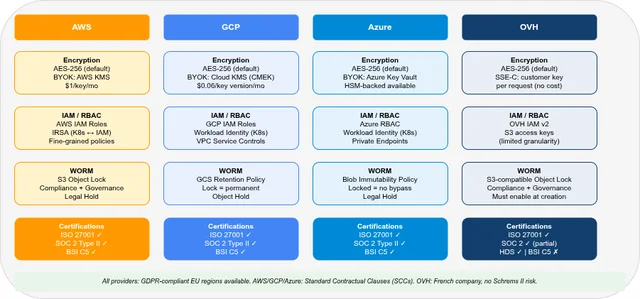
Security & Compliance at a Glance🔗
| AWS | GCP | Azure | OVH | |
|---|---|---|---|---|
| Encryption at rest | AES-256 (SSE-S3 / SSE-KMS) | AES-256 (Google-managed / CMEK) | AES-256 (platform-managed / CMK) | AES-256 (platform-managed or SSE-C) |
| BYOK | ✓ (KMS — paid) | ✓ (Cloud KMS / CMEK) | ✓ (Azure Key Vault) | ✓ (SSE-C, customer-managed) |
| Encryption in transit | TLS 1.2+ everywhere | TLS 1.2+ everywhere | TLS 1.2+ everywhere | TLS 1.2+ everywhere |
| WORM / Object Lock | ✓ S3 Object Lock (Compliance + Governance mode) | ✓ GCS Retention Policy + Object Hold | ✓ Azure Blob Immutability (WORM) | ✓ S3-compatible Object Lock |
| IAM/RBAC | AWS IAM (fine-grained) | GCP IAM (fine-grained) | Azure RBAC (fine-grained) | — (DIY: OVH IAM v2 + ClickHouse roles) |
| Audit logging | CloudTrail (management events included) | Cloud Audit Logs (Admin Activity 400d; Data Access 30d when enabled) | Azure Activity Log + Diagnostic Settings | Limited / service-specific; DIY for ClickHouse query audit |
| GDPR EU-only regions | ✓ (EU regions, SCCs) | ✓ (EU regions, SCCs) | ✓ (EU regions, SCCs) | ✓ (Paris/Milan, 3-AZ MKS) |
| BSI C5 | ✓ | ✓ | ✓ | ✗ |
| ISO 27001 | ✓ | ✓ | ✓ | ✓ |
| SOC 2 Type II | ✓ | ✓ | ✓ | ✓ (partial) |
Encryption🔗
At Rest🔗
All four providers support AES-256 encryption at rest. The differentiator is who holds the key.
Platform-managed keys (default): the provider generates and manages encryption keys. Zero operational overhead; keys are not accessible to the customer.
Customer-managed keys (BYOK): the customer creates and controls the master key in a managed key service. The provider’s managed service uses the key through the KMS interface, while the customer retains control over key lifecycle and revocation.
| Provider | BYOK service | Cost | Key rotation |
|---|---|---|---|
| AWS | AWS KMS (Customer Managed Key) | $1/key/month + $0.03/10K API calls | Automatic (annual) or manual |
| GCP | Cloud KMS (CMEK) | $0.06/key version/month + $0.03/10K operations | Automatic or manual; old key versions retained until data re-encrypted |
| Azure | Azure Key Vault (RSA / EC key) | ≈$0.005–$0.015/key operation (Premium: HSM) | Azure Storage auto re-encrypts when CMK rotated |
| OVH | SSE-C (customer-supplied key per request) | No additional charge | Manual; key supplied on every API call |
With OVH S3-compatible SSE-C, you supply the AES-256 encryption key on every PUT and GET request. OVH never stores the key — if you lose it, the data is permanently unreadable.
In the self-hosted ClickHouse path, the key lives in ClickHouse’s storage_configuration (the server_side_encryption_customer_key field). This configuration must be mounted as a Kubernetes Secret, not a ConfigMap — a ConfigMap is unencrypted and would expose the key in plaintext. Inject it via External Secrets Operator from HashiCorp Vault or a similar KMS rather than hardcoding it in the Helm values.
For log archiving specifically, BYOK is most relevant when regulatory requirements mandate that the customer can revoke access to their data by destroying the key. AWS KMS and Azure Key Vault both support this pattern: destroying the CMK makes the encrypted CloudWatch Logs / Blob Storage data permanently inaccessible.
In Transit🔗
All four providers enforce TLS 1.2+ on all API endpoints by default. For S3-compatible APIs (AWS S3, GCS, Azure Blob, OVH Object Storage), HTTP access can be explicitly disabled at the bucket/container level via bucket policies or access controls:
# AWS S3 bucket policy: deny HTTP
{
  "Effect": "Deny",
  "Principal": "*",
  "Action": "s3:*",
  "Resource": ["arn:aws:s3:::my-bucket", "arn:aws:s3:::my-bucket/*"],
  "Condition": { "Bool": { "aws:SecureTransport": "false" } }
}
Access Control (IAM / RBAC)🔗
AWS IAM🔗
AWS uses identity-based policies (attached to IAM users, groups, or roles) and resource-based policies (attached to S3 buckets, CloudWatch Logs groups, etc.).
For log archiving, the recommended pattern is:
- Log writer role:
logs:PutLogEvents,firehose:PutRecord,s3:PutObjecton archive bucket - Log reader role:
logs:FilterLogEvents,athena:StartQueryExecution,s3:GetObject(archive only) - No role: deny all write permissions to the archive bucket from all principals except the log writer role
Service accounts for Kubernetes pods: use IRSA (IAM Roles for Service Accounts) to bind a Kubernetes ServiceAccount to an IAM Role. The pod receives temporary credentials via the EKS OIDC provider — no long-lived credentials needed.
# IRSA annotation on Kubernetes ServiceAccount
apiVersion: v1
kind: ServiceAccount
metadata:
  name: log-writer
  annotations:
    eks.amazonaws.com/role-arn: arn:aws:iam::123456789012:role/log-writer-role
GCP IAM🔗
GCP uses predefined roles and custom roles bound to IAM principals at the project, folder, or resource level. Workload Identity Federation is the GKE equivalent of IRSA: a Kubernetes ServiceAccount is bound to a GCP Service Account, which has IAM bindings.
Key roles for log archiving:
roles/logging.logWriter: write logs to Cloud Loggingroles/logging.viewer: read logs (Cloud Logging)roles/bigquery.dataEditor: write to BigQuery datasetsroles/storage.objectCreator: write to GCS buckets (no read/delete)roles/storage.objectViewer: read from GCS buckets
VPC Service Controls can restrict Cloud Logging and BigQuery APIs to only accept requests from within a defined service perimeter — relevant for high-compliance environments where exfiltration of log data must be prevented.
Azure RBAC🔗
Azure uses role-based access control at the management plane (subscription/resource group) and data plane (storage, Log Analytics). Key built-in roles:
Log Analytics Contributor: manage workspaces, write log dataLog Analytics Reader: read logs and query KQLStorage Blob Data Contributor: read and write Blob StorageStorage Blob Data Reader: read Blob Storage only
For Kubernetes pods on AKS, use Azure Workload Identity (successor to AAD Pod Identity): binds a Kubernetes ServiceAccount to an Azure Managed Identity. The pod receives Azure AD tokens without credentials in environment variables.
Azure Private Endpoints can restrict Log Analytics Workspace and Blob Storage to only accept connections from within a VNet — no public internet access to log data.
OVH IAM v2🔗
OVH IAM v2 (available in OVH Public Cloud) supports policy-based access control for OVH services including Object Storage. The model is less mature than AWS/GCP/Azure:
- Policies are attached to OVH service accounts or users
- Object Storage permissions:
objectstore:object:get,objectstore:object:put, etc. - No equivalent to IRSA/Workload Identity — service account credentials must be distributed explicitly (via OVH API or CLI)
For the self-hosted ClickHouse path, OVH S3-compatible access keys for the logs-warm and logs-cold buckets should be rotated regularly and stored in Kubernetes Secrets (or External Secrets with HashiCorp Vault).
S3 access keys (access_key_id / secret_access_key): authentication credentials that control who can access the bucket — rotate these regularly via OVH Public Cloud console or API.
SSE-C key (server_side_encryption_customer_key): the AES-256 encryption key that controls how the data is encrypted at rest — never rotated without re-encrypting all objects.
Both live in the ClickHouse storage configuration and must be stored as Kubernetes Secrets, not ConfigMaps. A rolling restart of ClickHouse is required after rotation.
WORM / Immutability🔗
Regulatory requirements (GDPR audit logs, financial records, healthcare logs) often mandate that archived logs cannot be modified or deleted for a defined retention period. All four providers support Object Lock or equivalent.
| AWS | GCP | Azure | OVH | |
|---|---|---|---|---|
| WORM mechanism | S3 Object Lock | GCS Retention Policy + Object Hold | Azure Blob Immutability Policy | S3-compatible Object Lock |
| Compliance mode (no bypass) | ✓ (Compliance mode) | ✓ (locked retention policy) | ✓ (locked immutability policy) | ✓ |
| Governance mode (admin bypass) | ✓ (Governance mode) | ✗ (lock is absolute) | ✓ (requires specific unlock role) | ✓ |
| Granularity | Per object (version-level) | Per bucket or per object | Per container or per blob | Per object |
| Immutability setup timing | Can enable on existing bucket (Versioning required) | Can be set after bucket creation | Can be set after bucket creation | Must be enabled at creation |
| Legal hold | ✓ (indefinite, no expiry) | ✓ (Object Hold) | ✓ (Legal Hold policy) | ✓ |
Exact prerequisites differ by provider. AWS S3 Object Lock can be enabled on an existing bucket if Versioning is already active — bucket re-creation is not required. GCS Retention Policy and Azure Blob Immutability can also be added after bucket/container creation. OVH S3-compatible Object Lock must be enabled at bucket creation. Plan your compliance bucket structure before writing any regulated data.
AWS S3 Object Lock🔗
{
  "ObjectLockEnabled": "Enabled",
  "Rule": {
    "DefaultRetention": {
      "Mode": "COMPLIANCE",
      "Years": 7
    }
  }
}
With COMPLIANCE mode, no principal — including the AWS root account — can delete or shorten the retention period until it expires. With GOVERNANCE mode, principals with the s3:BypassGovernanceRetention permission can override the lock. Use COMPLIANCE for legally mandated retention.
GCP GCS Retention Policy🔗
gcloud storage buckets update gs://my-log-archive \
  --retention-period=2557d  # 7 years
GCS retention policies apply at the bucket level (all objects in the bucket). GCS also supports object-level retention configurations, which allow finer-grained control over individual objects via the GCS API or gcloud storage objects update --retention. Once the policy is locked (gsutil retention lock gs://my-log-archive), neither the policy duration nor the lock status can be changed — the locked retention policy is irreversible by the customer.
Azure Blob Immutability🔗
Azure Blob Immutability can be set at the container level (all blobs) or on individual blobs (version-level). A time-based retention policy in Locked state cannot be shortened or removed for the retention duration. Legal holds have no expiry date.
For log archiving in the Archive tier, set immutability on the Archive-tier container before writing any data. Note that rehydrating from Archive (moving to Hot/Cool) is possible even with an immutability policy active — the data is copied, not moved.
Microsoft documentation: Configure immutability policies for blob versions
GDPR and Data Residency🔗
EU Regions and Standard Contractual Clauses🔗
| Provider | EU log archiving region | SCC / DPA available |
|---|---|---|
| AWS | eu-central-1 (Frankfurt), eu-west-1 (Ireland), eu-west-3 (Paris) | ✓ AWS GDPR DPA (SCCs included) |
| GCP | europe-west3 (Frankfurt), europe-west1 (Belgium), europe-west4 (Netherlands) | ✓ Google Cloud DPA (SCCs included) |
| Azure | West Europe (Netherlands), North Europe (Ireland), France Central (Paris) | ✓ Microsoft DPA (SCCs included) |
| OVH | PAR1 (Paris, France), MIL1 (Milan, Italy) — 3-AZ MKS only | ✓ OVH DPA — GDPR-compliant |
AWS, GCP, and Azure all offer Data Processing Agreements with Standard Contractual Clauses (SCCs) for GDPR compliance. The Schrems II ruling requires SCCs when transferring personal data from the EU to non-EU sub-processors. Review the provider’s sub-processor list to ensure all log-related services (Firehose, Pub/Sub, Event Hubs, KMS) are covered.
OVH as a French company is subject to French data protection law (aligned with GDPR). MKS with 3-AZ availability is only supported in Paris (PAR1, France) and Milan (MIL1, Italy) — both within the EU. OVH reduces US-transfer exposure compared with US hyperscalers; however, sub-processor lists and support/access paths should still be reviewed for your specific use case — Schrems II risk depends on the full processing chain, not only the provider’s jurisdiction.
Log Data as Personal Data🔗
Under GDPR, log files containing IP addresses, user identifiers, or user agent strings are considered personal data. For 7-year archival:
- Lawful basis: Typically Article 6(1)(c) — legal obligation (financial, healthcare) or 6(1)(f) — legitimate interests (security audit, fraud detection). Document the basis.
- Data minimisation: Consider IP truncation or pseudonymisation after the operational security window (for example, 30–90 days) unless the full IP address is legally required for the retention purpose.
- Right to erasure: S3 Object Lock Compliance mode makes erasure impossible during the retention period. Balance legal obligation against individual rights in your DPA.
- Data retention policy: Document the 7-year retention period and its legal basis in your records of processing activities (ROPA).
Compliance Certifications🔗
| Certification | AWS | GCP | Azure | OVH |
|---|---|---|---|---|
| ISO 27001 | ✓ | ✓ | ✓ | ✓ |
| ISO 27017 (cloud security) | ✓ | ✓ | ✓ | ✓ |
| ISO 27018 (PII in cloud) | ✓ | ✓ | ✓ | ✓ |
| SOC 2 Type II | ✓ | ✓ | ✓ | ✓ (partial — select services) |
| SOC 3 (public) | ✓ | ✓ | ✓ | ✗ |
| BSI C5 (Germany) | ✓ | ✓ | ✓ | ✗ |
| TISAX (automotive) | ✓ | ✓ | ✓ | ✗ |
| HDS (French health data) | ✗ | ✗ | ✗ | ✓ |
| SecNumCloud (French government) | ✗ | ✗ | ✗ | In progress (OVH Trusted Cloud) |
BSI C5 (Cloud Computing Compliance Criteria Catalogue) is the German BSI’s cloud security standard, increasingly required for German public sector and critical infrastructure contracts. AWS, GCP, and Azure all hold C5 attestation for their EU data centres. OVH does not currently hold BSI C5 — a relevant gap for German public sector use cases.
HDS (Hébergeur de Données de Santé) is the French certification for hosting health data. OVH holds HDS certification, making it the only provider in this comparison suitable for HIPAA-equivalent French healthcare log archiving without additional contractual overlays.
FAQ🔗
Which provider is best for financial services log archiving under DORA / MiFID II?🔗
All three hyperscalers (AWS, GCP, Azure) hold the relevant certifications (ISO 27001, SOC 2, BSI C5 for German entities) and offer WORM-compliant object storage with 7-year+ retention. The choice typically comes down to existing cloud footprint rather than compliance differentiators. OVH is viable for EU-only data residency requirements but lacks BSI C5 — a gap for German-regulated entities.
Can I use S3 Object Lock on the OVH-compatible Object Storage?🔗
Yes. OVH Object Storage uses the S3-compatible API and supports Object Lock in both Compliance and Governance modes. The same caveats apply as for AWS S3: Object Lock must be enabled at bucket creation, auto-enables versioning, and cannot be disabled once enabled. The minimum retention period granularity is days.
Does enabling WORM prevent the CloudWatch Logs retention policy from deleting old logs?🔗
CloudWatch Logs has its own retention policy (1 day to never expire), separate from S3 Object Lock. CloudWatch Logs does not support Object Lock — its data is in CloudWatch-managed storage, not S3. To apply WORM to CloudWatch log data, export the logs to an S3 bucket with Object Lock enabled before the CloudWatch retention period expires. This is the standard compliance pattern: CloudWatch for operational hot tier (30–90 days), S3 + Object Lock for the immutable archive.
What is the minimum encryption standard for financial log archiving?🔗
Regulators (EBA, BaFin, FCA) typically require AES-256 at rest and TLS 1.2+ in transit. All four providers meet this baseline with their default platform-managed encryption. BYOK (customer-managed keys) is required if the regulation mandates that the customer can revoke data access independent of the provider — relevant for some Tier-1 banking requirements. AWS KMS with S3 Object Lock in Compliance mode is a common pattern in EU financial services environments.
Part 1: Overview & 7-year cost comparison
Part 2: Pre-Flight, Flexibility & Auditor Export
Part 3: Operations — Kubernetes integration, ingest pipeline, backup & DR
Part 5: Query, Dashboards & Recommendations
Part 6: Production Checklist, Guardrails & Runbooks
Self-hosted alternative: Elasticsearch vs. OpenSearch vs. Loki vs. Quickwit vs. ClickHouse — Part 3 (Security)