Elasticsearch vs. OpenSearch vs. Loki vs. Quickwit vs. ClickHouse: Security & Compliance
Table of contents
Access control, encryption, and immutability requirements often determine whether a log archive can be used for compliance purposes — and the five systems differ substantially in what they enforce natively versus what must be delegated to infrastructure.
This is Part 3 of a five-part series.
- Part 1 — Comparison: Storage tiering, compression, resource consumption, query languages, SaaS options
- Part 2 — Operations: Setup, ingest pipeline, ECS vs. OTel, backup & DR, observability, alerting
- Part 3 — Security & Compliance — this post: Encryption, RBAC, WORM / S3 Object Lock
- Part 4 — UX, Dashboards & Alerts: UI layers, log search UX, cold-tier query behaviour, dashboard building, sharing, alerting
- Part 5 — Use Case: Vector, Istio/Envoy, nginx, Java on OVH MKS — complete ClickHouse ingestion setup and monthly awffull report
Encryption🔗
Long-term log archives often serve compliance and audit purposes, making encryption a first-class requirement. Three dimensions matter: TLS in transit, at-rest encryption, and BYOK (Bring Your Own Key) for key ownership guarantees.
| Elasticsearch | OpenSearch | Loki | Quickwit | ClickHouse | |
|---|---|---|---|---|---|
| TLS in transit | ✓ enforced by default (8.x) | ✓ free Security plugin | ✓ configurable (HTTP + gRPC) | ✓ configurable | ✓ configurable (client + inter-replica + Keeper) |
| At-rest encryption | OS/disk level only | OS/disk level only | S3 SSE (SSE-S3 / SSE-KMS) | S3 SSE (SSE-S3 / SSE-KMS) | Native app-level encrypted disk (AES-256-CTR) + S3 SSE for cold tier |
| At-rest scope | Disk volume | Disk volume | Object storage layer | Object storage layer | Application layer (data files) + object storage layer |
| BYOK (self-hosted) | OS disk encryption with own keys | OS disk encryption with own keys | S3 SSE-KMS with CMK | S3 SSE-KMS with CMK | Config/env keys; Vault via community integration |
| BYOK (managed) | Elastic Cloud Enterprise: AWS KMS / Azure KV / GCP KMS | Amazon OpenSearch Service: AWS KMS (free) | Grafana Cloud: provider-managed | — | ClickHouse Cloud: AWS KMS / Azure KV |
Application-level vs. OS-level at-rest encryption🔗
This distinction matters for compliance: Elasticsearch and OpenSearch store data as Lucene segment files with no application-level encryption. Protection depends entirely on the underlying volume being encrypted (LUKS, cloud EBS/disk encryption). If an attacker copies raw segment files off disk, they are readable directly — no key needed at the application layer. For audit scenarios where log data must be protected against storage exfiltration, this is a relevant gap.
ClickHouse handles this differently: the encrypted disk type (available since 21.1) encrypts data inside the ClickHouse process before it reaches the filesystem. Raw .bin and .mrk3 part files copied off disk are ciphertext — unreadable without the ClickHouse encryption key. Supported algorithms: AES_128_CTR, AES_256_CTR. The cold tier on S3 can additionally use S3 SSE-KMS for a second encryption boundary. All encryption features are part of the Apache 2.0 binary — ClickHouse has no enterprise software tier.
Loki and Quickwit store all data in object storage. S3 SSE-KMS with a Customer Managed Key (CMK) covers at-rest encryption for everything stored. Since neither system has local primary storage (only WAL and optional split cache), the S3 layer provides comprehensive coverage without any application-level encryption needed.
BYOK on managed services🔗
The most notable difference is between Elastic Cloud (BYOK is an Enterprise tier add-on: AWS KMS, Azure Key Vault, GCP KMS) and Amazon OpenSearch Service (BYOK via AWS KMS is available at no extra cost, not gated by a paid tier). For teams already on AWS with key management requirements, this is a meaningful cost difference.
For self-hosted deployments, all five systems ultimately rely on OS/disk-level key management (ES, OpenSearch) or application-level key configuration (ClickHouse via config/env vars). None ship deep native KMS integration out of the box in self-hosted mode — ClickHouse community integrations for HashiCorp Vault exist but are not officially supported.
Access Control and RBAC🔗
Compliance-grade log archives require controlled, auditable access. The five systems differ significantly in what they enforce natively vs. what must be delegated to a proxy.
| Elasticsearch | OpenSearch | Loki | Quickwit | ClickHouse | |
|---|---|---|---|---|---|
| Authentication | Native / LDAP / AD / SAML / OIDC / PKI | Native / LDAP / AD / SAML / OIDC / JWT | Delegated to proxy | Delegated to proxy / API gateway | Native / LDAP / Kerberos / SSL cert / JWT |
| Index / collection-level access | ✓ (free since 7.1) | ✓ (free, Security plugin) | Tenant isolation only | Index isolation (no auth enforcement) | ✓ (SQL GRANT on database / table) |
| Row / document-level security | ✓ (DLS, free) | ✓ (DLS, free) | ✗ | ✗ | ✓ (Row Policy, SQL) |
| Field / column-level security | ✓ (FLS, free) | ✓ (FLS, free) | ✗ | ✗ | ✓ (column-level GRANT) |
| Audit logging | Query audit (full audit: Enterprise) | Query audit (free) | ✗ native (proxy / Grafana Enterprise) | ✗ | ✓ system.query_log (free, SQL-queryable) |
| Multi-tenancy | Index per tenant + DLS | Index per tenant + DLS + Dashboard tenants (free) | Hard isolation via OrgID header | Index per tenant (no enforcement) | Row Policy per tenant / database per tenant |
| RBAC maturity | Very high | Very high | Low (delegated) | Very low | High |
Elasticsearch🔗
Full RBAC, Field-Level Security (FLS), and Document-Level Security (DLS) are free since version 7.1. FLS restricts which fields a role can read — useful for hiding PII columns (fields containing personally identifiable information such as user_id, email, ip_address, or raw_message) from ops teams. DLS applies a per-role query filter transparently at search time, so a tenant role only sees documents matching tenant_id = "acme". The main gap is audit logging: a full query-level audit trail (who searched what, from which IP, at what time) requires the Enterprise subscription.
OpenSearch🔗
Matches Elasticsearch on RBAC, FLS, and DLS — and adds free audit logging. The Security plugin ships enabled by default and is Apache 2.0, with no paid tier required. OpenSearch Dashboards multi-tenancy (private, shared, and global tenant spaces) is also free. For deployments where audit logging is a hard compliance requirement and cost is constrained, OpenSearch is the stronger choice over Elasticsearch.
Loki🔗
Designed around hard multi-tenancy at the storage layer: each X-Scope-OrgID value is completely isolated. Within a tenant, however, access is all-or-nothing — no RBAC, no FLS, no DLS. Authentication is fully delegated to a reverse proxy (oauth2-proxy, NGINX, Grafana auth proxy). Fine-grained access control within a tenant requires Grafana Enterprise, which adds significant licensing cost. For multi-tenant SaaS scenarios where customer-level isolation is the only requirement, Loki’s model works well. For internal setups where different teams need different views of the same log stream, Loki offers little natively.
Quickwit🔗
No built-in authentication or access control in the current OSS release (0.9.x). All enforcement must happen at the network or proxy layer. This is workable for internal deployments behind a service mesh or VPN, but is a meaningful gap for any multi-team or compliance scenario. The enterprise auth roadmap is uncertain — see the Part 1 SaaS Options section for context.
ClickHouse🔗
The most granular access control of the five. SQL GRANT/REVOKE controls access down to individual columns:
-- Row Policy: tenant sees only their own rows (equivalent to ES Document Level Security)
CREATE ROW POLICY tenant_policy ON logs
USING tenant_id = currentUser TO tenant_reader_role;
-- Column grant: analytics role cannot read the raw message field
GRANT SELECT(timestamp, level, service, trace_id) ON logs TO analytics_role;Row Policies are evaluated transparently at query time — the restricted user cannot distinguish a filtered result from a genuinely empty result. Audit logging via system.query_log is always-on and free: every query is recorded with user, source IP, query text, execution time, and rows read — queryable as a regular SQL table.
Unlike Elasticsearch — where full audit logging and certain security features require Enterprise — all ClickHouse access control and audit features are part of the Apache 2.0 binary. ClickHouse Inc. does not publish an enterprise software tier; the only premium offering is the managed ClickHouse Cloud service.
Immutability and WORM Compliance🔗
Compliance frameworks such as SOC 2, PCI DSS, ISO 27001, MiFID II, and SEC 17a-4 often require that audit logs be immutable — unmodifiable and undeletable for the full retention period. None of the five systems provide end-to-end WORM guarantees at the application layer. Immutability is implemented at the storage layer.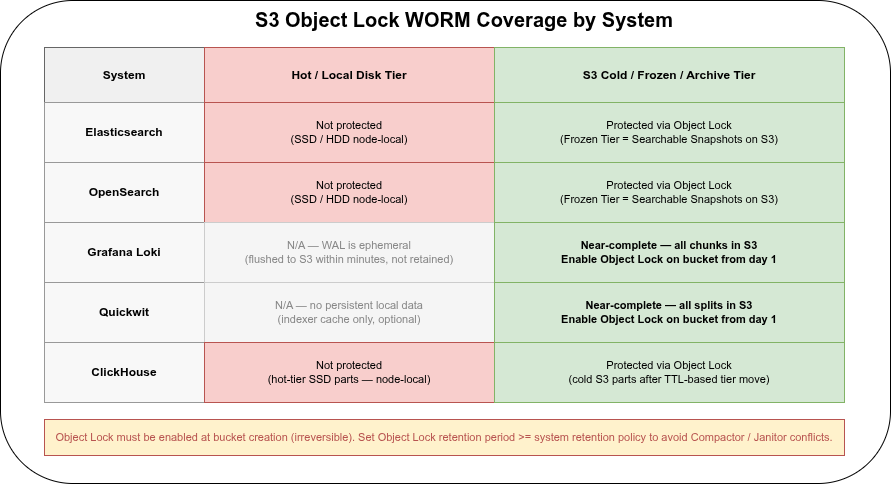
S3 Object Lock🔗
The most practical WORM mechanism for cloud-native log archives is S3 Object Lock, available on AWS S3, MinIO, and OVH Object Storage. On OVH it is fully supported and works as follows:
- Must be enabled at bucket creation — cannot be added to an existing bucket, and enabling it is irreversible. Enabling Object Lock automatically activates versioning on the bucket.
- Compliance mode: no user — including root / admin — can delete or overwrite objects before the retention period expires. Retention period cannot be shortened once set. Use this for regulatory requirements (SOC 2, PCI DSS, MiFID II).
- Governance mode: privileged users with
s3:BypassGovernanceRetentioncan override. More operationally flexible; weaker compliance guarantee. - Legal Hold: an independent on/off flag per object with no expiration date — supplements retention periods for objects under legal investigation.
- DELETE behavior: a DELETE request without a version ID only creates a delete marker; the locked object version remains protected. A DELETE with an explicit version ID during the retention period returns HTTP 403.
| Cold / archived data | Hot / local data | |
|---|---|---|
| Loki | ✓ All in S3 — enable Object Lock on the bucket | N/A (WAL is ephemeral, not retained) |
| Quickwit | ✓ All in S3 — enable Object Lock on the bucket | N/A |
| ClickHouse cold tier | ✓ S3 parts — enable Object Lock on the cold bucket | ✗ Hot-tier SSD parts not covered (encrypted via encrypted disk, but not WORM-protected) |
| Elasticsearch Frozen Tier | ✓ Object Lock on snapshot / frozen bucket | ✗ Hot / warm tier on node-local disk |
| OpenSearch Frozen Tier | ✓ Same as ES | ✗ Same as ES |
For Loki and Quickwit, S3 Object Lock on the data bucket provides near-complete WORM coverage — both systems store all data in object storage from day one.
For ClickHouse and Elasticsearch/OpenSearch, only the cold/frozen tier in S3 is covered. Hot-tier data on local SSD is not protected by Object Lock. For compliance use cases this means either accepting that the most recent N days of logs are not WORM-protected (during the hot-tier window), or enforcing OS-level immutability on the hot-tier storage — which is uncommon in practice.
Combining Object Lock with Async Replication on OVH: both the source and destination bucket must have Object Lock enabled. Replicated objects carry the source bucket’s lock configuration to the destination. Objects uploaded directly to the destination bucket use the destination bucket’s default lock configuration.
Application-layer constraints🔗
Beyond storage-layer WORM, restrict application-layer operations that could silently remove data before the retention period:
- Elasticsearch / OpenSearch: ILM read-only phase sets indices read-only within the cluster. Cluster admins can still delete shards manually — S3 Object Lock on the frozen tier is the only hard guarantee.
- ClickHouse:
ALTER TABLE DELETEmutations must be blocked via RBAC (denyALTER DELETEfor all roles except a dedicated admin). TTL expiry is the correct mechanism for log retention; ad-hoc mutations should never touch log tables. - Loki / Quickwit: if S3 Object Lock retention period is longer than the configured Loki/Quickwit retention policy, the Compactor / Janitor will attempt to delete objects that Object Lock refuses to remove — this results in errors and stalled compaction. Set Object Lock retention ≥ system retention policy.
FAQ🔗
What encryption key does ClickHouse use for at-rest encryption, and how is key rotation handled?🔗
ClickHouse’s encrypted disk type uses AES-256-CTR (recommended) or AES-128-CTR — a stream cipher, meaning data is not padded and ciphertext is the same size as plaintext. The key is a 32-byte (256-bit) value defined in the server configuration:
<disks>
  <encrypted_local>
    <type>encrypted</type>
    <disk>local</disk>
    <path>encrypted/</path>
    <algorithm>AES_256_CTR</algorithm>
    <key_hex id="key1">a1b2c3d4e5f6...32 bytes hex...</key_hex>
    <current_key_id>key1</current_key_id>
  </encrypted_local>
</disks>
The key material can be provided as a hex literal in the config file, or read from an environment variable (${ENV_VAR}) to keep it out of config files on disk.
Key rotation is supported via multiple key IDs. To rotate:
- Add the new key with a new
idto the config - Change
current_key_idto point to the new key - Restart ClickHouse (or reload config with
SYSTEM RELOAD CONFIG)
From that point on, all new parts are written with the new key. Existing parts on disk remain encrypted with the old key — ClickHouse does not re-encrypt existing data automatically. Both keys must stay in the configuration until every old part encrypted with the original key has been merged away or expired via TTL. For a 7-year archive with slow part churn, this means the old key may need to remain in config for years.
There is no built-in re-encryption command. Full re-encryption of existing parts would require exporting, dropping, and re-importing — impractical for large archives. For compliance frameworks that require periodic key rotation with guaranteed re-encryption of all data, this is a meaningful limitation: ClickHouse’s model is key rolling (new writes use new key), not key rotation with re-encryption.
For external key management, ClickHouse Cloud supports BYOK via AWS KMS and Azure Key Vault. Self-hosted deployments have community-maintained HashiCorp Vault integrations, but no officially supported KMS connector as of 24.x.
Do I need OS-level disk encryption on top of ClickHouse’s encrypted disk?🔗
ClickHouse’s encrypted disk type provides application-layer AES-256-CTR encryption before data reaches the filesystem — raw part files are ciphertext without the ClickHouse key. OS-level encryption (LUKS, dm-crypt) on top adds defense-in-depth but is not required by most compliance frameworks if application-layer encryption is already in place. Verify your specific framework — some (e.g. PCI DSS) may specify requirements at the storage layer explicitly.
Does Loki support restricting which log streams a team can query?🔗
Not natively in Loki OSS. Each X-Scope-OrgID tenant is fully isolated, but within a tenant all streams are accessible to any authenticated user. Stream-level access control (team A sees {app="payments"} but not {app="auth"} within the same tenant) requires Grafana Enterprise, which adds datasource-level permissions and team-based query restrictions.
Part 1: Comparison, storage model, compression, resource consumption, ingest, and SaaS options