SigNoz on OVH MKS: Infrastructure with Terraform + Ansible
Table of contents
The previous two series covered the theory: which storage engine fits 7-year log archiving and what managed cloud services cost. This post turns that analysis into a fully reproducible sovereign observability stack. The goal is not just lower cost, but operational control and EU-hosted observability without hyperscaler lock-in — SigNoz Community Edition on OVH, with metrics, distributed traces, and logs all stored in ClickHouse with S3 cold-tier tiering to OVH Object Storage Infrequent Access.
Series navigation:
- Full guide: SigNoz on OVH MKS: The Complete Guide
- Part 1 — Infrastructure (this post)
- Part 2 — Metrics, Traces & Logs with Istio Ambient
- Part 3 — Monthly Access Log Reports (Vector + awffull)
The example repo is at codeberg.org/nis-aleks/ovh-example-observability. Clone it, fill in your credentials, run Terraform and Ansible — that’s it.
This repo is a working demo, not a hardened production blueprint. OVH pricing changes over time — always verify current rates in the OVH Public Cloud pricing page before provisioning. The cost estimates in this post reflect prices at time of writing (May 2026). You are responsible for any costs incurred in your OVH account.
Architecture🔗
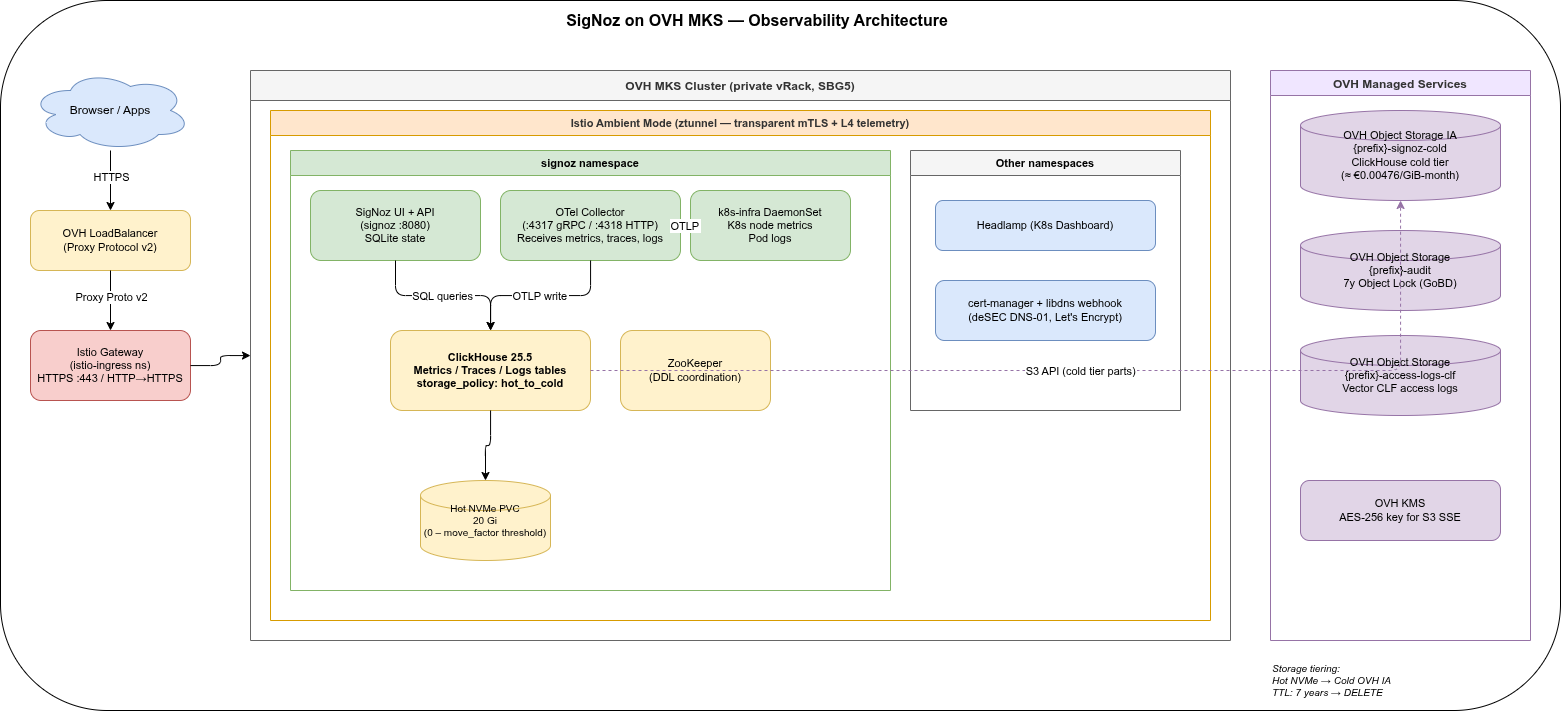
Traffic enters through the OVH LoadBalancer with Proxy Protocol v2, hits the Istio Gateway for TLS termination, and routes to SigNoz or Headlamp via HTTPRoutes. Inside the cluster, Istio Ambient Mode provides transparent mTLS between all pods — no sidecars injected.
ClickHouse uses a two-tier storage policy: hot parts live on csi-cinder-high-speed PVCs (OVH Block Storage High Speed, NVMe-backed at ≈€0.09/GiB-month), and after the move_factor threshold (default 80% full), parts migrate to OVH Object Storage Infrequent Access at ≈€0.00476/GiB-month with no egress or retrieval fees. Three PVCs are provisioned automatically: 20 GiB for ClickHouse, 8 GiB for ZooKeeper, and 1 GiB for the SigNoz query service.
Stack at a glance🔗
| Layer | Component | Version |
|---|---|---|
| Kubernetes | OVH MKS | 1.35 |
| Service mesh | Istio Ambient Mode | 1.30.0 |
| Observability | SigNoz | 0.122.0 |
| Storage backend | ClickHouse | 25.5.6 |
| Hot-tier storage | OVH Block Storage High Speed | csi-cinder-high-speed |
| Ingress | Istio Gateway API | v1.5.1 |
| TLS | cert-manager + deSEC DNS-01 | v1.17.1 |
| DNS | deSEC | — |
| Network gateway | OVH Gateway S | — |
OVH quota requirements🔗
The demo fits within the default OVH Public Cloud quotas for SBG5. The table below shows what the staging deployment consumes and what to request before scaling to production:
| Resource | Demo (default quota) | Used by demo | Prod recommendation |
|---|---|---|---|
| Servers | 3 | 2 (2 worker nodes) | 6–10 |
| vCPU | 6 | 4 | 40+ |
| RAM | 25 GB | 16 GB | 160+ GB |
| Additional disk | 30 GB | 29 GB | 500+ GB |
| Floating IPs | 4 | 1 (LB only; node IPs are isAdditionalIp: false and don’t count here) | 10+ |
| Gateways | 1 | 1 | 2+ |
| LB Octavia | 1 | 1 | 5+ |
The demo leaves almost no room: disk is at 29/30 GB and Gateway + LB Octavia are both maxed at 1/1. If you add a second environment or a larger node pool, request quota increases via OVH Control Panel → Public Cloud → Quota and Regions before running terraform apply.
Design goals🔗
This setup optimises for:
- EU-hosted infrastructure without hyperscaler lock-in
- one storage engine for metrics, traces, and logs
- predictable long-term retention cost via ClickHouse + OVH IA
- reproducible infrastructure with Terraform + Ansible
- small-team operability over maximum feature count
Why Terraform + Ansible, not GitOps?🔗
This repo intentionally uses Terraform + Ansible instead of Flux or ArgoCD. The goal is a reproducible bootstrap with minimal always-on control-plane components: Terraform owns cloud infrastructure; Ansible owns Helm releases, rendered values, and post-install ClickHouse changes that are difficult to express as Kubernetes manifests. For a long-running production platform, the same Helm values and manifests can be moved into a GitOps workflow once the initial bootstrap is stable.
What is SigNoz?🔗
SigNoz is an open-source observability platform (Apache 2.0) — and effectively a ClickHouse-native observability platform. Unlike Prometheus + Grafana + Loki stacked separately, SigNoz stores metrics, distributed traces, and logs in a single ClickHouse cluster. This is a natural fit if you already run ClickHouse for log archiving: same storage engine, same S3 tiering config, same SQL for ad-hoc queries.
Key facts for the Community Edition:
| Feature | Community | Enterprise |
|---|---|---|
| Metrics (Prometheus remote_write / OTLP) | ✓ | ✓ |
| Distributed traces (OTLP) | ✓ | ✓ |
| Logs (OTLP / k8s-infra) | ✓ | ✓ |
| Built-in alerting | ✓ | ✓ |
| SSO / SAML / OIDC | ✗ | ✓ |
| Multi-tenancy / RBAC | ✗ | ✓ |
| License | Apache 2.0 | Commercial |
Most observability stacks run separate databases per signal type: Prometheus for metrics, Jaeger or Tempo for traces, Loki or Elasticsearch for logs — each with its own retention config, S3 integration, and operational overhead. SigNoz stores all three in a single ClickHouse cluster: the same hot/cold storage policy, the same TTL config, the same S3 endpoint, the same SQL interface for ad-hoc queries. If you already run ClickHouse for log archiving, SigNoz adds zero separate storage infrastructure.
For a single-team or internal platform, Community Edition covers everything. The missing SSO is the main production concern — work around it with Istio authorization policies or a reverse proxy with BasicAuth if needed.
Terraform🔗
The terraform/ directory provisions all OVH infrastructure. Everything is stateless from Terraform’s perspective — no backend configured by default, state lives in terraform.tfstate locally. For a team setup, point it at an OVH S3 bucket as remote backend.
Networking: vRack + private subnet🔗
# network.tf
resource "ovh_vrack_cloudproject" "main" ...
resource "ovh_cloud_project_network_private" "main"
name = "${local.prefix}-network"
regions =var.private_network_region
resource "ovh_cloud_project_network_private_subnet_v2" "main"
cidr =.private_subnet_cidr # 10.1.0.0/24 (staging GRA9)
resource "ovh_cloud_project_gateway" "main"
model =.gateway_model # "s" by default
network_id =.private_network_openstack_id
subnet_id =.main.id
All cluster nodes share this private network. The MKS API endpoint is public (OVH requirement). private_network_routing_as_default = true routes all node egress through the OVH managed gateway — but OVH still assigns Floating IPs to nodes by default (visible as EXTERNAL-IP in kubectl get nodes). Security relies on OpenStack security groups, not the absence of a public IP. The gateway provides outbound NAT so nodes can pull container images and reach OVH S3 without depending on their individual Floating IPs.
Each worker node gets one IPv4 and one IPv6 Floating IP (isAdditionalIp: false — included in the node price, not billed separately). The Istio ingress LoadBalancer also receives a Floating IP, included in the Octavia LB cost. For a two-node cluster you therefore have six public IPs in total: 1 gateway + 1 LB + 2× IPv4 node + 2× IPv6 node.
The OVH Gateway S runs continuously at ≈€2.43/month. It provides outbound NAT and is required for private_network_routing_as_default to work. Note that OVH assigns Floating IPs to nodes regardless — the security perimeter is the OpenStack security group, not the absence of a public IP.
Kubernetes: OVH MKS🔗
# mks.tf
resource "ovh_cloud_project_kube" "main"
region =.mks_region
version =.mks_version # "1.35"
private_network_id = ...
private_network_configuration
default_vrack_gateway =.main.interfaces0.ip
private_network_routing_as_default = true
customization_apiserver
admissionplugins
enabled ="NodeRestriction"
resource "ovh_cloud_project_kube_nodepool" "workers"
flavor_name =.nodepool_flavor # b3-8 for staging, c3-16 for prod
min_nodes =.nodepool_min_nodes
desired_nodes =.nodepool_desired_nodes
max_nodes =.nodepool_max_nodes
anti_affinity = true
The full stack (ClickHouse, ZooKeeper, SigNoz, OTel Collector, k8s-infra, Istio, cert-manager, Headlamp) saturates a single b3-8 node at ≈95% CPU requests — the autoscaler will immediately provision a second node. Set nodepool_min_nodes = 2 and nodepool_desired_nodes = 2 from the start; starting with 1 only delays the inevitable and causes a rolling reschedule. For production, use c3-16 (16 GB RAM, 4 vCPU) — the cost comparison from the self-hosted series covers the OVH pricing in detail.
S3 buckets🔗
The repo creates five Object Storage buckets:
| Bucket | Purpose | Retention |
|---|---|---|
{prefix}-signoz-cold | ClickHouse cold tier | ClickHouse TTL (7y) |
{prefix}-audit | ClickHouse backup archive | 7y Object Lock Compliance |
{prefix}-operational | ClickHouse operational exports | 365d lifecycle |
{prefix}-access-logs-clf | Monthly CLF access log archives (Vector → Part 3) | — |
{prefix}-awffull-reports | awffull HTML reports + hist file (Part 3) | — |
The signoz-cold bucket is defined in terraform/signoz.tf:
resource "ovh_cloud_project_storage" "signoz_cold"
service_name =.ovh_cloud_project_id
region_name =.storage_region
name = "${local.prefix}-signoz-cold"
versioning = status = "disabled"
No Object Lock here — ClickHouse’s TTL rules handle deletion. An S3 IAM user clickhouse_cold gets GetObject, PutObject, DeleteObject, and ListBucket on this bucket only. After terraform apply, retrieve the credentials:
terraform output -json clickhouse_cold_s3_access_key | tr -d '"'
terraform output -json clickhouse_cold_s3_secret_key | tr -d '"'KMS🔗
kms.tf creates an OVH KMS service with an AES-256 key for Object Storage SSE.
Ansible🔗
The ansible/ directory has a single site.yml playbook with seven roles, each independently runnable via --tags. All roles run locally against the cluster via kubectl and helm — no separate jump host needed.
Execution order🔗
istio → cert_manager → headlamp → signoz → vector → awffull → routesThe routes role always runs last because it creates Istio HTTPRoutes and DNS records for all services — those services need to exist first. The vector and awffull roles are covered in Part 3.
istio🔗
Installs Gateway API CRDs (v1.5.1), then Istio in Ambient Mode: istio-base, istiod, istio-cni, and ztunnel. Ambient Mode means no sidecar injection — ztunnel handles transparent mTLS at the node level, and Envoy waypoint proxies are added per-namespace only when L7 features are needed. istiod is installed with meshConfig.accessLogEncoding=JSON, which enables structured JSON access logs from the Envoy ingress proxy — required by the Vector DaemonSet in Part 3.
cert_manager🔗
Installs cert-manager with the cert-manager-webhook-libdns webhook for DNS-01 challenges. The webhook supports multiple libdns DNS providers — here configured for deSEC. DNS-01 means no LoadBalancer IP is needed during certificate issuance — the ACME challenge goes through the deSEC API directly. A wildcard cert (*.your-domain.at) covers all services.
headlamp🔗
Installs Headlamp as a read-only Kubernetes dashboard. A ServiceAccount with cluster-viewer RBAC and a long-lived token are created (staging only — use Keycloak OIDC for production).
signoz🔗
The new role added for this post. It:
- Creates the
signoznamespace - Adds the SigNoz Helm repo (
https://charts.signoz.io) - Renders
values.yaml.j2→/tmp/signoz-values.yamlwith credentials from vault - Runs
helm upgrade --install signoz signoz/signoz - Deletes the temp values file
- Installs
signoz/k8s-infra(DaemonSet for K8s metrics + pod log collection) - Waits for the
signozStatefulSet to be ready - Runs
tasks/ttl.yml: configures ClickHouse storage policy, TTL per data type, and Gorilla+ZSTD codec
The values.yaml.j2 template configures ClickHouse with the two-tier storage policy:
# ansible/roles/signoz/templates/values.yaml.j2
clickhouse:
  persistence:
    size: "{{ signoz_ch_hot_storage_size }}"   # 20Gi hot NVMe

  files:
    config.d/s3-cold.xml: |
      <clickhouse>
        <storage_configuration>
          <disks>
            <s3_cold>
              <type>object_storage</type>
              <object_storage_type>s3</object_storage_type>
              <endpoint>{{ signoz_s3_endpoint }}{{ signoz_s3_bucket }}/</endpoint>
              <access_key_id>{{ vault_signoz_s3_access_key_id }}</access_key_id>
              <secret_access_key>{{ vault_signoz_s3_secret_key }}</secret_access_key>
              <metadata_path>/var/lib/clickhouse/disks/s3_cold/</metadata_path>
              <cache_enabled>true</cache_enabled>
              <data_cache_enabled>true</data_cache_enabled>
              <max_cache_size>5368709120</max_cache_size>  <!-- 5 GiB -->
            </s3_cold>
          </disks>
          <policies>
            <hot_to_cold>
              <volumes>
                <!-- Volume name must be 'default' — ClickHouse requires the new
                     storage policy to contain all volume names from the old one. -->
                <default><disk>default</disk></default>
                <cold><disk>s3_cold</disk></cold>
              </volumes>
              <move_factor>0.2</move_factor>
            </hot_to_cold>
          </policies>
        </storage_configuration>
      </clickhouse>
A second file, config.d/compression.xml, sets ZSTD(3) as the default block compression for all columns without an explicit codec. This replaces ClickHouse’s built-in LZ4 default and reduces S3 cold-tier storage by 30–50% compared to LZ4.
The files: key in the SigNoz ClickHouse sub-chart maps directly to /etc/clickhouse-server/config.d/ inside the ClickHouse container. The credentials are rendered by Ansible from vault_signoz.yml (ansible-vault encrypted) and end up in a Helm-managed ConfigMap.
Retention and compression🔗
After Helm deploys SigNoz, tasks/ttl.yml connects to the ClickHouse pod via kubectl exec and applies:
Storage policy — ALTER TABLE ... MODIFY SETTING storage_policy = 'hot_to_cold' on all SigNoz data tables, enabling time-based TTL moves to S3.
TTL per data type:
| Data type | Hot (NVMe SSD) | Cold (S3 IA) | Total |
|---|---|---|---|
| Traces | 7 days | 83 days | 90 days |
| Metrics | 7 days | 723 days | 730 days (2 years) |
| Logs | 7 days | 2 548 days | 2 555 days (7 years) |
The 7-year log retention matches the compliance requirement from the log archiving series. Metrics are kept two years for capacity planning; traces are kept 90 days as they grow fastest.
Column codec — samples_v4.value (Float64 metric values) gets CODEC(Gorilla, ZSTD(1)): Gorilla XOR-encodes consecutive float values before ZSTD compression, giving ≈4× better ratio than plain ZSTD for gauge and counter data.
ClickHouse forbids ALTER TABLE MODIFY COLUMN on ORDER BY / PRIMARY KEY columns (error 524). For SigNoz, unix_milli and timestamp are key columns and cannot have their codec changed this way. The global ZSTD(3) config from compression.xml still applies to key columns for newly written parts.
All retention windows are configurable in ansible/roles/signoz/defaults/main.yml via signoz_hot_retention_days, signoz_traces_retention_days, signoz_metrics_retention_days, and signoz_logs_retention_days.
For this staging/example setup, S3 credentials land in a Kubernetes ConfigMap (accessible to anyone with kubectl access to the signoz namespace). For production, use External Secrets Operator with OpenBao to inject credentials as a K8s Secret, then mount it as a volume with extraVolumes and use from_env references in the XML — as described in the ClickHouse use case post.
This post configures retention and cold-tier movement, not a complete disaster recovery procedure. For production, back up ClickHouse metadata, ZooKeeper state, and Terraform state regularly, and run at least one restore test before relying on the archive for compliance.
vector🔗
Installs a Vector DaemonSet in the vector namespace. Collects Envoy JSON access logs from the istio-ingress namespace, parses them via a VRL transform, and writes structured rows to logs.envoy_access_logs in the SigNoz ClickHouse cluster. Requires meshConfig.accessLogEncoding=JSON (enabled by the istio role) and vault_awffull_ch_password from vault_awffull.yml. Covered in detail in Part 3.
awffull🔗
Creates a monthly CronJob in the reports namespace. On the 1st of each month at 03:00 it exports the previous month’s logs.envoy_access_logs rows as Combined Log Format via the ClickHouse HTTP API, archives the CLF file to {prefix}-access-logs-clf, generates awffull HTML reports, and syncs them to {prefix}-awffull-reports (S3 static website). Covered in Part 3.
routes🔗
Creates the Istio Gateway, one HTTPRoute per service, a wildcard TLS Certificate, DNS A records in deSEC, two EnvoyFilter resources (Proxy Protocol parsing + suppress Server: header), and an AuthorizationPolicy at the gateway level. All routes are driven from ingress_routes in vars.yml — add a new entry there and re-run --tags routes to expose a new service without touching templates.
The AuthorizationPolicy enforces three security levels: ops.<domain> (SigNoz UI) and reports.<domain> allow browser access from trusted IPs or an ops bearer token; otel.<domain> (OTLP ingest) always requires an ingest bearer token; headlamp.<domain> is open at gateway level. The reports route uses an ExternalName Service and an Istio ServiceEntry to proxy the browser through the gateway to the S3 static website — added in Part 3.
Production readiness🔗
The demo is a working starting point, not a hardened production stack. The table below maps each area to its current state and the recommended production approach:
| Area | Demo setup | Production recommendation |
|---|---|---|
| ClickHouse | Bundled single replica | External replicated ClickHouse via Altinity operator |
| Auth | Local SigNoz users + gateway bearer token | OIDC via oauth2-proxy or SigNoz Enterprise |
| Secrets | Ansible Vault → ConfigMap | External Secrets Operator + OpenBao/Vault |
| Nodes | 2× b3-8 staging | 3+ c3-16 across failure domains |
| Backups | S3 buckets provisioned | Scheduled ClickHouse backup + restore test |
Deployment walkthrough🔗
Prerequisites🔗
- OVH API credentials (
OVH_APPLICATION_KEY,OVH_APPLICATION_SECRET,OVH_CONSUMER_KEY) - OpenStack credentials for the same project
- deSEC account + API token
- Local:
terraform≥ 1.9,ansible≥ 2.17,kubectl,helm
Step 1 — Terraform🔗
cd terraform
cp envs/staging.tfvars terraform.tfvars
# Edit: set ovh_cloud_project_id, vrack_id, base_domain
terraform init
terraform apply -var-file=terraform.tfvars
Note the S3 credentials from the outputs.
Step 2 — Ansible vault setup🔗
cd ansible

# vault_desec.yml — deSEC token:
vi group_vars/staging/vault_desec.yml
ansible-vault encrypt group_vars/staging/vault_desec.yml --vault-password-file ~/.vault_pass

# vault_signoz.yml — S3 credentials (from terraform output) + auth tokens:
vi group_vars/staging/vault_signoz.yml
ansible-vault encrypt group_vars/staging/vault_signoz.yml --vault-password-file ~/.vault_pass

# vault_awffull.yml — awffull S3 credentials + ClickHouse passwords (needed for Part 3):
#   terraform output -raw awffull_s3_access_key
#   terraform output -raw awffull_s3_secret_key
vi group_vars/staging/vault_awffull.yml
ansible-vault encrypt group_vars/staging/vault_awffull.yml --vault-password-file ~/.vault_pass
Update group_vars/staging/vars.yml: set base_domain, verify signoz_s3_bucket matches terraform output signoz_cold_bucket_name.
Step 3 — Bootstrap🔗
# Full bootstrap (runs locally via inventory/localhost.yml):
ansible-playbook -i inventory/localhost.yml site.yml --ask-vault-pass

# Or step by step (useful when extending an existing cluster):
ansible-playbook -i inventory/localhost.yml site.yml --tags istio --ask-vault-pass
ansible-playbook -i inventory/localhost.yml site.yml --tags cert-manager --ask-vault-pass
ansible-playbook -i inventory/localhost.yml site.yml --tags headlamp --ask-vault-pass
ansible-playbook -i inventory/localhost.yml site.yml --tags signoz --ask-vault-pass
ansible-playbook -i inventory/localhost.yml site.yml --tags vector --ask-vault-pass
ansible-playbook -i inventory/localhost.yml site.yml --tags awffull --ask-vault-pass
ansible-playbook -i inventory/localhost.yml site.yml --tags routes --ask-vault-pass
The full run takes 15–25 minutes: the majority is the TLS certificate issuance (DNS-01 propagation) and ClickHouse startup.
Step 4 — Verify the deployment🔗
kubectl get pods -A --field-selector 'metadata.namespace!=kube-system'Expected output (all pods Running, migrator Completed):
| Namespace | Pod | Ready | Status |
|---|---|---|---|
| cert-manager | cert-manager | 1/1 | Running |
| cert-manager | cert-manager-cainjector | 1/1 | Running |
| cert-manager | cert-manager-webhook | 1/1 | Running |
| cert-manager | libdns-webhook | 1/1 | Running |
| headlamp | headlamp | 1/1 | Running |
| istio-ingress | ingress-gateway-istio | 1/1 | Running |
| istio-system | istio-cni-node (per node) | 1/1 | Running |
| istio-system | istiod | 1/1 | Running |
| istio-system | ztunnel (per node) | 1/1 | Running |
| signoz | chi-signoz-clickhouse-cluster-0-0-0 | 1/1 | Running |
| signoz | signoz | 1/1 | Running |
| signoz | signoz-clickhouse-operator | 2/2 | Running |
| signoz | signoz-k8s-infra-otel-agent (per node) | 1/1 | Running |
| signoz | signoz-k8s-infra-otel-deployment | 1/1 | Running |
| signoz | signoz-otel-collector | 1/1 | Running |
| signoz | signoz-telemetrystore-migrator | 0/1 | Completed |
| signoz | signoz-zookeeper | 1/1 | Running |
The signoz-telemetrystore-migrator Job runs the ClickHouse schema migrations on first install and exits with Completed — this is expected. The signoz-clickhouse-operator shows 2/2 because it runs an operator container and a metrics sidecar.
Step 5 — First SigNoz login🔗
Open https://ops.<your-domain> in your browser. The first visit shows a signup form — create the admin account. This page disappears after the first account is created.
Step 6 — Exposed routes🔗
After a successful run of the routes role, four HTTPRoutes are active:
| URL-Prefix | Target service | Internal Port | Access control |
|---|---|---|---|
https://ops.<domain> | signoz (SigNoz UI + API) | 8080 | Trusted IP or Authorization: Bearer <ops-token> |
https://otel.<domain> | signoz-otel-collector (OTLP/HTTP) | 4318 | Authorization: Bearer <otel-token> (always required) |
https://headlamp.<domain> | headlamp (K8s dashboard) | 80 | Open — demo only, see note |
https://reports.<domain> | ExternalName → S3 static website (Part 3) | 80 | Trusted IP or Authorization: Bearer <ops-token> |
Headlamp is exposed without authentication in this demo setup. Do not expose it publicly in production without adding an AuthorizationPolicy entry or placing it behind an authenticating proxy.
The AuthorizationPolicy is enforced at the Istio Gateway level in the istio-ingress namespace — requests that don’t match are rejected before reaching the target pod. Tokens are stored in group_vars/staging/vault_signoz.yml (vault_signoz_ops_token, vault_signoz_otel_token). Add your IP to signoz_trusted_ips in vars.yml to allow browser access to the SigNoz UI without a bearer token.
The otel route accepts OTLP/HTTP from anywhere on the public internet — no VPN or cluster access needed. This is the external ingest endpoint for applications and agents running outside the cluster.
Next: Part 2 covers sending Istio metrics and traces to SigNoz, verifying the S3 cold tier is active, and building the first dashboards. Part 3 adds structured Envoy access log collection via Vector and monthly awffull reports served through the existing Istio gateway.
Update🔗
Updated 2026-06-02: Corrected Istio Ambient Mode version from 1.29.2 to 1.30.0.