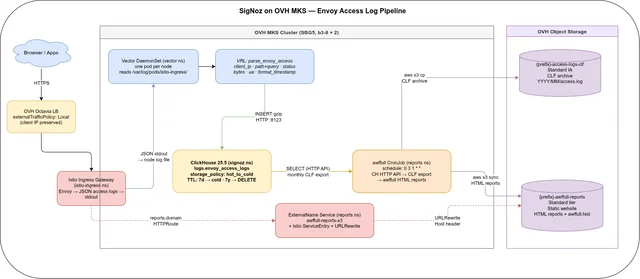
SigNoz on OVH MKS: Access Log Reports with Vector and ClickHouse
Table of contents
Posts 1 and 2 of this series set up the SigNoz observability stack on OVH MKS and demonstrated metrics, traces, and Kubernetes pod log collection. This post adds a practical use case: structured Envoy access log collection via Vector, archiving to OVH Object Storage in Combined Log Format, and monthly HTML reports via awffull — accessible at https://reports.<your-domain> through the existing Istio gateway.
Series navigation:
- Full guide: SigNoz on OVH MKS: The Complete Guide
- Part 1 — Infrastructure (Terraform + Ansible)
- Part 2 — Metrics, Traces & Logs
- Part 3 — Access Log Reports (this post)
This post is based on a working demo, not a hardened production blueprint. Always verify OVH pricing at the OVH Public Cloud pricing page before provisioning.
All code is in the repository: codeberg.org/nis-aleks/ovh-example-observability
What this adds🔗
Before (Posts 1+2):
Istio Ingress Gateway → Envoy (JSON logs on stdout)
                                ↓
                     k8s-infra OTel Collector
                                ↓
                     SigNoz logs (unstructured body — good for real-time search)
After (Post 3):
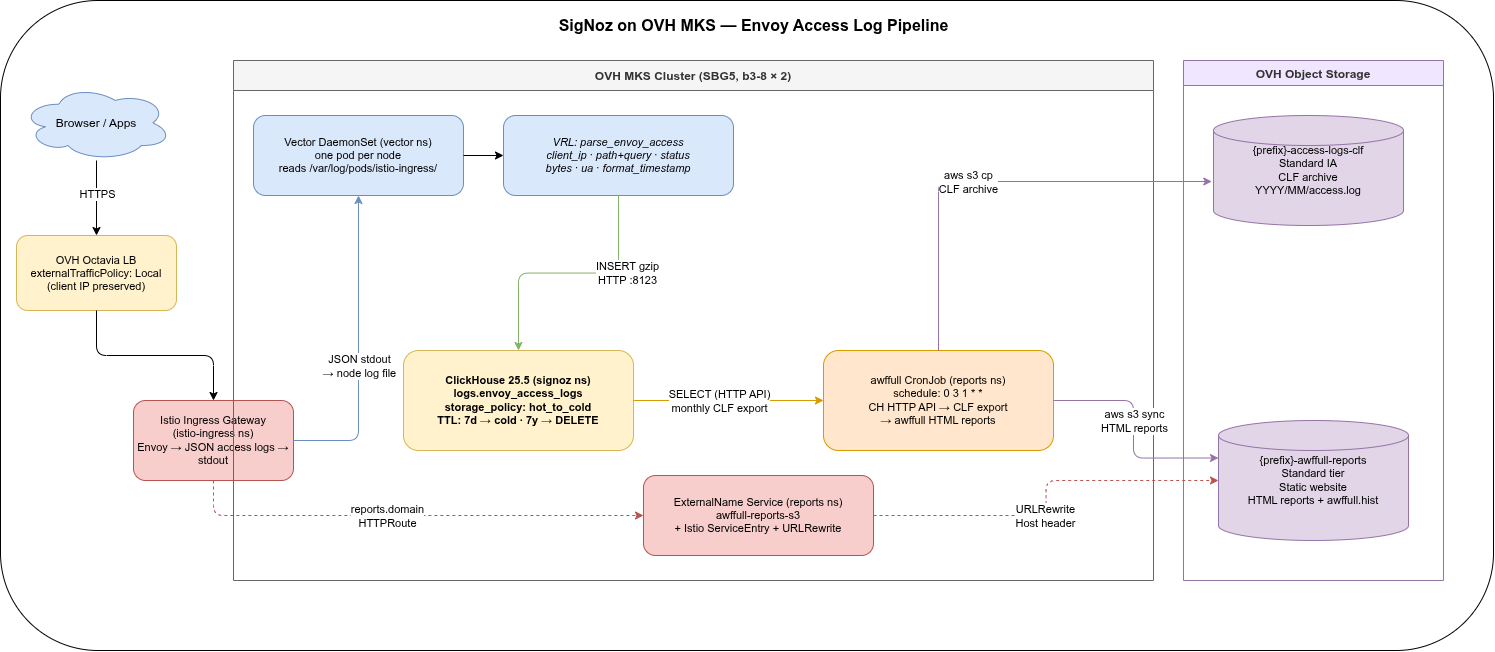
Why route through ClickHouse? Multiple Envoy pods write to the same logs.envoy_access_logs table. ClickHouse merges them via ORDER BY (toDate(timestamp), status, client_ip). The monthly CronJob exports one CLF file that covers all gateway pods — no per-pod S3 key collisions, and the structured columns enable SQL filtering before export.
This pattern is covered in detail in the companion ClickHouse Use Case post (Part 5 of the log archiving series). This post focuses on the specific wiring for the SigNoz-on-OVH stack.
New Terraform resources🔗
The awffull use case needs two additional S3 buckets and a dedicated IAM user. The existing access-logs-clf bucket was already created in Part 1; add the reports bucket and IAM user to terraform/storage.tf and terraform/iam.tf:
# terraform/storage.tf
resource "ovh_cloud_project_storage" "awffull_reports"
service_name =.ovh_cloud_project_id
region_name =.storage_region
name = "${local.prefix}-awffull-reports"
versioning = status = "disabled"
# terraform/iam.tf
resource "ovh_cloud_project_user" "awffull"
service_name =.ovh_cloud_project_id
description = "${local.prefix}-awffull"
role_names ="objectstore_operator"
resource "ovh_cloud_project_user_s3_policy" "awffull"
service_name =.ovh_cloud_project_id
user_id =.awffull.id
policy = jsonencode
Statement =
Sid = "AwffullWriteCLF"
Effect = "Allow"
Action ="s3:PutObject""s3:ListMultipartUploadParts"
"s3:ListBucketMultipartUploads""s3:AbortMultipartUpload"
Resource =
"arn:aws:s3:::${ovh_cloud_project_storage.access_logs_clf.name}"
"arn:aws:s3:::${ovh_cloud_project_storage.access_logs_clf.name}/*"
Sid = "AwffullReportsRW"
Effect = "Allow"
Action ="s3:GetObject""s3:PutObject""s3:DeleteObject"
"s3:ListBucket""s3:GetBucketLocation"
"s3:ListMultipartUploadParts""s3:ListBucketMultipartUploads"
"s3:AbortMultipartUpload"
"s3:GetBucketWebsite""s3:PutBucketWebsite"
Resource =
"arn:aws:s3:::${ovh_cloud_project_storage.awffull_reports.name}"
"arn:aws:s3:::${ovh_cloud_project_storage.awffull_reports.name}/*"
After terraform apply, collect the new outputs for the vault file:
terraform output -raw awffull_s3_access_key
terraform output -raw awffull_s3_secret_key
Enabling Envoy JSON access logs🔗
The istiod Helm install in ansible/roles/istio/tasks/main.yml needs one additional flag:
- name: Install istiod (Ambient Mode)
  ansible.builtin.command: >
    helm upgrade --install istiod istio/istiod
    --namespace {{ istio_namespace }}
    --version {{ istio_version }}
    --set profile=ambient
    --set meshConfig.accessLogFile=/dev/stdout
    --set meshConfig.accessLogEncoding=JSON
    --wait
Both flags are required. accessLogEncoding=JSON alone does nothing — without accessLogFile=/dev/stdout, Envoy writes no access logs at all. With both set, each request produces a JSON object on the container’s stdout, which Vector’s kubernetes_logs source picks up via the node log files.
If you’re updating an existing deployment, re-run the istio tag:
ansible-playbook -i inventory/localhost.yml site.yml --tags istio --ask-vault-passYou can verify JSON logging is active:
kubectl logs -n istio-ingress \
  $(kubectl get pods -n istio-ingress -l gateway.networking.k8s.io/gateway-name=ingress-gateway \
    -o jsonpath='{.items[0].metadata.name}') \
  --tail=3
# Should print JSON objects: {"start_time":"...","method":"GET",...}
Ansible role: vector🔗
The vector role does three things: creates a ClickHouse database + table + users, creates a K8s Secret with the ClickHouse password, and installs the Vector DaemonSet via Helm.
ClickHouse setup (tasks/clickhouse.yml)🔗
Via kubectl exec into the SigNoz ClickHouse pod (the pod that already runs as part of the SigNoz deployment):
CREATE DATABASE IF NOT EXISTS logs;
CREATE TABLE IF NOT EXISTS logs.envoy_access_logs
(
timestamp DateTime64(3, 'UTC'),
client_ip String,
method LowCardinality(String),
path String,
query String,
protocol LowCardinality(String),
status UInt16,
bytes_sent UInt64,
bytes_received UInt64,
duration_ms UInt32,
referer String,
user_agent String,
host String,
upstream_cluster LowCardinality(String),
upstream_host String,
request_id String,
response_flags LowCardinality(String),
namespace LowCardinality(String),
pod String,
node LowCardinality(String)
)
ENGINE = MergeTree
PARTITION BY toYYYYMM(timestamp)
ORDER BY (toDate(timestamp), status, client_ip)
TTL
toDateTime(timestamp) + INTERVAL 7 DAY TO VOLUME 'cold',
toDateTime(timestamp) + INTERVAL 7 YEAR DELETE
SETTINGS storage_policy = 'hot_to_cold';The hot_to_cold storage policy was configured by the signoz role (it has two volumes: default on NVMe + cold on OVH Object Storage IA). Access log rows move to S3 cold tier after 7 days and are deleted after 7 years.
Two dedicated users are created — vector_writer (INSERT only, for the DaemonSet) and awffull_reader (SELECT only, for the CronJob):
CREATE USER IF NOT EXISTS vector_writer IDENTIFIED WITH sha256_password BY '...';
GRANT INSERT ON logs.envoy_access_logs TO vector_writer;

CREATE USER IF NOT EXISTS awffull_reader IDENTIFIED WITH sha256_password BY '...';
GRANT SELECT ON logs.envoy_access_logs TO awffull_reader;
Passwords come from vault_awffull.yml (vault_vector_ch_password, vault_awffull_ch_password). Ansible tasks use no_log: true for the user creation steps.
Vector Helm values (templates/values.yaml.j2)🔗
Vector runs as a DaemonSet (Helm role Agent) in the vector namespace. The kubernetes_logs source is filtered to istio-ingress via the namespace label selector:
customConfig:
  sources:
    kubernetes_logs:
      type: kubernetes_logs
      extra_namespace_label_selector: "kubernetes.io/metadata.name=istio-ingress"

  transforms:
    route_source:
      type: route
      inputs: [kubernetes_logs]
      route:
        envoy_access: >-
          .kubernetes.container_name == "istio-proxy" && .stream == "stdout"

    parse_envoy_access:
      type: remap
      inputs: [route_source.envoy_access]
      drop_on_abort: true
      reroute_dropped: true
      source: |
        parsed, err = parse_json(.message)
        if err != null { abort }

        # Timestamp: format as ClickHouse-native string, not ISO 8601
        ts = parse_timestamp(to_string!(get(parsed, ["start_time"]) ?? ""), "%+") ?? now()
        .timestamp = format_timestamp!(ts, format: "%Y-%m-%d %H:%M:%S%.3f")

        # Client IP: x_forwarded_for first, fallback downstream_remote_address
        xfwd = to_string(get(parsed, ["x_forwarded_for"]) ?? "") ?? ""
        if xfwd != "" {
          .client_ip = strip_whitespace!(split(xfwd, ",")[0])
        } else {
          downstream = to_string(get(parsed, ["downstream_remote_address"]) ?? "") ?? ""
          m = parse_regex(downstream, r'(?P<ip>\d{1,3}(?:\.\d{1,3}){3})') ?? null
          .client_ip = if m != null { string!(m.ip) } else { "" }
        }
        # ... remaining fields in roles/vector/templates/values.yaml.j2
Two non-obvious points worth calling out:
Timestamp format: Vector serialises VRL timestamp objects as ISO 8601 ("2026-05-19T00:03:42Z"). ClickHouse’s JSONEachRow parser rejects the Z timezone suffix by default. Adding ?date_time_input_format=best_effort to the sink endpoint URL seems like the obvious fix, but it breaks Vector’s startup healthcheck: Vector appends /ping to the endpoint string, producing ...best_effort/ping — a malformed URL that ClickHouse returns 400 for. The correct fix is to format the timestamp in VRL as "%Y-%m-%d %H:%M:%S%.3f" (space separator, no timezone), which ClickHouse DateTime64 parses without any extra settings.
Client IP extraction: downstream_remote_address contains the port (194.0.2.1:54321). On IPv6-mapped addresses (::ffff:10.0.0.1:443), splitting on : returns an empty string. Use parse_regex with a named IPv4 capture group instead — it returns null on no match rather than an empty split result.
The ClickHouse sink uses HTTP Basic auth from a K8s Secret:
  sinks:
    clickhouse_envoy_access:
      type: clickhouse
      endpoint: "http://chi-signoz-clickhouse-cluster-0-0.signoz.svc.cluster.local:8123"
      database: logs
      table: envoy_access_logs
      auth:
        strategy: basic
        user: "vector_writer"
        password: "${CLICKHOUSE_PASSWORD}"
      compression: gzip
      buffer:
        type: disk
        max_size: 1073741824
        when_full: block
${CLICKHOUSE_PASSWORD} is a Vector environment variable reference resolved at runtime from the vector-ch-creds Secret in the vector namespace. The disk buffer survives ClickHouse restarts without data loss.
The SigNoz OTel Collector’s opamp client uses a dynamic config scoped to your organisation. Until the first admin account is created via the UI at https://ops.<your-domain>, the opamp server logs cannot create agent without orgId and never pushes a valid receiver config — port 4318 is not bound and Vector’s ClickHouse healthcheck passes but no OTLP data arrives.
Create the admin account before running --tags vector.
The Vector Helm chart uses a separate version scheme from the app. Chart 0.52.0 installs app 0.55.0; chart 0.44.0 installs app 0.48.0. The vector_version variable in roles/vector/defaults/main.yml refers to the chart version. Check available chart/app pairs with:
helm search repo vector/vector --versions | head -5Deploy:
ansible-playbook -i inventory/localhost.yml site.yml --tags vector --ask-vault-passVerify rows are arriving:
kubectl exec -n signoz \
  $(kubectl get pods -n signoz -l app.kubernetes.io/name=clickhouse \
    -o jsonpath='{.items[0].metadata.name}') -- \
  clickhouse-client --query \
  "SELECT count(), min(timestamp), max(timestamp) FROM logs.envoy_access_logs"
Ansible role: awffull🔗
The awffull role creates the reports namespace, a K8s Secret, the CronJob, and configures the S3 static website.
Monthly CronJob🔗
Runs on the 1st of each month at 03:00. Uses the registry.gitlab.com/aleks001/awffull:latest image (contains awffull + AWS CLI). ClickHouse export uses the HTTP API via curl — no clickhouse-client binary needed in the container:
# Export previous month as Combined Log Format
cat > /tmp/clf_query.sql <<SQL
SELECT concat(
    client_ip, ' - - [',
    formatDateTime(toTimeZone(timestamp, 'UTC'), '%d/%b/%Y:%H:%M:%S +0000', 'UTC'), '] "',
    method, ' ', path,
    if(query != '', concat('?', query), ''),
    ' ', protocol, '" ',
    toString(status), ' ',
    toString(bytes_sent), ' "',
    if(referer != '' AND referer != '-', referer, '-'), '" "',
    if(user_agent != '', user_agent, '-'), '"'
)
FROM logs.envoy_access_logs
WHERE toYYYYMM(timestamp) = ${YYYYMM}
ORDER BY timestamp
FORMAT LineAsString
SQL

curl -s -f \
  -H "X-ClickHouse-User: ${CLICKHOUSE_USER}" \
  -H "X-ClickHouse-Key: ${CLICKHOUSE_PASSWORD}" \
  --data-binary @/tmp/clf_query.sql \
  "${CLICKHOUSE_HOST}" > "${LOG_FILE}"
toYYYYMM(timestamp) = ${YYYYMM} restricts the scan to a single partition — ClickHouse reads only that month’s parts, even if they are on cold OVH Object Storage.
The ORDER BY timestamp ensures the merged output across all Envoy pods is sorted chronologically. awffull processes the CLF file as if it came from a single server.
After generating reports, the script:
- Archives the CLF log to
s3://{clf-bucket}/{YYYY}/{MM}/access.log - Persists
awffull.histtos3://{reports-bucket}/awffull/awffull.hist(enables incremental month-over-month processing) - Syncs HTML reports to
s3://{reports-bucket}/awffull/{YYYY}/{MM}/
S3 static website (tasks/s3website.yml)🔗
The awffull-reports bucket is configured as a Standard-tier static website (Standard tier is required — Infrequent Access has higher latency, unsuitable for browser-served HTML):
- name: Enable S3 static website hosting
  ansible.builtin.command: >
    aws s3api put-bucket-website
    --bucket {{ awffull_s3_bucket }}
    --website-configuration
    '{"IndexDocument":{"Suffix":"index.html"},"ErrorDocument":{"Key":"error.html"}}'
  environment:
    AWS_ENDPOINT_URL: "{{ awffull_s3_endpoint }}"
    AWS_ACCESS_KEY_ID: "{{ vault_awffull_s3_access_key_id }}"
    AWS_SECRET_ACCESS_KEY: "{{ vault_awffull_s3_secret_key }}"
OVH’s S3 implementation supports neither PutBucketPolicy (NotImplemented) nor PutBucketAcl via the API (AccessDenied regardless of IAM permissions). Set the bucket to Public manually in the OVH Console: Object Storage → bucket → Visibility → Public.
The role attempts put-bucket-acl --acl public-read anyway (with ignore_errors: true), so on providers where it works it is fully automated.
This makes all objects in the bucket publicly readable at S3 level, including awffull.hist. That is acceptable here because access to https://reports.<your-domain> is already protected at the Istio gateway level by the AuthorizationPolicy (trusted IPs or Bearer ops-token) — the S3 website hostname is not publicly advertised.
On AWS and most other S3-compatible providers, you can use a bucket policy with a Deny on *.hist and Condition: { StringEquals: { aws:PrincipalType: Anonymous } }. The Condition is critical: a Deny without it applies to all principals including the authenticated CronJob, preventing awffull.hist restore. On OVH, use the Console to set the bucket public instead.
Deploy:
ansible-playbook -i inventory/localhost.yml site.yml --tags awffull --ask-vault-passIstio route: reports.<your-domain>🔗
The reports URL proxies browser requests through the Istio gateway to the S3 static website endpoint — no additional pod needed.
Add to ingress_routes in group_vars/staging/vars.yml:
- name: reports
  host: "reports.{{ base_domain }}"
  namespace: reports
  service: awffull-reports-s3
  port: 80
  external_hostname: "{{ awffull_s3_website_host }}"
awffull_s3_website_host is the S3 website hostname (format: {bucket}.s3-website.{region}.io.cloud.ovh.net). Set this in vars.yml:
awffull_s3_website_host: "YOUR_PREFIX-staging-awffull-reports.s3-website.sbg.io.cloud.ovh.net"The routes role detects the external_hostname field and automatically:
- Creates an ExternalName Service in the
reportsnamespace pointing to the S3 website hostname - Creates an Istio ServiceEntry in
istio-ingressfor egress to the external host - Adds a URLRewrite filter to the HTTPRoute that rewrites the
Hostheader fromreports.<your-domain>to the S3 bucket hostname — this is required for S3 virtual-hosted-style website routing
The Gateway and Certificate resources are generated automatically from the ingress_routes list — the reports entry is picked up by the same loop that handles ops, otel, and headlamp.
AuthorizationPolicy for reports: same trusted IPs and ops-token as ops (reports contain visitor IP addresses and should not be public — only operators access them):
# reports (awffull): trusted IPs or ops token
- to:
    - operation:
        hosts: ["reports.{{ base_domain }}"]
  from:
    - source:
        remoteIpBlocks: ["{{ ip }}"]
# ...and Bearer ops-token rule
Deploy routes:
ansible-playbook -i inventory/localhost.yml site.yml --tags routes --ask-vault-passVerify🔗
After the first CronJob run (or trigger it manually for testing):
# Trigger manually for the current month
kubectl create job -n reports --from=cronjob/awffull-monthly awffull-test

# Follow logs
kubectl logs -n reports -l job-name=awffull-test -f
The report is available at:
https://reports.<your-domain>/awffull/YYYY/MM/index.htmlTo verify the CLF archive in S3:
aws s3 ls s3://YOUR_PREFIX-staging-access-logs-clf/ --recursive \
  --endpoint-url https://s3.sbg.io.cloud.ovh.net/
# Expected: YYYY/MM/access.log
To query the structured data directly in ClickHouse:
kubectl exec -n signoz \
  $(kubectl get pods -n signoz -l app.kubernetes.io/name=clickhouse \
    -o jsonpath='{.items[0].metadata.name}') -- \
  clickhouse-client --query \
  "SELECT status, count() AS hits, sum(bytes_sent) AS bytes
   FROM logs.envoy_access_logs
   WHERE toYYYYMM(timestamp) = toYYYYMM(now())
GROUP BY status ORDER BY hits DESC"vault_awffull.yml🔗
Fill in before deploying:
# S3 credentials from terraform output:
vault_awffull_s3_access_key_id: "..."
vault_awffull_s3_secret_key: "..."

# Choose freely — used to create ClickHouse users on first deploy:
vault_vector_ch_password: "..."   # vector_writer user (INSERT)
vault_awffull_ch_password: "..."  # awffull_reader user (SELECT)
Then encrypt:
ansible-vault encrypt group_vars/staging/vault_awffull.yml --vault-password-file ~/.vault_passFull deployment order🔗
# First time (all roles):
ansible-playbook -i inventory/localhost.yml site.yml --ask-vault-pass
# Order: istio → cert_manager → headlamp → signoz → vector → awffull → routes

# After changes to a single role:
ansible-playbook -i inventory/localhost.yml site.yml --tags vector --ask-vault-pass
ansible-playbook -i inventory/localhost.yml site.yml --tags awffull --ask-vault-pass
ansible-playbook -i inventory/localhost.yml site.yml --tags routes --ask-vault-passawffull reports include visitor IP addresses, referrers, user agents, and visited paths. The reports.<your-domain> route is protected by the same AuthorizationPolicy as ops.<your-domain> (trusted IPs or Bearer token) — it is not publicly accessible by default. Before granting broader access, verify compliance with applicable privacy regulations (GDPR, etc.) for your jurisdiction.