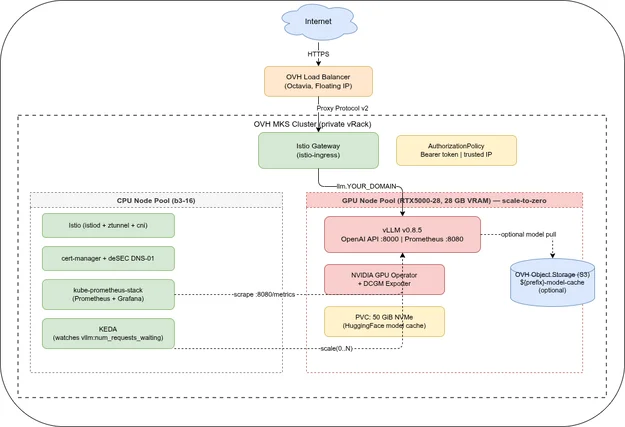
LLM Inference on OVH MKS: Terraform, Ansible, and Deployment
Part 1 covered the architecture and use cases. This post walks through the complete Terraform and Ansible setup and a first deployment.
Series navigation:
- Full guide: LLM Inference on OVH MKS: The Complete Guide
- Part 1 — Introduction
- Part 2 — Terraform, Ansible, and Deployment (this post)
- Part 3 — Models, AWQ, and OpenAI API
- Part 4 — Prometheus, Grafana, and KEDA
- Part 5 — Connect IDEs and Web UIs
- Part 6 — Self-hosted LLM Gateway
The companion repository is at codeberg.org/nis-aleks/ovh-llm-inference.
Terraform🔗
The full Terraform source is in terraform/ of the companion repo.
Networking (vRack + gateway)🔗
network.tf provisions a vRack private subnet and an OVH managed gateway (NAT for nodes without public IPs). This is identical to the SigNoz on OVH MKS series — see that post for details.
Two node pools (mks.tf)🔗
The interesting addition is the GPU pool:
# GPU pool — runs vLLM; scale-to-zero when no inference requests are queued
resource "ovh_cloud_project_kube_nodepool" "gpu"
service_name =.ovh_cloud_project_id
kube_id =.main.id
name = "${local.prefix}-gpu"
flavor_name =.gpu_nodepool_flavor # RTX5000-28
desired_nodes = 0
min_nodes = 0
max_nodes =.gpu_nodepool_max_nodes
autoscale = true
anti_affinity = false
template
metadata
labels = "nvidia.com/gpu.present""true"
annotations =
spec
taints =
key = "nvidia.com/gpu"
value = "present"
effect = "NoSchedule"
unschedulable = false
min_nodes = 0 with autoscale = true enables scale-to-zero. The Kubernetes Cluster Autoscaler (managed by OVH MKS) will provision a new GPU node when KEDA creates a pending pod, and remove the node after the cooldown period expires.
When creating a node pool manually in the OVH Console, autoscaling defaults to Disabled. With autoscaling disabled and three GPU nodes fixed at desired_nodes = 3, all nodes run 24/7 and the cluster cost reaches roughly €1,000+ per month.
With scale-to-zero (min_nodes = 0, autoscaling enabled), GPU nodes only run when inference requests are queued — idle time costs nothing. At ≈€0.36/h per node, three fixed GPU nodes cost roughly €790/month; with scale-to-zero the same nodes cost only what you actually use. Terraform sets this correctly via min_nodes = 0 and autoscale = true. If you later inspect the node pool in the OVH Console, confirm that autoscaling shows Min 0 / Max N rather than Disabled.
The template.spec.taints block stamps the taint directly on the node via the OVH Node Pool API so that even freshly-provisioned nodes start tainted — vLLM pods have a matching toleration, everything else does not.
New variables🔗
variable "gpu_nodepool_flavor"
type = string
default = "RTX5000-28"
variable "gpu_nodepool_max_nodes"
type = number
default = 2
Object Storage🔗
storage.tf provisions an optional ${prefix}-model-cache S3 bucket for storing model weights. Useful for large models where re-downloading from HuggingFace on each deployment cycle would be slow. For the default LLaMA 3.1 8B, the PVC cache (provisioned by the vllm Ansible role) is sufficient.
Ansible🔗
Role order🔗
istio → cert_manager → gpu_operator → prometheus → vllm → keda → routesThe gpu_operator and prometheus roles are new compared to the SigNoz series. The istio and cert_manager roles are identical.
Role: gpu_operator🔗
The GPU Operator manages the complete NVIDIA software stack on each GPU node: the kernel driver, Container Toolkit (GPU-aware container runtime), Device Plugin (exposes nvidia.com/gpu as a schedulable resource), and DCGM Exporter (GPU metrics for Prometheus). OVH MKS GPU nodes do not come with pre-installed NVIDIA drivers — the GPU Operator installs the driver via its driver DaemonSet on first deployment.
- name: Install NVIDIA GPU Operator
  ansible.builtin.command: >
    helm upgrade --install gpu-operator nvidia/gpu-operator
    --namespace {{ gpu_operator_namespace }}
    --version {{ gpu_operator_version }}
    --set toolkit.enabled=true
    --set devicePlugin.enabled=true
    --set dcgmExporter.enabled=true
--wait --timeout 20mThe device plugin alone is enough to schedule GPU pods, but it does not configure the NVIDIA Container Runtime on the node. Without that, containers cannot access the GPU hardware. The GPU Operator handles both, plus the DCGM Exporter that feeds Part 4’s Grafana dashboard with GPU VRAM and utilization metrics.
Role: vllm🔗
The vllm role creates a namespace, a Kubernetes Secret with the HuggingFace token and vLLM API key, and then applies a Jinja2-templated Deployment + PVC + Service manifest.
Key parts of templates/deployment.yaml.j2:
strategy:
  type: Recreate
progressDeadlineSeconds: 3600
tolerations:
  - key: "nvidia.com/gpu"
    operator: "Equal"
    value: "present"
    effect: "NoSchedule"
nodeSelector:
  nvidia.com/gpu.present: "true"
enableServiceLinks: false
containers:
  - name: vllm
    image: vllm/vllm-openai:{{ vllm_version }}
    args:
      - "--model"
      - "{{ vllm_model }}"
      - "--dtype"
      - "{{ vllm_dtype }}"
      - "--max-model-len"
      - "{{ vllm_max_model_len | string }}"
      - "--gpu-memory-utilization"
      - "{{ vllm_gpu_memory_utilization | string }}"
    env:
      - name: HF_TOKEN
        valueFrom:
          secretKeyRef:
            name: vllm-creds
            key: HF_TOKEN
      - name: VLLM_API_KEY
        valueFrom:
          secretKeyRef:
            name: vllm-creds
            key: VLLM_API_KEY
      - name: HF_HOME
        value: /data/huggingface
    ports:
      - name: http
        containerPort: 8000
    resources:
      limits:
        nvidia.com/gpu: "1"
        memory: "{{ vllm_memory_limit }}"
    readinessProbe:
      httpGet:
        path: /health
        port: 8000
      initialDelaySeconds: 120    # model load takes time
strategy: Recreate is required because the GPU node pool has a single node with one GPU. A RollingUpdate would try to start the new pod before terminating the old one — but the old pod holds the only nvidia.com/gpu resource and the ReadWriteOnce PVC, so the new pod is stuck pending indefinitely. Recreate terminates the old pod first, then starts the new one.
progressDeadlineSeconds: 3600 overrides Kubernetes’ default of 600 seconds. Without it, the Deployment is marked as failed after 10 minutes even if the GPU node is still provisioning — which on first deployment after quota activation can take up to an hour.
enableServiceLinks: false prevents Kubernetes from injecting service discovery environment variables into the pod (see the warning below).
The readinessProbe.initialDelaySeconds: 120 is important: vLLM downloads the model weights from HuggingFace (if not already cached) and loads them into GPU VRAM before it starts accepting requests. LLaMA 3.1 8B takes roughly 2 minutes on first run, under 30 seconds on subsequent starts (from the PVC cache).
The HF_HOME env var points to the PVC mount (/data/huggingface), so downloaded weights survive pod restarts and redeployments.
Kubernetes automatically injects environment variables for every Service in the same namespace, using the pattern <SERVICE_NAME>_PORT=tcp://<ClusterIP>:<port>. Because the Service is named vllm, the pod receives VLLM_PORT=tcp://10.x.x.x:8000. vLLM reads VLLM_PORT as a port number and fails to start with:
ValueError: VLLM_PORT 'tcp://10.x.x.x:8000' appears to be a URI.The fix is enableServiceLinks: false in the pod spec, which disables automatic service environment variable injection for this pod.
vLLM 0.22.0 ships with a FlashInfer build that is incompatible with Turing-architecture GPUs (compute capability 7.5, e.g. Quadro RTX 5000). The first inference request crashes with:
RuntimeError: BatchPrefillWithPagedKVCache failed with error invalid argumentSetting VLLM_ATTENTION_BACKEND=TRITON does not help — the V1 engine in 0.22.0 ignores this variable. The fix is to use vLLM v0.21.0, where the FlashInfer build is compatible with Turing.
Role: routes🔗
routes installs the Istio ingress gateway and creates an Istio Gateway, a cert-manager Certificate (wildcard *.YOUR_DOMAIN), an HTTPRoute for llm.YOUR_DOMAIN, and an AuthorizationPolicy.
The AuthorizationPolicy uses ALLOW-only policies scoped by hostname. In Istio, if any ALLOW policy exists for a workload, all traffic that does not match an ALLOW rule is denied — no explicit deny-all policy is needed:
# vLLM: allow trusted IPs (no token) OR valid Bearer token
apiVersion: security.istio.io/v1
kind: AuthorizationPolicy
metadata:
  name: vllm-allow
  namespace: istio-ingress
spec:
  selector:
    matchLabels:
      gateway.networking.k8s.io/gateway-name: ingress-gateway
  action: ALLOW
  rules:
    - from:
        - source:
            remoteIpBlocks: ["YOUR_IP/32"]
      to:
        - operation:
            hosts: ["llm.YOUR_DOMAIN"]
    - to:
        - operation:
            hosts: ["llm.YOUR_DOMAIN"]
      when:
        - key: request.headers[Authorization]
          values: ["Bearer YOUR_VLLM_API_KEY"]
Deployment walkthrough🔗
Prerequisites🔗
The default OVH Public Cloud quota does not include GPU flavors. Before running terraform apply, check your project quota at OVH Console → Public Cloud → Quota. If GPU flavors are not listed, open a support ticket to request a quota increase. In practice, OVH required a one-time account validation payment of roughly €200 before GPU node pools could be created. terraform apply will fail with a quota error if this step is skipped — the base infrastructure (MKS cluster, CPU node pool, networking) provisions successfully, but the GPU node pool will not.
# Required tools
terraform --version   # >= 1.9
ansible --version     # >= 2.17
helm version          # >= 3.17
kubectl version       # >= 1.35

# Ansible collections
cd ansible && ansible-galaxy collection install -r requirements.yml
Step 1 — Terraform🔗
cd terraform
cp envs/staging.tfvars terraform.tfvars
# Fill in: base_domain, resource_prefix, ovh_cloud_project_id,
#          vrack_id, desec_token, ovh_application_key/secret/consumer_key

terraform init
terraform apply -var-file=terraform.tfvars

# Save the kubeconfig (required by Ansible):
terraform output -raw mks_kubeconfig > envs/staging-kubeconfig
chmod 600 envs/staging-kubeconfig
Step 2 — Ansible vault setup🔗
cd ansible

# deSEC token:
vi group_vars/staging/vault_desec.yml
ansible-vault encrypt group_vars/staging/vault_desec.yml --vault-password-file ~/.vault_pass

# HuggingFace token + vLLM API key:
# Accept LLaMA license first: https://huggingface.co/meta-llama/Llama-3.1-8B-Instruct
vi group_vars/staging/vault_vllm.yml
ansible-vault encrypt group_vars/staging/vault_vllm.yml --vault-password-file ~/.vault_pass
Step 3 — Deploy🔗
cd ansible
ansible-playbook -i inventory/localhost.yml site.yml --ask-vault-pass
The GPU node is provisioned on demand when the vLLM pod is first scheduled. Two things make the wait work correctly:
Deployment progressDeadlineSeconds: 3600 — Kubernetes’ default progress deadline is 600 seconds. Without overriding it, the Deployment is marked as failed after 10 minutes even if the GPU node is still provisioning. The vllm Deployment spec sets progressDeadlineSeconds: 3600 to match the actual worst-case provisioning time.
Two-stage Ansible wait — the vllm role first waits for a GPU node with label nvidia.com/gpu.present=true to reach Ready state (polling every 50 seconds, up to 1 hour), then runs kubectl rollout status for the deployment itself. This separates node provisioning time from application startup time and gives visible progress during the wait.
On first deployment after OVH GPU quota activation, expect the node to stay in “Installing” state in the OVH Console for up to 1 hour — this is not a bug, OVH provisions GPU hardware from a separate pool. Subsequent deployments with the node pool already running take 5–15 minutes.
Step 4 — Verify🔗
# Pod is running and model is loaded
kubectl logs -n vllm deployment/vllm -f | grep "Application startup"
# → INFO:     Application startup complete.

# List models
curl https://llm.YOUR_DOMAIN/v1/models \
  -H "Authorization: Bearer YOUR_VLLM_API_KEY"

# Chat completion
curl https://llm.YOUR_DOMAIN/v1/chat/completions \
  -H "Authorization: Bearer YOUR_VLLM_API_KEY" \
  -H "Content-Type: application/json" \
  -d '{
    "model": "hugging-quants/Meta-Llama-3.1-8B-Instruct-AWQ-INT4",
    "messages": [{"role": "user", "content": "What is vLLM?"}],
    "max_tokens": 150
  }'
Next: Part 3 covers which models fit on the RTX5000-28’s 16 GB GPU VRAM, why AWQ quantization is required for 7B+ models, and how to use the OpenAI-compatible API from Python. Part 4 adds Prometheus metrics, a Grafana dashboard, and KEDA scale-to-zero autoscaling.
Series
LLM Inference on OVH MKSIndex and reading guide for a six-part series on self-hosting LLM inference on OVH MKS — vLLM, GPU node pools, Terraform, observability, clients, and a gateway.
When to self-host an LLM on Kubernetes, why vLLM, and what the stack looks like on OVH MKS. Covers use cases, cost framing, and architecture. Part 1 of 6.
Provision an OVH MKS GPU node pool with Terraform, deploy vLLM, Istio, and cert-manager with Ansible, and walk through a first deployment. Part 2 of 6.
Which models fit on a 16 GB GPU, why AWQ is required for 7B+ models on the RTX5000-28, and how to use the OpenAI-compatible API from Python. Part 3 of 6.
Scrape vLLM and DCGM metrics with kube-prometheus-stack, visualise TTFT and tokens/s in Grafana, and autoscale to zero with KEDA. Part 4 of 6.
Connect Continue.dev, Zed, Cline, Open WebUI, and ownCloud Infinite Scale to a self-hosted vLLM endpoint on OVH MKS. Per-client setup guide. Part 5 of 6.
LiteLLM gateway on top of vLLM: per-user API keys, budget limits, and automatic fallback to commercial APIs when the local GPU node is cold. Part 6 of 6.