LLM Inference on OVH MKS: LiteLLM API Gateway
Parts 1–5 deployed a functional self-hosted LLM endpoint. This part adds LiteLLM — an open-source proxy that exposes a unified OpenAI-compatible API across multiple LLM backends — in front of vLLM. The gateway layer brings per-user API keys, budget enforcement, and automatic fallback to commercial APIs when the local model is unavailable.
Series navigation:
- Full guide: LLM Inference on OVH MKS: The Complete Guide
- Part 1 — Introduction
- Part 2 — Terraform, Ansible, and Deployment
- Part 3 — Models, AWQ, and OpenAI API
- Part 4 — Prometheus, Grafana, and KEDA
- Part 5 — Connect IDEs and Web UIs
- Part 6 — Self-hosted LLM Gateway (this post)
The companion repository is at codeberg.org/nis-aleks/ovh-llm-inference.
Why a gateway?🔗
The vLLM endpoint from Part 2 uses a single shared API key. That works for a single developer, but breaks down as the team grows:
| Problem | Without gateway | With LiteLLM |
|---|---|---|
| API key management | single shared key | per-user virtual keys |
| Budget / quota | none | per-user or team-wide budgets |
| Backend fallback | manual re-pointing | automatic (vLLM → Claude → OpenAI) |
| Client configuration | each client hard-codes the vLLM URL | all clients point to one endpoint |
| Scale-from-zero gap | first request gets 503 during cold-start | fallback API handles the request transparently |
The last row matters directly: with scale-to-zero from Part 4, the GPU node is released when idle. The first request after a cold period hits an unavailable vLLM and receives a 503. With a gateway in place, LiteLLM automatically routes that request to a commercial API instead. Once the GPU node is back, subsequent requests return to the local model — transparent to the client.
Architecture🔗
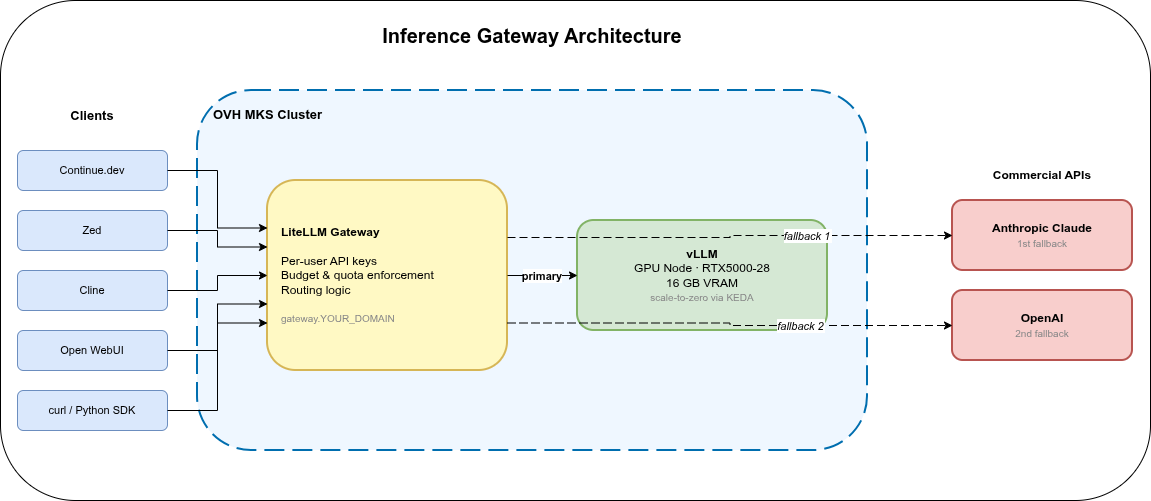
LiteLLM runs as a Deployment in the same MKS cluster, in a dedicated litellm namespace. Clients connect to gateway.YOUR_DOMAIN via the existing Istio ingress; all traffic goes through LiteLLM, which routes to the appropriate backend. The vLLM endpoint from the previous parts stays accessible for direct access, but the gateway becomes the standard integration point for team members.
Outbound traffic to commercial APIs (Anthropic, OpenAI) leaves the cluster via the OVH managed NAT gateway provisioned in Part 2’s Terraform setup — no additional egress configuration needed.
Ansible role: litellm🔗
The litellm role creates:
- Namespace
litellm - A PostgreSQL Deployment + PVC for persistent virtual key and spend storage
- A ConfigMap with
config.yaml - A Secret (
litellm-creds) with API keys, master key, and database URL - The LiteLLM Deployment and Service
- An Istio HTTPRoute for
gateway.YOUR_DOMAIN(added to theroutesrole)
The updated role order in site.yml:
istio → cert_manager → gpu_operator → prometheus → vllm → open_webui → keda → litellm → routeslitellm must run before routes so that the litellm namespace exists when the HTTPRoute is created.
LiteLLM configuration🔗
ansible/roles/litellm/templates/config.yaml.j2:
model_list:
  - model_name: default
    litellm_params:
      model: openai/{{ vllm_model }}
      api_base: http://vllm.{{ vllm_namespace }}.svc.cluster.local:8000/v1
      api_key: os.environ/VLLM_API_KEY

  - model_name: claude
    litellm_params:
      model: anthropic/claude-3-5-haiku-20241022
      api_key: os.environ/ANTHROPIC_API_KEY

  - model_name: openai
    litellm_params:
      model: gpt-4o-mini
      api_key: os.environ/OPENAI_API_KEY

router_settings:
  fallbacks:
    - {"default": ["claude", "openai"]}
  num_retries: 2
  timeout: 30

general_settings:
  master_key: os.environ/LITELLM_MASTER_KEY
  database_url: os.environ/DATABASE_URL
  store_model_in_db: false
  model_alias_map:
    "gpt-4": "default"
    "gpt-4o": "default"
    "gpt-3.5-turbo": "default"
The model_name: default is what clients specify in their requests. LiteLLM routes to vLLM first; if vLLM returns a 5xx or times out after 30 s, it falls back to claude, then to openai. Clients do not need to know the fallback chain exists — they always use the same endpoint and the same model name.
The model_alias_map under general_settings maps common OpenAI model names to default. Tools like Continue.dev and Cline often allow configuring a model name alongside the API base; if a team member hard-codes gpt-4o, the gateway transparently routes it to vLLM.
Anthropic releases new model versions regularly. Replace claude-3-5-haiku-20241022 with the current model identifier from Anthropic’s model documentation. For a fallback role, a fast and cost-effective model is a better fit than a frontier model.
LiteLLM Deployment🔗
Key sections of ansible/roles/litellm/templates/deployment.yaml.j2:
apiVersion: apps/v1
kind: Deployment
metadata:
  name: litellm
  namespace: litellm
spec:
  replicas: 1
  strategy:
    type: Recreate
  selector:
    matchLabels:
      app: litellm
  template:
    spec:
      enableServiceLinks: false
      containers:
        - name: litellm
          image: ghcr.io/berriai/litellm:main-v{{ litellm_version }}
          args:
            - "--config"
            - "/app/config.yaml"
            - "--port"
            - "4000"
          env:
            - name: LITELLM_MASTER_KEY
              valueFrom:
                secretKeyRef:
                  name: litellm-creds
                  key: LITELLM_MASTER_KEY
            - name: VLLM_API_KEY
              valueFrom:
                secretKeyRef:
                  name: litellm-creds
                  key: VLLM_API_KEY
            - name: ANTHROPIC_API_KEY
              valueFrom:
                secretKeyRef:
                  name: litellm-creds
                  key: ANTHROPIC_API_KEY
            - name: OPENAI_API_KEY
              valueFrom:
                secretKeyRef:
                  name: litellm-creds
                  key: OPENAI_API_KEY
            - name: DATABASE_URL
              valueFrom:
                secretKeyRef:
                  name: litellm-creds
                  key: DATABASE_URL
          volumeMounts:
            - name: config
              mountPath: /app/config.yaml
              subPath: config.yaml
          ports:
            - name: http
              containerPort: 4000
          readinessProbe:
            httpGet:
              path: /health/readiness
              port: 4000
            initialDelaySeconds: 20
            periodSeconds: 10
      volumes:
        - name: config
          configMap:
name: litellm-configPostgreSQL🔗
LiteLLM requires a PostgreSQL database to persist virtual keys and spend data across pod restarts. A single-pod PostgreSQL without HA is sufficient for a small team:
apiVersion: apps/v1
kind: Deployment
metadata:
  name: litellm-db
  namespace: litellm
spec:
  replicas: 1
  strategy:
    type: Recreate
  selector:
    matchLabels:
      app: litellm-db
  template:
    spec:
      containers:
        - name: postgres
          image: postgres:16-alpine
          env:
            - name: POSTGRES_DB
              value: litellm
            - name: POSTGRES_USER
              value: litellm
            - name: POSTGRES_PASSWORD
              valueFrom:
                secretKeyRef:
                  name: litellm-creds
                  key: POSTGRES_PASSWORD
          volumeMounts:
            - name: data
              mountPath: /var/lib/postgresql/data
      volumes:
        - name: data
          persistentVolumeClaim:
            claimName: litellm-db
---
apiVersion: v1
kind: Service
metadata:
  name: litellm-db
  namespace: litellm
spec:
  selector:
    app: litellm-db
  ports:
    - port: 5432
      targetPort: 5432
The DATABASE_URL secret value: postgresql://litellm:YOUR_PG_PASSWORD@litellm-db.litellm.svc.cluster.local:5432/litellm
LiteLLM runs Prisma migrations automatically on startup; the database schema is created on first launch.
As an alternative to the in-cluster PostgreSQL, OVH Public Cloud Databases offers a managed PostgreSQL service. To use it, remove the litellm-db Deployment and PVC from the Ansible role and set litellm_database_url in vars.yml to the managed endpoint URL from the OVH Console.
Ingress🔗
The routes role gets a new HTTPRoute for gateway.{{ base_domain }}:
apiVersion: gateway.networking.k8s.io/v1
kind: HTTPRoute
metadata:
  name: litellm
  namespace: litellm
spec:
  parentRefs:
    - name: ingress-gateway
      namespace: istio-ingress
  hostnames:
    - "gateway.{{ base_domain }}"
  rules:
    - backendRefs:
        - name: litellm
          port: 4000
The AuthorizationPolicy for gateway.{{ base_domain }} is allow-all — LiteLLM handles its own authentication via virtual keys. This follows the same pattern as Open WebUI from Part 5.
Per-user API keys🔗
With the gateway running, create a virtual key for each team member via the admin API. Virtual keys are standard bearer tokens — clients use them identically to any OpenAI API key:
curl -X POST https://gateway.YOUR_DOMAIN/key/generate \
  -H "Authorization: Bearer $LITELLM_MASTER_KEY" \
  -H "Content-Type: application/json" \
  -d '{"user_id": "alice", "key_alias": "alice-dev"}'
Response:
{
  "key": "sk-...",
  "key_alias": "alice-dev",
  "user_id": "alice",
  "expires": null
}
Share the sk-... value with the team member. They replace their existing vLLM credentials with:
- API Base:
https://gateway.YOUR_DOMAIN/v1 - API Key: the
sk-...value - Model:
default(or any alias frommodel_alias_map)
The change is the same across all clients from Part 5 — Continue.dev, Cline, Zed, and Open WebUI all accept an arbitrary API base URL.
Budgets and quotas🔗
Keys can carry spend limits and rate limits at creation time:
curl -X POST https://gateway.YOUR_DOMAIN/key/generate \
  -H "Authorization: Bearer $LITELLM_MASTER_KEY" \
  -H "Content-Type: application/json" \
  -d '{
    "user_id": "alice",
    "key_alias": "alice-dev",
    "max_budget": 20.0,
    "budget_duration": "1mo",
    "tpm_limit": 50000,
    "rpm_limit": 200
}'| Parameter | Effect |
|---|---|
max_budget | Maximum USD spend; key returns 429 when reached |
budget_duration | Reset period: 1d, 7d, 1mo |
tpm_limit | Tokens per minute cap |
rpm_limit | Requests per minute cap |
When the budget is exhausted, the key returns HTTP 429 BudgetExceededError. The spend counter resets at the start of each budget_duration period.
Local vLLM requests carry no token cost by default. To track them in budget accounting, add a litellm_params.input_cost_per_token and output_cost_per_token to the default model entry in config.yaml — this does not affect billing, only the spend counter in LiteLLM’s database.
Fallback to commercial APIs🔗
LiteLLM triggers a fallback when a backend returns a 5xx response, a connection error, or when the configured timeout is exceeded:
router_settings:
  fallbacks:
    - {"default": ["claude", "openai"]}
  num_retries: 2
  timeout: 30
Fallback sequence for a request during GPU cold-start:
- Client sends a request to
gateway.YOUR_DOMAINwithmodel: default - LiteLLM forwards to
http://vllm.vllm.svc.cluster.local:8000/v1 - vLLM returns 503 (no pod running, GPU node scaling up)
- LiteLLM retries twice against vLLM, then switches to Anthropic Claude
- If Claude also fails, the request goes to OpenAI
- The successful response is returned to the client; the fallback is invisible to the client
When a fallback fires, the request is processed by Claude or OpenAI and billed at their per-token rates. Monitor fallback frequency via LiteLLM’s /spend/logs endpoint or Prometheus metrics (litellm_llm_api_failed_requests_metric_total). A burst of cold-start fallbacks can produce a noticeable spike in commercial API costs.
Audit logging🔗
LiteLLM writes every request to the SpendLogs table in PostgreSQL. To query spend by user:
curl "https://gateway.YOUR_DOMAIN/spend/logs?user_id=alice&start_date=2026-06-01" \
  -H "Authorization: Bearer $LITELLM_MASTER_KEY"
For longer retention or structured log analysis, LiteLLM supports callback integrations that forward request records to Kafka, S3, or an OpenTelemetry endpoint. The 6-part log archiving series covers the storage side in detail — the same ClickHouse or Loki sink used for access logs can receive LiteLLM records with a matching callback.
When not to use a gateway🔗
LiteLLM adds an extra Deployment, a PostgreSQL instance, and an additional network hop to every request. If you are the only user and all requests go to a single vLLM backend with no fallback requirements, the direct endpoint from Part 2 is the simpler choice.
The gateway becomes useful once multiple users, budget tracking, audit requirements, or multiple backend providers are involved.
| Team size | Starting point |
|---|---|
| 1 developer | Direct vLLM endpoint (llm.YOUR_DOMAIN) |
| 2–10 users | LiteLLM + vLLM |
| 10–50 users | LiteLLM + per-user budgets + audit logging |
| Business-critical | LiteLLM + commercial fallbacks + managed PostgreSQL |
Summary🔗
LiteLLM converts the single-user vLLM endpoint from the previous parts into a team service:
| Capability | How |
|---|---|
| Per-user keys | Virtual keys via /key/generate; stored in PostgreSQL |
| Budget enforcement | max_budget + budget_duration per key |
| Rate limiting | tpm_limit + rpm_limit per key |
| Fallback routing | router_settings.fallbacks: vLLM → Claude → OpenAI |
| Scale-from-zero handling | Fallback providers can serve requests while the local GPU node is starting |
| Client compatibility | Standard OpenAI API; no client-side changes beyond URL + key |
| Audit trail | PostgreSQL SpendLogs; optional callback export to log sinks |
The full Ansible role (ansible/roles/litellm/) is in the companion repository at codeberg.org/nis-aleks/ovh-llm-inference.
Related reading:
- Self-hosted Log Archiving: ES / OpenSearch / Loki / Quickwit / ClickHouse — log storage options for LiteLLM audit records
- SigNoz on OVH MKS: Infrastructure — full observability stack on the same MKS cluster
Series
LLM Inference on OVH MKSIndex and reading guide for a six-part series on self-hosting LLM inference on OVH MKS — vLLM, GPU node pools, Terraform, observability, clients, and a gateway.
When to self-host an LLM on Kubernetes, why vLLM, and what the stack looks like on OVH MKS. Covers use cases, cost framing, and architecture. Part 1 of 6.
Provision an OVH MKS GPU node pool with Terraform, deploy vLLM, Istio, and cert-manager with Ansible, and walk through a first deployment. Part 2 of 6.
Which models fit on a 16 GB GPU, why AWQ is required for 7B+ models on the RTX5000-28, and how to use the OpenAI-compatible API from Python. Part 3 of 6.
Scrape vLLM and DCGM metrics with kube-prometheus-stack, visualise TTFT and tokens/s in Grafana, and autoscale to zero with KEDA. Part 4 of 6.
Connect Continue.dev, Zed, Cline, Open WebUI, and ownCloud Infinite Scale to a self-hosted vLLM endpoint on OVH MKS. Per-client setup guide. Part 5 of 6.
LiteLLM gateway on top of vLLM: per-user API keys, budget limits, and automatic fallback to commercial APIs when the local GPU node is cold. Part 6 of 6.