LLM Inference on OVH MKS: The Complete Guide
Table of contents
This is the index and reading guide for a six-part series on self-hosting LLM inference on a GPU-enabled Kubernetes node pool, using OVH Managed Kubernetes Service (MKS) as the concrete platform throughout. The series runs end to end: the decision of whether to self-host at all, provisioning the GPU infrastructure, serving a model behind an OpenAI-compatible API, wiring up observability and autoscaling, connecting real client tools, and finally putting a multi-user gateway in front of the whole thing.
Two things recur across all six parts. The first is vLLM as the serving engine — every part after the introduction assumes vLLM is what is running behind the API, and several of the autoscaling and observability decisions only make sense in terms of what vLLM specifically exposes (its Prometheus metrics, its OpenAI-compatible endpoint, its Recreate-only rollout constraint). The second is a single OVH RTX5000-28 GPU node pool (Quadro RTX 5000, 16 GB VRAM) as the reference hardware — the VRAM budget of that one card is the constraint that shapes the model choice in Part 3, the scale-to-zero design in Part 4, and the fallback pattern in Part 6.
This series is fairly broad, but it is not, and cannot be, complete. Every deployment carries its own constraints — a data-residency requirement, a latency budget that a 3–5 minute cold-start cannot meet, a team size that changes whether a shared gateway is worth the operational overhead, a GPU flavor not covered here — that can turn a general setup into the wrong fit for that specific situation. Treat this guide as a starting point, not a checklist to apply unmodified: it is always worth checking your own constraints against the choices below before committing to any of them.
How to read this guide🔗
If you have not decided whether self-hosting makes sense for your situation, start with Part 1 — it lays out the decision criteria and the cost framing before any infrastructure work begins. If you already know you want to self-host and are looking for a specific piece, the summaries below point at the part that covers it.
- Part 1 — Introduction: when to self-host, why vLLM, architecture, cost framing
- Part 2 — Terraform, Ansible, and Deployment: GPU node pool, Ansible roles, first deployment
- Part 3 — Models, AWQ, and OpenAI API: VRAM budgeting, quantization, the OpenAI-compatible endpoint
- Part 4 — Prometheus, Grafana, and KEDA: metrics, dashboards, scale-to-zero autoscaling
- Part 5 — Connect IDEs and Web UIs: wiring real clients to the endpoint
- Part 6 — LiteLLM API Gateway: per-user keys, budgets, and commercial-API fallback
Part 1 — Introduction🔗
Audience: decision makers and architects framing the cost/benefit.
Part 1 answers the question that has to be settled before any Terraform gets written: does self-hosting make sense for this use case, or is a commercial API the simpler path? It lays out the four situations where self-hosting has a real advantage — data privacy, cost at volume, model choice outside what commercial APIs offer, and vendor independence — and is explicit that an 8B quantized model is not a frontier-model replacement; the value proposition is data locality, infrastructure control, and a fixed cost, not output quality. It also introduces vLLM, the architecture (two node pools, one CPU and one GPU-with-taint), and the business-hours scheduling pattern that turns a €263/month always-on GPU into an ≈€74/month business-hours-only one.
Key takeaways:
- Self-hosting is a fit for a coding assistant for a small team, an internal RAG chatbot, or regulated data that must stay on your own infrastructure — not for 100+ concurrent public users on a single GPU node.
- vLLM’s PagedAttention is what makes queue-based, multi-tenant serving practical; Ollama and llama.cpp target a different use case (single developer, local machine) and do not support the AWQ/GPTQ formats this series relies on.
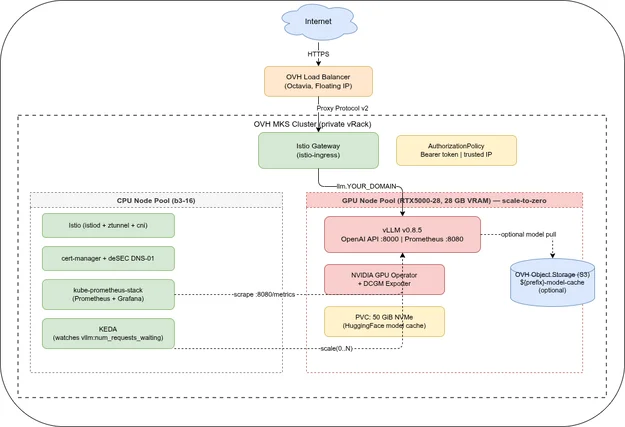
- The cluster splits into a CPU node pool (always on, runs Istio/cert-manager/Prometheus/KEDA) and a GPU node pool (
min=0, tainted, vLLM only) — platform pods never compete with GPU workloads for a node. - Scheduling the GPU deployment to business hours only (247 days × 10 h/year in the worked example) brings the cost from ≈€263/month at 24/7 down to ≈€74/month, without touching the autoscaling logic covered in Part 4.
Part 2 — Terraform, Ansible, and Deployment🔗
Audience: platform engineers provisioning the infrastructure.
Part 2 is the infrastructure build-out: the Terraform for the GPU node pool (min_nodes = 0, autoscale = true, a taint stamped on the node template so only vLLM pods land there) and the seven-role Ansible playbook that installs everything from Istio to the vLLM Deployment itself. It is also where the series’ sharpest edge cases live — the GPU node pool defaulting to disabled autoscaling when created by hand in the Console, the VLLM_PORT collision with Kubernetes’ automatic service-discovery environment variables, and a FlashInfer/Turing-GPU incompatibility that only shows up on the first inference request.
Key takeaways:
strategy: Recreateis not optional on this hardware: a single-GPU, single-node pool means aRollingUpdatewould leave the new pod permanently pending behind the old pod’s GPU and RWO PVC.progressDeadlineSeconds: 3600overrides Kubernetes’ 600-second default because first-time GPU node provisioning after OVH quota activation can take up to an hour.enableServiceLinks: falseis required — otherwise Kubernetes injects aVLLM_PORTenvironment variable from the Service that collides with vLLM’s own port variable and crashes the container.- vLLM v0.21.0, not v0.22.0, is the version pinned in this series specifically because of a FlashInfer/Turing-architecture incompatibility that breaks the first inference request on the RTX5000-28.
- A GPU node pool created manually in the OVH Console defaults to autoscaling disabled — verify Min 0 / Max N in the Console, not just in the Terraform state.
Read Part 2 — Terraform, Ansible, and Deployment →
Part 3 — Models, AWQ, and OpenAI API🔗
Audience: whoever picks and serves the model.
Part 3 is the VRAM math and the model-selection reference. The RTX5000-28’s flavor name is misleading — the “28” is system RAM, and the actual GPU has 16 GB VRAM — which means any 7B+ model in fp16/bf16 already fills or exceeds the usable budget before a single KV-cache entry is allocated. AWQ 4-bit quantization is therefore the default approach on this card, not an optimization: it is what makes an 8B model, or even a 14B model, fit at all with headroom left for concurrent requests. The part closes with the OpenAI-compatible API surface — curl, Python SDK, and streaming — that every downstream client in Parts 5 and 6 depends on.
Key takeaways:
- On a 16 GB GPU with
--gpu-memory-utilization 0.85, the usable budget is ≈13.6 GB for weights and KV cache combined — an 8B model in bf16 alone needs ≈16 GB, so AWQ is required, not optional. - The comparison table across six GPU flavors in GRA9 shows the jump from RTX5000-28 (≈€0.36/h, AWQ required) to Tesla V100S
t2-le-45(≈€0.80/h, 32 GB, bf16 fits) to H100h100-380(≈€2.80/h, 70B+ fits). - Switching models is a one-line change in
terraform.tfvars(GPU flavor) plus a few lines invars.yml(model ID, dtype, max context) — the infrastructure does not change. - vLLM does not support GGUF; it works natively with HuggingFace format, AWQ, and GPTQ, which rules out Ollama-style model files as a source.
--max-model-lenand--gpu-memory-utilizationare the two levers that trade context length and concurrency headroom against each other on a fixed VRAM budget.
Read Part 3 — Models, AWQ, and OpenAI API →
Part 4 — Prometheus, Grafana, and KEDA🔗
Audience: SRE and observability engineers.
Part 4 wires up kube-prometheus-stack against vLLM’s native metrics and the GPU Operator’s DCGM Exporter, ships a Grafana dashboard for TTFT, tokens/s, and GPU utilization, and then adds KEDA to scale the GPU node pool to zero when idle. The scale-to-zero mechanism has an asymmetry that is easy to miss: the Prometheus-based trigger can scale a running deployment up from 1 to N, but it cannot scale from 0 to 1, because a deployment at zero replicas emits no metric for Prometheus to read — the first request after idle gets a 503 unless something else handles the 0→1 transition.
Key takeaways:
- Scale-down to zero works cleanly with a Prometheus trigger on
vllm:num_requests_waiting; scale up from zero does not — that gap needs either the (beta) KEDA HTTP Add-on or a warmminReplicaCount: 1. - A full cold start — node provisioning, GPU Operator device registration, model load from the PVC cache — takes 3–5 minutes; client timeouts need to be set to at least 360 seconds to survive it.
progressDeadlineSeconds: 3600on the Deployment (set in Part 2) is what keepskubectl rollout statusfrom reporting failure while the GPU node is still coming up.- If SigNoz is already deployed from the companion observability series, it can replace kube-prometheus-stack entirely, but it does not auto-discover Prometheus Operator ServiceMonitors — the OpenTelemetry Collector needs a Prometheus receiver pointed at vLLM’s
/metricsendpoint manually.
Read Part 4 — Prometheus, Grafana, and KEDA →
Part 5 — Connect IDEs and Web UIs🔗
Audience: end users and developers connecting their own clients.
Part 5 is the client-side companion to the first four parts: once the endpoint exists, this is how actual people use it. Every client — Open WebUI for non-developers, Continue.dev and Zed for IDE integration, Cline for agentic coding, ownCloud Infinite Scale for document assistance — reduces to the same three values (base URL, API key, model ID), because they all speak the same OpenAI-compatible protocol vLLM exposes. The part is also candid about where an 8B model’s limits show up in practice: well-defined, bounded tasks work; multi-file agentic workflows degrade quickly.
Key takeaways:
- Every client in this part needs exactly the same three values — base URL, API key, model ID — because they all target the same OpenAI-compatible surface from Part 3.
- Open WebUI auto-discovers the model list from
/v1/models; IDE-integrated tools like Continue.dev and Zed require the model ID to be entered manually and to match exactly. - Cline as an agentic extension exposes the 8B model’s ceiling clearly — well-defined single-file tasks work, but multi-step, multi-file agentic workflows lose context and instruction-following quickly; Qwen2.5 14B AWQ from Part 3 is a stronger fit if agentic use is the primary goal.
- The same cold-start timeout problem from Part 4 resurfaces here at the IDE-extension layer: default extension timeouts are far shorter than the 3–5 minute cold-start window.
Read Part 5 — Connect IDEs and Web UIs →
Part 6 — LiteLLM API Gateway🔗
Audience: platform engineers running a shared, multi-user endpoint.
Part 6 closes the series by putting LiteLLM in front of vLLM once a single shared API key stops being workable — once there is a team, a budget to enforce, or a need for the endpoint to keep responding even when the GPU node is scaled to zero. LiteLLM adds per-user virtual keys, spend and rate limits backed by PostgreSQL, and — the piece that ties directly back to Part 4’s scale-to-zero gap — automatic fallback to Anthropic Claude or OpenAI when vLLM returns a 503 during a cold start, so the client never sees the gap at all.
Key takeaways:
- LiteLLM’s fallback chain (
default → claude → openai) directly closes the scale-from-zero gap identified in Part 4: a cold-start 503 from vLLM is retried and then routed to a commercial API transparently. - Per-user virtual keys carry their own
max_budget,budget_duration,tpm_limit, andrpm_limit— spend and rate control that the single shared vLLM API key from Parts 2–5 has no equivalent for. - A
model_alias_maplets clients hard-code familiar names likegpt-4oand still be routed to the local vLLM model — no client reconfiguration needed when adding the gateway. - The gateway is explicitly framed as optional infrastructure: for a single developer with no fallback requirement, the direct vLLM endpoint from Part 2 remains the simpler choice.
- Fallback requests are billed by the commercial provider at their own rates — a burst of cold-start fallbacks is a cost signal worth monitoring, not just a reliability feature.
Read Part 6 — LiteLLM API Gateway →
The through-line🔗
Three themes connect all six parts.
The GPU is the scarce resource everything else is designed around. The 16 GB VRAM budget of a single RTX5000-28 forces AWQ quantization in Part 3, forces strategy: Recreate in Part 2 because there is no second GPU to roll onto, and forces the scale-to-zero design in Part 4 because that GPU node accounts for most of the stack’s monthly cost. Every other decision in the series is downstream of that one constraint.
Fallback and graceful degradation, not just uptime. Scale-to-zero in Part 4 trades cost for a cold-start gap; the client-timeout guidance in Part 5 is a workaround for that gap; the LiteLLM fallback chain in Part 6 is what actually closes it, by routing to a commercial API instead of returning a 503. The series treats “the GPU node is currently absent” as a normal operating state to design around, not a failure mode to eliminate.
Fixed infrastructure cost versus linear per-user cost. Part 1’s cost framing — a fixed ≈€74–263/month GPU node against per-seat commercial subscriptions that scale with headcount — is the economic argument for the entire series, and Part 6’s per-user budgets are what let that fixed cost be allocated and monitored once more than one person is actually using it.
Related deep-dives🔗
- SigNoz on OVH MKS: The Complete Guide — an alternative, complementary observability stack pattern on the same OVH MKS platform; Part 4 above notes exactly where it can substitute for kube-prometheus-stack.
Where to start🔗
If you have not yet decided whether self-hosting is worth it for your situation, start at Part 1 — the cost framing and use-case fit there are the foundation everything after it assumes. If you already know you want this stack, use the summaries above to jump to the part that matches your current gap.