LLM Inference on OVH MKS: Introduction
This post covers the decision context for self-hosting LLM inference on OVH MKS: when it makes sense, what the stack looks like, and what the costs are. Part 2 walks through the Terraform and Ansible setup.
Series navigation:
- Full guide: LLM Inference on OVH MKS: The Complete Guide
- Part 1 — Introduction (this post)
- Part 2 — Terraform, Ansible, and Deployment
- Part 3 — Models, AWQ, and OpenAI API
- Part 4 — Prometheus, Grafana, and KEDA
- Part 5 — Connect IDEs and Web UIs
- Part 6 — Self-hosted LLM Gateway
The companion repository is at codeberg.org/nis-aleks/ovh-llm-inference.
Why self-host?🔗
Commercial LLM APIs (OpenAI, Anthropic, Google) are easy to use, well-maintained, and require no infrastructure. Self-hosting makes sense when one or more of the following applies:
Data privacy and compliance. Requests sent to a commercial API leave your infrastructure. For regulated industries (healthcare, finance, legal) or when processing confidential business data, keeping inference on your own infrastructure may be a hard requirement regardless of the provider’s data processing agreements.
Cost at scale. Commercial APIs are priced per token — cost scales with request volume. A self-hosted endpoint has a fixed hourly cost independent of throughput. Depending on volume and model, either model can be cheaper; the break-even point varies.
Model choice. The open-weights ecosystem (LLaMA, Mistral, Qwen, Gemma, and thousands of fine-tunes on HuggingFace) includes models that are not available through any commercial API. If you need a domain-specific fine-tune, a model with a specific license, or simply a model that a provider does not offer, self-hosting is the only option.
Vendor independence. API pricing, rate limits, and model availability can change. A self-hosted endpoint gives you full control over the model version and the serving infrastructure.
If none of these apply to your situation, a commercial API could be the simpler path.
This series covers serving pre-trained models, not training or fine-tuning. Model weights are downloaded from HuggingFace Hub and loaded directly by vLLM. Training even a small 7B model requires significantly more GPU memory (optimizer states, gradients) and different tooling (PyTorch, DeepSpeed, FSDP) — that is intentionally out of scope here.
An OVH RTX5000-28 GPU node is a paid instance billed per hour (≈€0.36/h as MKS node pool as of mid-2026 — check current pricing at ovhcloud.com). Running one GPU node 24/7 costs roughly €263/month at on-demand rates. OVH offers Savings Plans that can reduce this — check the OVH Savings Plans page for current discounts. With scale-to-zero the GPU node is only billed when inference requests are queued — idle time is free.
Note also that the default OVH Public Cloud quota does not include too much GPU flavors. You will likely need to request a quota increase before Terraform can provision the GPU node pool — in practice this required a one-time payment of roughly €200 on account validation. Plan this before starting.
Why OVH?🔗
This series builds on the OVH MKS infrastructure from the SigNoz series — the Terraform networking module and the Ansible roles for cert-manager and Istio are reused here unchanged. The new pieces are the GPU node pool and the vLLM role.
Two properties matter for this specific autoscaling setup:
- GPU node pools with Cluster Autoscaler — Part 4’s scale-to-zero relies on the cloud’s autoscaler provisioning and releasing GPU nodes on demand. OVH MKS supports this out of the box. See Part 3 for the full GPU flavor table for GRA9.
- European data location — OVH GPU-capable MKS regions include GRA9 and SBG5, which keeps data in the EU without routing it through US-based infrastructure.
The Ansible roles (vLLM, KEDA, GPU Operator) are portable to other managed Kubernetes providers (EKS, GKE, AKS). The Terraform will need adaptations for the node pool API.
Where this stack fits🔗
| Use case | Fit |
|---|---|
| Coding assistant for a team of 5–20 | ✓ |
| Internal chatbot or RAG (Retrieval-Augmented Generation) over private documents | ✓ |
| Regulated data: healthcare, finance, legal | ✓ — inference stays on your infrastructure |
| Testing open-weight model variants or fine-tunes | ✓ |
| Complex reasoning, agentic workflows (with larger models) | ✓ — switch to 32B+ on a V100S or H100 flavor |
| Public service with 100+ concurrent users | needs a multi-node GPU fleet |
A self-hosted 8B model is not a Claude or GPT-4o replacement. The value of this setup is data locality, infrastructure control, and predictable fixed cost — not output quality. For an 8B model, output quality is a real trade-off: complex reasoning, long multi-step workflows, and nuanced writing are areas where frontier APIs have a clear advantage. A larger self-hosted model (32B+ AWQ on a V100S or H100) changes this calculus significantly — but that is a separate cost and infrastructure discussion. The use cases above are where the 8B trade-off favours self-hosting.
The default model is 8B — adjust for your use case. The series uses hugging-quants/Meta-Llama-3.1-8B-Instruct-AWQ-INT4 as a cost-effective starting point. A quantized 8B model is noticeably weaker than frontier models (GPT-4o, Claude) on multi-step reasoning and complex agentic tasks. The infrastructure itself is not the limiting factor: the same stack runs Qwen2.5 32B AWQ on a V100S (32 GB) or LLaMA 3.1 70B AWQ on an H100 (80 GB) with a single flavor change in terraform.tfvars. Part 3 has the full GPU flavor table and VRAM guide.
The limiting factor is model choice, not infrastructure. Switching GPU flavor starts with one line in terraform/envs/staging.tfvars plus model-specific vLLM settings. Part 3 covers this in the Changing the model section.
Cost framing. Per-user coding assistant subscriptions (GitHub Copilot, JetBrains AI) run roughly €10–€20/user/month. At 5 developers that is €50–€100/month; at 10 developers €100–€200/month. A self-hosted endpoint with business-hours usage (8 h/day) runs ≈€86/month regardless of team size — fixed cost vs. linear per-user cost. Part 4 has the full cost breakdown.
Business-hours scheduling. Because the GPU node is only billed while it exists, you can reduce costs further by scaling the vLLM deployment up in the morning and back to zero in the evening — the Cluster Autoscaler provisions and releases the GPU node automatically. Allow roughly one hour of buffer before and after working hours: GPU node provisioning takes 5–15 minutes, and vLLM needs another 2–3 minutes to load the cached model weights. The table below uses Austria as an example (13 public holidays, 40 h/week, 247 working days/year):
| Scenario | h/year | €/year | ≈€/month |
|---|---|---|---|
| 24/7 | 8,760 | €3,154 | €263 |
| 8 h/day, 365 days | 2,920 | €1,051 | €88 |
| Business hours only (247 days × 10 h) | 2,470 | €889 | €74 |
Scale up and down with two commands:
kubectl -n vllm scale deployment vllm --replicas=1  # morning: provision GPU node
kubectl -n vllm scale deployment vllm --replicas=0  # evening: release GPU node
Both can be wrapped in a Kubernetes CronJob for fully automated scheduling.
What is vLLM?🔗
vLLM is an open-source LLM inference engine optimized for high throughput and low latency. Key properties:
- OpenAI-compatible REST API — works as a drop-in replacement for clients using the OpenAI Python SDK or
curl - PagedAttention for efficient KV cache utilisation (up to 3× higher throughput vs. naïve serving)
- Supports HuggingFace models, AWQ/GPTQ quantization, LoRA adapters
- Exposes Prometheus metrics natively (request queue depth, TTFT (Time To First Token), tokens/s, GPU cache usage)
vLLM vs. alternatives🔗
| Tool | Best for |
|---|---|
| vLLM | Multi-user production API, Kubernetes, high throughput |
| Ollama | Local machine, single developer, quick setup |
| llama.cpp | CPU inference, edge devices, GGUF models |
| OpenWebUI | Browser-based chat frontend (can connect to vLLM, see Part 5) |
The primary differentiator: PagedAttention manages the KV cache like virtual memory, allowing concurrent requests from multiple clients to share GPU memory efficiently. Ollama is the simpler choice for a developer running a model locally on a laptop. vLLM is designed for a shared server endpoint — it handles batching and KV cache scheduling automatically, which is what makes the queue-based autoscaling in Part 4 work.
vLLM does not support GGUF models (the format used by Ollama and llama.cpp). It works with the native HuggingFace format, AWQ, and GPTQ.
Architecture🔗
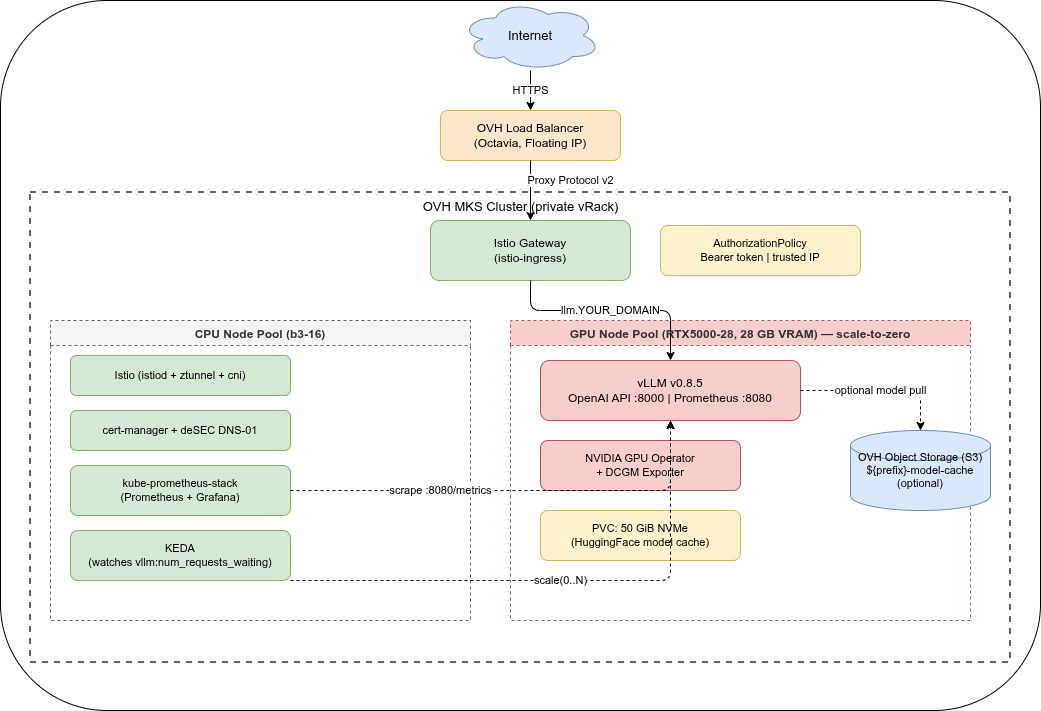
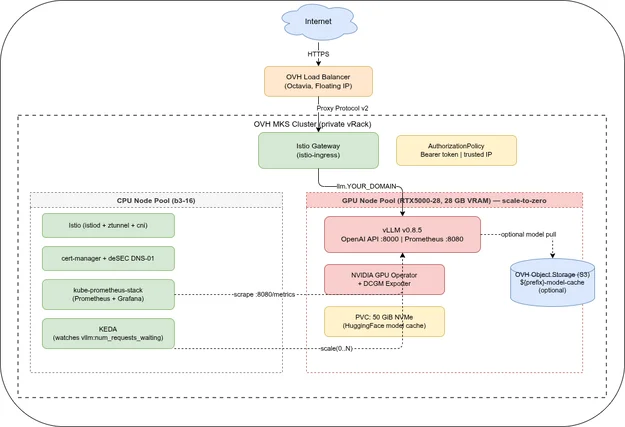
Stack at a glance🔗
| Component | Tool | Version |
|---|---|---|
| Kubernetes | OVH MKS | 1.35 |
| Service mesh | Istio Ambient Mode | 1.30.0 |
| LLM inference | vLLM | v0.21.0 |
| GPU | OVH RTX5000-28 | 16 GB VRAM (Quadro RTX 5000) |
| Autoscaling | KEDA | 2.16.0 (Part 4) |
| Monitoring | kube-prometheus-stack | 65.0.0 (Part 4) |
| Ingress | Istio Gateway API | TLS via Let’s Encrypt + deSEC DNS-01 |
Two node pools🔗
The cluster uses two separate node pools:
- CPU workers (
b3-16, min 1 / max 3) — Istio, cert-manager, Prometheus, KEDA. Always at least one node running. - GPU pool (
RTX5000-28, min 0 / max 2) — vLLM only. Starts at zero and is provisioned on demand by KEDA when inference requests queue up. Note: the “28” in the flavor name is system RAM (28 GB); the GPU itself has 16 GB VRAM.
Keeping GPU nodes in a dedicated pool with a Kubernetes taint (nvidia.com/gpu=present:NoSchedule) ensures that only vLLM workloads land there. Platform pods stay on CPU nodes and are never evicted to make room for GPU workloads.
Production readiness🔗
This setup is a production-ready starting point, but consider:
- Multiple replicas — set
replicas: 2in the Deployment for no-downtime rolling updates (requires 2 GPU nodes) - Resource quotas — add a LimitRange to the
vllmnamespace to prevent accidental over-provisioning - HuggingFace rate limits — for high-availability deploys, pre-seed the model cache PVC or use an S3 mirror
- Audit logging — add vLLM request logging to a ClickHouse sink (same pattern as the access logs series)
- GPU sharing — if you want to run multiple small models on a single GPU node, the NVIDIA Device Plugin supports time-sliced GPU allocation (
time-slicingconfig in the GPU Operator). Time slicing splits VRAM across pods and adds context-switch overhead — it is only practical for lightweight models (≤5 GB each, e.g. a 3B quantized model). For hard memory isolation between workloads, MIG (Multi-Instance GPU) is the right tool, but it requires an A100 or H100 — the RTX5000-28 does not support MIG. For a single model at full throughput, a dedicated GPU per pod remains the better choice.
Next: Part 2 covers the Terraform node pool configuration and the complete Ansible role setup. Part 3 covers which models fit on the RTX5000-28’s 16 GB GPU VRAM and how to use the OpenAI-compatible API from Python.
Questions or feedback about this series? Feel free to reach out at al-vllm@none.at.
Series
LLM Inference on OVH MKSIndex and reading guide for a six-part series on self-hosting LLM inference on OVH MKS — vLLM, GPU node pools, Terraform, observability, clients, and a gateway.
When to self-host an LLM on Kubernetes, why vLLM, and what the stack looks like on OVH MKS. Covers use cases, cost framing, and architecture. Part 1 of 6.
Provision an OVH MKS GPU node pool with Terraform, deploy vLLM, Istio, and cert-manager with Ansible, and walk through a first deployment. Part 2 of 6.
Which models fit on a 16 GB GPU, why AWQ is required for 7B+ models on the RTX5000-28, and how to use the OpenAI-compatible API from Python. Part 3 of 6.
Scrape vLLM and DCGM metrics with kube-prometheus-stack, visualise TTFT and tokens/s in Grafana, and autoscale to zero with KEDA. Part 4 of 6.
Connect Continue.dev, Zed, Cline, Open WebUI, and ownCloud Infinite Scale to a self-hosted vLLM endpoint on OVH MKS. Per-client setup guide. Part 5 of 6.
LiteLLM gateway on top of vLLM: per-user API keys, budget limits, and automatic fallback to commercial APIs when the local GPU node is cold. Part 6 of 6.