LLM Inference on OVH MKS: Models, AWQ, and OpenAI API
Part 1 covered the architecture and use cases. Part 2 walked through the Terraform and Ansible setup. This post covers which models fit on the RTX5000-28’s 16 GB GPU VRAM, why AWQ quantization is required for 7B+ models, and how to use the OpenAI-compatible endpoint from your own code.
Series navigation:
- Full guide: LLM Inference on OVH MKS: The Complete Guide
- Part 1 — Introduction
- Part 2 — Terraform, Ansible, and Deployment
- Part 3 — Models, Quantization, and OpenAI API (this post)
- Part 4 — Prometheus, Grafana, and KEDA
- Part 5 — Connect IDEs and Web UIs
- Part 6 — Self-hosted LLM Gateway
VRAM guide for the RTX5000-28🔗
The OVH flavor name “RTX5000-28” refers to the system RAM (28 GB), not the GPU VRAM. The actual GPU is a Quadro RTX 5000 with 16 GB VRAM.
The rule of thumb for fp16/bfloat16 inference is 2 bytes per parameter: a 7B model needs roughly 14 GB, an 8B model 16 GB. With --gpu-memory-utilization 0.85, vLLM reserves 0.85 × 16 GB = 13.6 GB for weights + KV cache combined. This means any 7B+ model in bf16/fp16 already fills or exceeds that budget before a single KV cache entry is allocated.
AWQ (4-bit) quantization is therefore the standard approach on this GPU. It reduces weight memory by roughly 3–4× while preserving most of the model quality, leaving the bulk of VRAM available for the KV cache and concurrent requests.
| Model | VRAM fp16/bf16 | VRAM AWQ-4bit | Fits (16 GB) | Notes |
|---|---|---|---|---|
| LLaMA 3.1 8B Instruct | ≈16 GB | ≈5 GB | ✓ AWQ only | bf16 fills all VRAM, no KV cache headroom |
| Mistral 7B v0.3 Instruct | ≈14 GB | ≈4 GB | ✓ AWQ only | Apache 2.0, no HF gate |
| Qwen2.5 7B Instruct | ≈14 GB | ≈4 GB | ✓ AWQ only | Strong on code + multilingual |
| Qwen2.5 14B Instruct | ≈28 GB | ≈8 GB | ✓ AWQ only | bf16 does not fit; KV cache headroom depends on --max-model-len, measure before relying on it |
| Gemma 2 9B Instruct | ≈18 GB | ≈5 GB | ✓ AWQ only | bf16 does not fit |
| LLaMA 3.1 70B Instruct | ≈140 GB | ≈37 GB | ✗ | Too large even with AWQ |
| Qwen2.5 32B Instruct | ≈64 GB | ≈17 GB | ✗ | Too large even with AWQ |
The AWQ figures refer to model weights only. vLLM still requires additional VRAM for the KV cache, CUDA runtime, and batching overhead — on a 16 GB GPU with --gpu-memory-utilization 0.85, the remaining 13.6 GB budget covers weights and KV cache combined.
The default model in this series is hugging-quants/Meta-Llama-3.1-8B-Instruct-AWQ-INT4 (set in vars.yml). Mistral 7B AWQ and Qwen2.5 7B AWQ have a similar VRAM footprint and no HuggingFace license gate — see the Changing the model section. Qwen2.5 14B AWQ fits in weight memory at ≈8 GB, but combined with KV cache and CUDA overhead the margin is small — keep --max-model-len at 4096 or lower and measure latency and context behaviour under your actual load before committing to it.
A 7B–8B quantized model is not a substitute for frontier models (Claude, GPT-4o) on tasks requiring complex multi-step reasoning or agentic workflows. The quality gap is smaller for code completion, internal RAG, summarisation, and privacy-sensitive batch workloads — these are the cases where the fixed infrastructure cost and data locality matter more than per-token API pricing.
GPU node pool options in GRA9🔗
This series uses the RTX5000-28 as a cost-effective starting point. The following GPU flavors are available as MKS node pools in GRA9 (as of mid-2026) — verify current availability and pricing in the OVH Console before choosing:
| Flavor | GPU | VRAM | bf16 for 7B+ | Price/h |
|---|---|---|---|---|
| rtx5000-28 | Quadro RTX 5000 | 16 GB | AWQ required | ≈€0.36 |
| t1-le-45 | Tesla V100 | 16 GB | AWQ required | ≈€0.70 |
| rtx5000-56 | 2× Quadro RTX 5000 | 32 GB | AWQ required | ≈€0.72 |
| t2-le-45 | Tesla V100S | 32 GB | ✓ | ≈€0.80 |
| rtx5000-84 | 3× Quadro RTX 5000 | 48 GB | AWQ required | ≈€1.08 |
| h100-380 | H100 | 80 GB | ✓ (70B+ fits) | ≈€2.80 |
The Tesla V100S (t2-le-45) is a possible next step if AWQ quantization is not an option for your use case: 32 GB VRAM fits LLaMA 8B or Mistral 7B in bf16, and its HBM2 memory (~900 GB/s bandwidth) gives better throughput than the RTX5000’s GDDR6 (~448 GB/s). Note that V100/V100S lacks hardware INT4 Tensor Cores (introduced with NVIDIA Ampere). AWQ quantization still runs on V100S and resolves the memory pressure problem, but the throughput improvement from INT4 computation is smaller than on Ampere (A100), Ada Lovelace (RTX 4000), or Hopper (H100) GPUs where the hardware is optimised for it. On V100S, AWQ is primarily useful for fitting larger models, not for a speed boost. A10, A100, L4, and L40S are not available as MKS node pools.
To use a different GPU flavor, change gpu_nodepool_flavor in terraform/envs/staging.tfvars:
gpu_nodepool_flavor = "t2-le-45" # Tesla V100S, 32 GB VRAMTo use any Meta LLaMA model you must accept the license at huggingface.co/meta-llama/Llama-3.1-8B-Instruct while logged in with the account whose token you set as vault_hf_token. Apache 2.0 models (Mistral, Qwen) don’t require acceptance.
Changing the model🔗
The model is set in ansible/group_vars/staging/vars.yml:
vllm_model: "hugging-quants/Meta-Llama-3.1-8B-Instruct-AWQ-INT4"
vllm_dtype: "float16"     # AWQ requires float16, not bfloat16
vllm_max_model_len: 4096
vllm_cache_size: "50Gi"   # PVC size — adjust for larger models
To switch to Mistral 7B AWQ (no HF gate required):
vllm_model: "TheBloke/Mistral-7B-Instruct-v0.3-AWQ"
vllm_dtype: "float16"
Then re-run the vllm role:
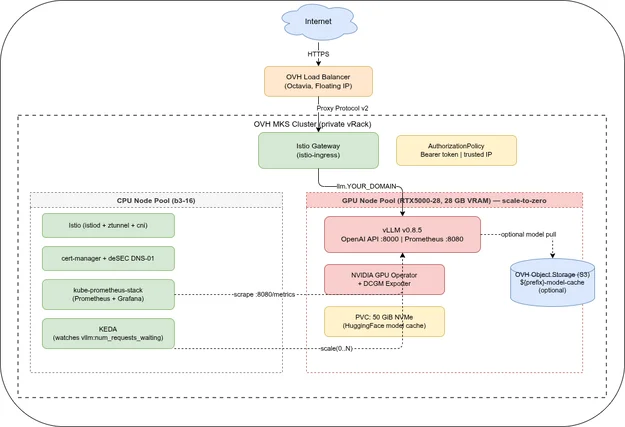
ansible-playbook -i inventory/localhost.yml site.yml --tags vllm --ask-vault-passAnsible does not download the model itself. It re-renders the Deployment manifest with the new --model argument and applies it via kubectl. Kubernetes then performs a rolling update: the old pod is replaced by a new one, and the new vLLM container downloads the model weights directly from HuggingFace Hub to the PVC at /data/huggingface on startup. The readiness probe only passes once vLLM has finished loading the weights and is ready to serve requests.
Quantization: AWQ🔗
AWQ (Activation-aware Weight Quantization) compresses weights to 4-bit integers while preserving most of the model quality. vLLM supports AWQ natively — no extra tooling required.
Using a pre-quantized model🔗
HuggingFace hosts AWQ variants for most popular models (often under -AWQ suffixes):
# Qwen2.5 14B at ~8 GB instead of ~28 GB (bf16 does not fit on 16 GB VRAM)
vllm_model: "Qwen/Qwen2.5-14B-Instruct-AWQ"
vllm_dtype: "float16"        # AWQ requires float16, not bfloat16
vllm_max_model_len: 8192
vLLM auto-detects the AWQ format from the model’s config.json. No extra --quantization flag needed for HuggingFace AWQ models.
AWQ vs. GPTQ vs. GGUF (GPT-Generated Unified Format)🔗
| Format | vLLM support | Speed | Quality drop | Notes |
|---|---|---|---|---|
| AWQ | ✓ native | Fast | Minimal at 4-bit | Recommended for production |
| GPTQ | ✓ native | Moderate | Slight | Older standard, still widely available |
| GGUF | ✗ | — | — | llama.cpp format; use Ollama instead |
GGUF is the format used by Ollama and llama.cpp. If you need GGUF models, you need a different inference engine. vLLM’s strength is throughput at scale; GGUF is optimised for CPU inference.
Using the OpenAI-compatible API🔗
vLLM’s API is a drop-in replacement for the OpenAI REST API. Any client that works with OpenAI will work with your self-hosted vLLM endpoint — just change the base URL and API key.
curl🔗
export VLLM_API_KEY="your-api-key"
export VLLM_BASE_URL="https://llm.YOUR_DOMAIN"

# List models
curl $VLLM_BASE_URL/v1/models \
  -H "Authorization: Bearer $VLLM_API_KEY"

# Chat completion
curl $VLLM_BASE_URL/v1/chat/completions \
  -H "Authorization: Bearer $VLLM_API_KEY" \
  -H "Content-Type: application/json" \
  -d '{
    "model": "hugging-quants/Meta-Llama-3.1-8B-Instruct-AWQ-INT4",
    "messages": [
      {"role": "system", "content": "You are a helpful assistant."},
      {"role": "user", "content": "Explain Kubernetes node affinity in two sentences."}
    ],
    "max_tokens": 200,
    "temperature": 0.7
  }'

# Streaming
curl $VLLM_BASE_URL/v1/chat/completions \
  -H "Authorization: Bearer $VLLM_API_KEY" \
  -H "Content-Type: application/json" \
  -d '{
    "model": "hugging-quants/Meta-Llama-3.1-8B-Instruct-AWQ-INT4",
    "messages": [{"role": "user", "content": "Write a haiku about Kubernetes."}],
    "stream": true
  }'
Python (OpenAI SDK)🔗
from openai import OpenAI
client =(
base_url="https://llm.YOUR_DOMAIN/v1",
api_key="your-api-key",
)
response = client.chat.completions.(
model="hugging-quants/Meta-Llama-3.1-8B-Instruct-AWQ-INT4",
messages=[
{"role": "system", "content": "You are a helpful assistant."},
{"role": "user", "content": "What is PagedAttention in vLLM?"},
],
max_tokens=300,
temperature=0.7,
)
print(response.choices[0].message.content)Streaming with Python🔗
stream = client.chat.completions.(
model="hugging-quants/Meta-Llama-3.1-8B-Instruct-AWQ-INT4",
messages=[{"role": "user", "content": "Count from 1 to 10 slowly."}],
stream=True,
)
for chunk in stream:
if chunk.choices[0].delta.content:
print(chunk.choices[0].delta.content, end="", flush=True)Performance tuning🔗
--max-model-len🔗
Limits the maximum context length (input + output tokens combined). Lower values reduce KV cache VRAM usage and allow more concurrent requests. For LLaMA 3.1 8B AWQ on the RTX5000-28 (16 GB VRAM):
4096— safe default, leaves room for batching8192— works, but less headroom for concurrent requests128000— the model’s full context; likely OOM unless you use AWQ with a small model
--gpu-memory-utilization🔗
Controls what fraction of GPU VRAM vLLM pre-allocates for weights + KV cache. Default is 0.9. Setting it to 0.85 leaves 15% (≈4.2 GB on RTX5000-28) for the OS and CUDA runtime:
vllm_gpu_memory_utilization: "0.85"--enforce-eager (debug only)🔗
Disables CUDA graph capture, which means slower first-request latency but easier debugging. Do not use in production:
# Add to vllm args in deployment.yaml.j2 for debugging only:
- "--enforce-eager"
Next: Part 3 wires up Prometheus, a Grafana dashboard with TTFT and tokens/s panels, and KEDA scale-to-zero autoscaling so the GPU node is only running when it’s needed.
Appendix: Model cache in OVH S3🔗
vLLM cannot load model weights directly from S3 — it requires the files on a local filesystem path. The PVC is therefore always needed at runtime and cannot be replaced by object storage.
What S3 can replace is HuggingFace Hub as the download source. By default, vLLM downloads weights from HuggingFace to the PVC at /data/huggingface. The PVC survives pod restarts, so the download only happens once — as long as the same node is reused.
The problem arises when the GPU node is replaced: the Cluster Autoscaler provisions a fresh node with an empty PVC, and vLLM has to download the full model again from HuggingFace over the public internet. For LLaMA 3.1 8B AWQ (≈5 GB) at a typical bandwidth of 100 Mbps, that is roughly 7 minutes of cold-start time. Pulling the same model from an OVH S3 bucket in the same datacenter happens at internal network speeds and takes under a minute.
The pattern is an initContainer that syncs from S3 to the PVC before the vLLM container starts:
# Optional: add to vllm role's deployment.yaml.j2
initContainers:
  - name: sync-model
    image: amazon/aws-cli
    command: ["aws", "s3", "sync",
              "s3://YOUR_PREFIX-staging-model-cache/{{ vllm_model }}/",
              "/data/huggingface/hub/"]
    env:
      - name: AWS_ACCESS_KEY_ID
        valueFrom:
          secretKeyRef:
            name: vllm-creds
            key: S3_ACCESS_KEY
      - name: AWS_SECRET_ACCESS_KEY
        valueFrom:
          secretKeyRef:
            name: vllm-creds
            key: S3_SECRET_KEY
      - name: AWS_ENDPOINT_URL
        value: "https://s3.sbg.io.cloud.ovh.net/"
    volumeMounts:
      - name: model-cache
        mountPath: /data
You would populate the bucket once by copying the model from HuggingFace to S3 manually, or by running the sync in reverse after the first successful pod start.
For this series, the PVC is sufficient. Whether the S3 setup is worth the additional complexity depends on how often GPU nodes are replaced in your environment and how much the longer cold-start time matters for your use case.
Series
LLM Inference on OVH MKSIndex and reading guide for a six-part series on self-hosting LLM inference on OVH MKS — vLLM, GPU node pools, Terraform, observability, clients, and a gateway.
When to self-host an LLM on Kubernetes, why vLLM, and what the stack looks like on OVH MKS. Covers use cases, cost framing, and architecture. Part 1 of 6.
Provision an OVH MKS GPU node pool with Terraform, deploy vLLM, Istio, and cert-manager with Ansible, and walk through a first deployment. Part 2 of 6.
Which models fit on a 16 GB GPU, why AWQ is required for 7B+ models on the RTX5000-28, and how to use the OpenAI-compatible API from Python. Part 3 of 6.
Scrape vLLM and DCGM metrics with kube-prometheus-stack, visualise TTFT and tokens/s in Grafana, and autoscale to zero with KEDA. Part 4 of 6.
Connect Continue.dev, Zed, Cline, Open WebUI, and ownCloud Infinite Scale to a self-hosted vLLM endpoint on OVH MKS. Per-client setup guide. Part 5 of 6.
LiteLLM gateway on top of vLLM: per-user API keys, budget limits, and automatic fallback to commercial APIs when the local GPU node is cold. Part 6 of 6.