K8s & OpenShift: The Big Picture
Table of contents
This is the opening post of a seven-part series on Kubernetes and OpenShift best practices, written from the vantage point of 2026 and eight years of hands-on experience — from initial cluster design through Day-2 operations and production debugging. This first part is deliberately non-technical: it is about whether and when a container platform earns its keep — the decisions that happen before anyone writes a single YAML manifest.
Series navigation:
- Full guide: The Kubernetes & OpenShift Best Practices Guide (2026 Edition)
- Part 1 — The Big Picture (this post)
- Part 2 — Building workloads right
- Part 3 — Resource management deep dive
- Part 4 — Scaling & resilience
- Part 5 — Security
- Part 6 — Day-2 operations & GitOps
- Part 7 — Compliance (regulatory frameworks, audit logging, log retention)
The technical parts are Kubernetes-first, with OpenShift, OVH MKS, and STACKIT SKE specifics called out as they come up.
A scope note before we start: OpenShift is the distribution called out by name throughout this series — not Rancher, VMware Tanzu, or other Kubernetes distributions. That is not a verdict on those platforms. It is because vanilla Kubernetes and OpenShift are the two platforms I have actually run in production long enough to write about with confidence. I would rather stay narrow and accurate than pad this series with platforms I only know from documentation. If you run Rancher, Tanzu, or something else, the vanilla-Kubernetes practices in this series still apply directly — you will just be missing the platform-specific callouts for your distribution.
Kubernetes is boring now — and that is the point🔗
A decade ago, running Kubernetes was a statement. In 2026 it is plumbing. Every major cloud offers a managed control plane, the APIs have stabilised, and the ecosystem has consolidated around a handful of well-understood patterns. “Boring” is a compliment here: boring infrastructure is infrastructure you can rely on.
That maturity shifts the interesting question. It is no longer “should we use containers?” — that debate is largely settled for server-side software. The question that actually determines outcomes is “are we running this well?” A cluster that technically works but has no resource limits, no network policies, and no upgrade plan is not a success. It is a liability with good uptime — for now.
This series is about the difference between the two. This first part frames the decisions that are easy to skip and expensive to get wrong.
Why best practices are a business topic, not a technical one🔗
It is tempting to file “best practices” under engineering hygiene — something the team should handle without management needing to care. That framing is wrong, because every practice in this series maps directly to a business outcome:
- Reliability maps to revenue and reputation. An outage during peak hours has a measurable cost. Practices like health probes, disruption budgets, and sensible replica counts (covered in Parts 2 and 4) are not engineering vanity — they are what keeps the service up when a node dies at 3 a.m.
- Security maps to risk exposure. A misconfigured container running as root with no network policy is a breach waiting for an attacker. The cost of getting this wrong is regulatory, financial, and reputational all at once.
- Resource hygiene maps directly to the cloud bill. Workloads without resource requests and limits are the single most common source of cloud waste — over-provisioned “just in case” capacity that nobody ever right-sizes. This is the FinOps angle, and it is large enough to fund a team; the business case is covered in more detail in Part 3.
- Operational maturity maps to team velocity. Teams that deploy declaratively and recover from failure automatically ship features. Teams that fight their platform do not.
None of these require a manager to read YAML. They do require someone to decide that the practices matter and to fund the time to apply them.
When not to use Kubernetes🔗
A best-practices series that opens by telling you to use the technology would not be worth much. The most important best practice is knowing when a full container orchestrator is the wrong tool.
Kubernetes carries a real operational tax: someone has to own upgrades, security patching, capacity, and the platform knowledge itself. That tax is worth paying when you have enough workloads to amortise it. It is a poor trade when:
- The team is small and the application is simple. A single web app with a database does not need a cluster. A managed Platform-as-a-Service (PaaS) or a couple of VMs behind a load balancer will be cheaper to run and far cheaper to operate.
- Nobody owns Day-2. If there is no one whose job is to keep the platform healthy after launch, a cluster will quietly rot — outdated, unpatched, and brittle. A managed service that removes that burden is the more honest choice.
- The workload is genuinely serverless-shaped. Spiky, event-driven, or batch workloads with long idle periods often fit functions or managed container-run services better than an always-on cluster.
If you cannot name the person or team who will apply the next quarter’s security patches and the next Kubernetes version upgrade, you are not ready to self-operate a cluster yet. That is not a failure — it is a reason to look at a managed offering that does it for you.
Containerise regardless of the orchestrator decision🔗
The decision above is about orchestration — whether you need Kubernetes to schedule, scale, and heal containers across a fleet of machines. It is a separate question from whether you should package your application as a container image in the first place. That second decision should almost always be yes, independent of the first.
A container image is a portable, self-contained unit: the application, its runtime, and its dependencies, built once and run identically anywhere a container runtime exists. That includes a single VM — Linux, macOS, or Windows — with no orchestrator involved at all. docker run or podman run on one box is a perfectly legitimate deployment target for a small application.
The reason to containerise even then is maintainability, not scale:
- The environment is reproducible. “Works on my machine” stops being a debugging category, because the machine’s actual runtime environment travels with the artifact.
- Deployments become a single artifact swap. Rolling back is pulling the previous image tag, not reconstructing a hand-tuned VM state.
- The path to an orchestrator later is free. An application that already runs as a container has done the hard part of adopting Kubernetes, OpenShift, or a managed container service. An application still deployed by copying files onto a VM has not.
- Patching the OS and patching the application decouple. A VM accumulates OS-level drift over years of in-place updates. A container image is rebuilt from a known-clean base on every release — there is no multi-year drift to accumulate.
None of this requires Kubernetes. It requires a Containerfile (or equivalent) and the discipline to run the built image instead of the source tree. Part 2 covers how to build that image well; this point is simply that the “should I containerise” question and the “should I orchestrate with Kubernetes” question are independent, and the first one is rarely worth arguing about in 2026.
Kubernetes vs. OpenShift vs. managed services🔗
If a container platform is the right call, the next decision is which one. The landscape in 2026 splits into three broad options, and the right answer depends entirely on your context — team size, compliance needs, existing cloud commitments, and how much of the platform you want to own.
| Dimension | Vanilla Kubernetes (self-managed) | Managed Kubernetes (EKS / AKS / GKE / OVH MKS / STACKIT SKE) | OpenShift (incl. ARO / ROSA) |
|---|---|---|---|
| Control-plane ownership | You | Provider | Provider or you, depending on edition |
| Setup effort | High | Low | Low to medium |
| Built-in opinions | Minimal — you assemble the stack | Minimal — you assemble the stack | Strong — CI/CD, registry, monitoring, auth included |
| Default security posture | Permissive — you harden it | Permissive — you harden it | Restrictive by default (SCCs, non-root enforced) |
| Vendor lock-in | Low | Medium (provider integrations) | Medium to high (platform-specific objects) |
| Licence cost | None (infra only) | None beyond infra + control-plane fee | Subscription on top of infra |
| Typical fit | Teams that want full control | Teams that want K8s without the control plane | Enterprises wanting a batteries-included platform |
A few honest observations rather than a verdict:
- Managed Kubernetes removes the hardest operational burden — the control plane — while leaving you in charge of workloads and add-ons. For most teams adopting Kubernetes today, it is the path with the least operational tax.
- OpenShift trades flexibility for an opinionated, integrated platform with a stricter security baseline out of the box. Its defaults enforce several things this series spends entire posts teaching you to configure manually on vanilla Kubernetes. That is an advantage if its opinions match your needs, and friction if they do not.
- Vanilla self-managed Kubernetes gives maximum control and minimum licence cost, at the price of owning everything — including the parts that are easy to neglect. Before installation, a set of architectural decisions must be made that managed providers and OpenShift have already answered for you: CNI plugin, ingress controller, storage provisioner, certificate management, and more. There is no wrong answer, but there is no default either.
There is no single best option here; there is only the option that fits your team and constraints. The rest of this series is written so that the practices apply regardless of which row you land on.
OVH (a French company) and STACKIT (Schwarz Digits, part of the Schwarz Group) are EU-headquartered and, unlike the three major US hyperscalers, generally not directly subject to the US CLOUD Act in the same way — though the precise reach can depend on corporate structure and jurisdiction, so it is a question for legal counsel, not a blanket guarantee. For organisations subject to NIS2, DORA, or DSGVO where data residency and sovereignty matter, an EU-headquartered provider meaningfully reduces this compliance complexity. Both platforms operate exclusively from EU data centres.
Certifications at a glance:
| OVH MKS | STACKIT SKE | |
|---|---|---|
| ISO 27001 | ✓ | ✓ |
| SOC 2 Type II | — | ✓ |
| BSI C5 | — | ✓ |
| HDS (French health data) | ✓ | — |
| SecNumCloud | In progress | — |
The compliance implications — particularly for NIS2 and DORA — are covered in Part 7.
Throughout this series, OpenShift callouts like this one flag where the platform behaves differently from vanilla Kubernetes — for example, Security Context Constraints (SCCs) instead of Pod Security Admission, Route objects instead of Ingress, the oc CLI alongside kubectl, and projects instead of bare namespaces. Several “best practices” on vanilla Kubernetes are simply the default on OpenShift.
Team readiness matters more than technology choice🔗
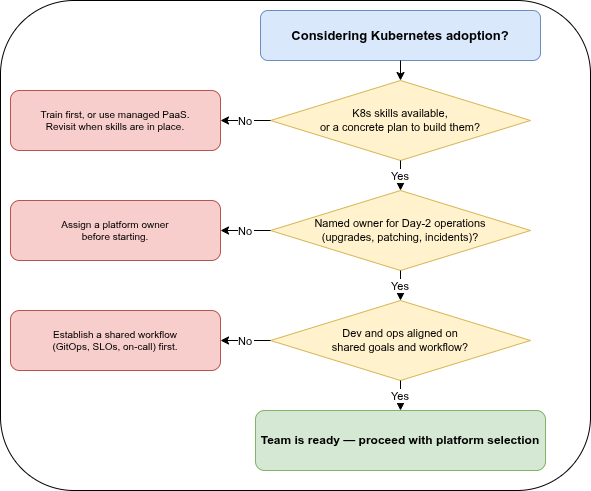
The most common reason a Kubernetes adoption disappoints is not a technical one. It is that the organisation adopted the platform without adopting the operating model that makes it work.
Three questions are worth answering honestly before committing:
- Do we have the skills, or a plan to build them? Kubernetes has a real learning curve. Pretending otherwise leads to clusters configured by trial and error — which is exactly how the anti-patterns below take root.
- Who owns the platform after launch? Day-2 operations — upgrades, patching, capacity, incident response — are where the cost actually lives. A platform with no owner degrades silently.
- Are development and operations aligned? If the people writing the application and the people running it have different goals and no shared workflow, the platform becomes a battleground rather than a force multiplier.
Organisational anti-patterns🔗
These are the failure modes that show up again and again, independent of which platform you chose:
- Lift-and-shift without re-architecting. Moving a monolith into a container unchanged gives you all the complexity of Kubernetes and none of its benefits. Containers reward applications that can start fast, scale horizontally, and handle being stopped at any moment.
- No CI/CD pipeline. Manually applying changes to a cluster does not scale and does not leave an audit trail. Declarative, automated delivery is foundational, not advanced — it is the subject of Part 6.
- Vendor lock-in by accident. Leaning on a single provider’s proprietary features without noticing makes a future move expensive. Lock-in is not inherently wrong — OpenShift, for example, trades portability for an integrated platform, and that is a legitimate choice. The anti-pattern is not the lock-in itself but stumbling into it without weighing the consequences.
- Dev/Ops misalignment. When developers throw artifacts over a wall and operators are measured only on stability, the platform amplifies the friction instead of removing it.
The six pillars — and the rest of this series🔗
A useful way to think about “running it well” is the same lens that cloud well-architected frameworks use: six pillars that any production platform has to address.
| Pillar | The question it answers | Where this series covers it |
|---|---|---|
| Reliability | Does it stay up when things fail? | Part 2 & Part 4 |
| Security | Is it defensible against attack? | Part 5 |
| Cost | Are we paying for what we actually use? | Part 3 & Part 6 |
| Operational excellence | Can we change it safely and recover fast? | Part 6 |
| Performance efficiency | Does it use resources sensibly under load? | Part 3 & Part 4 |
| Compliance & regulatory | Can you prove it — to an auditor, a regulator, a customer? | Part 7 |
The remaining six parts walk through these concerns from the practitioner’s side:
- Part 2 — Building workloads right: image hygiene, running as non-root, the three kinds of health probe, graceful shutdown, and the contract every pod has with the platform.
- Part 3 — Resource management deep dive: how requests and limits actually work, cgroups v1 versus v2 (v1 is on its way out as of 2026), Quality-of-Service classes, and what really happens when a container hits its memory limit.
- Part 4 — Scaling & resilience: horizontal and vertical autoscaling, pod disruption budgets, topology spread, and anti-affinity.
- Part 5 — Security: RBAC, Pod Security Admission (and OpenShift’s SCCs), network policies, and supply-chain controls like image scanning and signing.
- Part 6 — Day-2 operations & GitOps: declarative delivery, drift detection, observability, cost control, and upgrades.
- Part 7 — Compliance: mapping K8s controls to NIS2, DORA, PCI-DSS, HIPAA, and the Cyber Resilience Act; audit logging as evidence; log retention requirements and how the technical implementation looks in practice.
The throughline is simple: in 2026, the hard part of Kubernetes is not getting it running. It is running it well — safely, affordably, and without surprises. Part of “running it well” is a question most teams skip: is the application itself actually designed for the typical runtime peculiarities of Kubernetes — abrupt termination, ephemeral local storage, no guaranteed startup order, being scaled and rescheduled at any moment — or is it a VM-shaped application that merely happens to run inside a container? That is what the rest of this series is about.
Next: Part 2 covers building workloads right — image hygiene, running as non-root, the three kinds of health probe, and graceful shutdown.
Partly used sources — specific references appear in the relevant parts.
- Kubernetes resource limits and kernel cgroups — Medium (2019)
- Best practices for running apps in Kubernetes — Part 1 — Palark (2021)
- Best practices for running apps in Kubernetes — Part 2 — Palark (2021)
- Cgroups — Deep Dive into Resource Management in Kubernetes — Martin Heinz (2023)
- About cgroup v2 — kubernetes.io (2025)
- Kubernetes Best Practices I Wish I Had Known Before — Pulumi (2025, updated 2026)
- 17 container security best practices for 2026 — Sysdig (2026)
- Kubernetes security 101: 10 best practices and fundamentals — Sysdig (2026)
- Kubernetes production readiness checklist — learnkube.com (2026)
- Kubernetes Best Practices for Safer, More Reliable Clusters — Komodor (2026)
- Architecture Best Practices for Azure Container Apps — Microsoft Azure Well-Architected Framework (2026)
- kubernetes-best-practices — Diego Lima, Apache-2.0
- What Are cgroups in Kubernetes? — Zesty